

QIV (Quick Image Viewer) is a lightweight graphical image viewer designed for X11 desktops. It offers a quick way to inspect individual pictures or work through collections of images without the overhead of a full photo management application.
The viewer has a simple interface with extensive keyboard and mouse controls. Images can be opened directly from the command line, selected from directories, or supplied through lists of filenames. This makes it suitable for both interactive viewing and use in scripts.
QIV uses GDK and supports GTK 3, removing its former dependency on GTK 2. Although primarily an image viewer, it also includes facilities for adjusting image appearance, examining metadata, managing files and interacting with the X11 desktop.
This is free and open source software.
Key Features
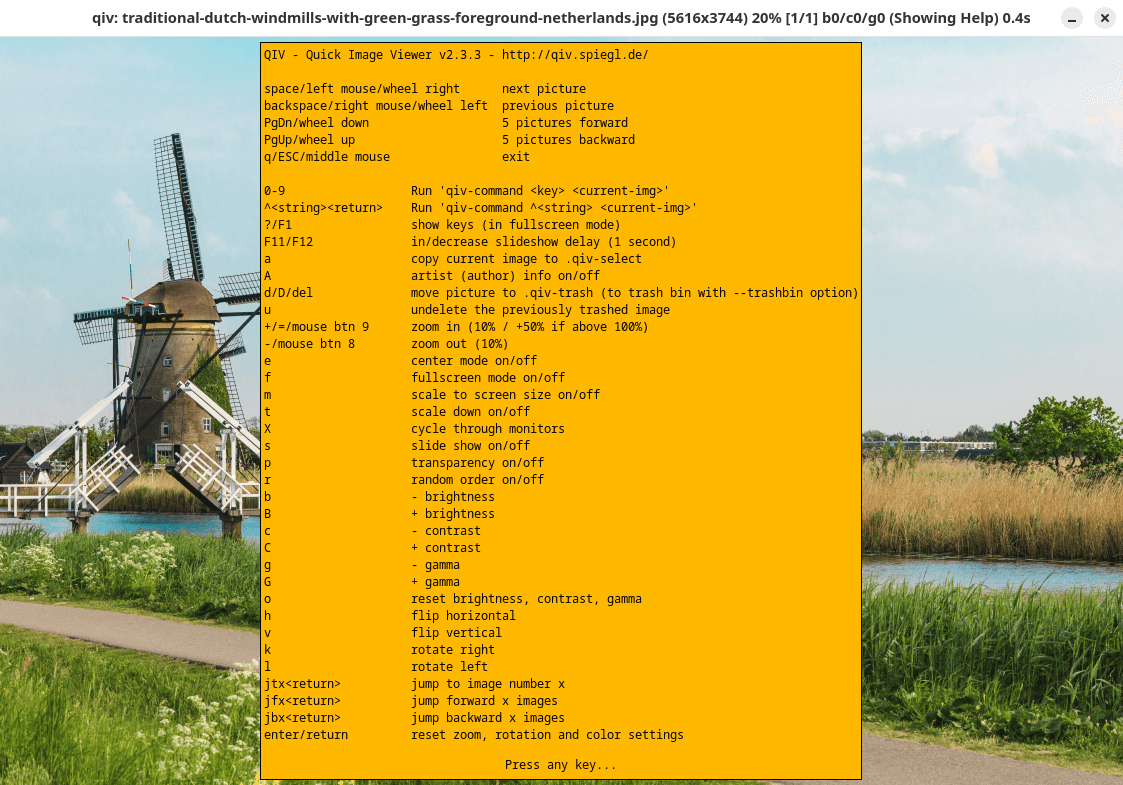
- Windowed and fullscreen viewing with keyboard and mouse navigation.
- Pan and zoom images, including a magnifying window for inspecting details.
- Automatically fit images to the screen while preserving their aspect ratio.
- Slideshow mode with configurable delays and random or shuffled image order.
- Rotate images clockwise or anticlockwise and flip them horizontally or vertically.
- Adjust brightness, contrast and gamma while viewing images.
- Support for HiDPI displays with configurable interface scaling.
- Display EXIF information and automatically rotate JPEG images using orientation metadata.
- Display JPEG comments and artist information.
- Support transparency and configurable source and display colour profiles.
- Sort images by filename, numerical order or modification time.
- Browse directories recursively, with optional symbolic link traversal.
- Move unwanted images to a local .qiv-trash directory and restore previously removed images.
- Copy selected images to a .qiv-select directory.
- Execute external commands through configurable qiv-command keyboard bindings.
- Watch an image file and automatically reload it when its contents change.
- Set the X11 desktop background using centred, tiled or stretched images.
- Cross-platform support – runs on Linux, Solaris (SunOS), FreeBSD, and HP-UX.
Website: spiegl.de/qiv
Support:
Developer: Andy Spiegl, Adam Kopacz, Thomas Wiegner and many more
License: GNU General Public License v2.0
QIV is written in C. Learn C with our recommended free books and free tutorials.
Related Software
| Graphical Image Viewers | |
|---|---|
| feh | Fast and light Imlib2-based image viewer |
| Regards | Modern image viewer with OpenGL/OpenCL support |
| Loupe | Written with GTK 4, Libadwaita and Rust |
| PhotoQT | Good looking, highly configurable, yet easy to use and fast |
| gThumb | Advanced image viewer and browser |
| Geeqie | Lightweight Gtk+ based image viewer |
| ImageGlass | Versatile image viewer |
| qimgv | Qt5 image viewer with video support |
| Vooki | Lightweight viewer with fast image preview |
| Gwenview | Simple image viewer for KDE |
| QuickViewer | Graphic image viewer for comfortable browsing |
| nomacs | Handles most image formats including RAW images |
| qView | Image viewer designed with minimalism and usability in mind |
| Oculante | Hardware-accelerated image viewer |
| GPicView | Simple and fast image viewer |
| Tacent View | Image and texture viewer |
| FIM | Viewer which is highly customizable and scriptable |
| Eye of Gnome | Fast and functional image viewer |
| vipsdisp | Tiny GTK+ image viewer |
| Pineapple Pictures | Lightweight image viewer with Stay-on-Top window |
| PreviewQt | Preview all kinds of files |
| pqiv | Powerful image viewer with minimal UI |
| Ristretto | View and scroll through images |
| QIV | Quick Image Viewer |
| Lightning Image Viewer | Fast and lightweight desktop image viewer |
| Fotema | Simple photo gallery software |
| CoreImage | Lightweight image viewer; part of the C suite |
| swayimg | Image viewer for Wayland |
| ParaPara | Lightweight and high-speed operation |
| imv | Lightweight, keyboard-driven image viewer for X11 and Wayland |
| Eye of MATE | Simple graphics viewer for the MATE Desktop Environment |
| LXImage-Qt | LXQt image viewer and screenshot tool |
| Mirage | Fast and simple GTK+ image viewer |
| PixelViewer | .NET based cross-platform image viewe |
| Pix | Image viewer and browser utility which is based on gThumb |
| ImageFan Reloaded | Tab-based image viewer |
| nsxiv | Fork of sxiv |
| BeeRef | Simple reference image viewer |
| Koko | Image gallery designed for desktop and touch-enabled devices |
| Xviewer | Simple image viewer with basic editing and slideshow features |
| Ephoto | Image viewer based on the EFL |
| SphereView | 360° equirectangular photospheres and panoramas |
| roseate | Simple image viewer |
| Imagot | Basic graphical image viewer |
| flxvwr | Image viewer written in Go using the Fyne toolkit |
| Blackbody | Thermogram viewer. It allows viewing FLIR and TIFF images |
Read our verdict in the software roundup.
 LinuxLinks helps you discover the best free and open source software for Linux. Explore our extensive collection of recommended applications, including alternatives to popular proprietary software. We also publish software reviews, Linux tutorials, hardware reviews, free programming books and articles covering the wider open source community. Browse our Linux resources to discover more. Know a useful free and open source Linux application we haven't covered? Suggest a program for inclusion. Has your software been featured on LinuxLinks? Display one of our Featured on LinuxLinks badges on your website or GitHub README. |
Please read our Comment Policy before commenting.
Hi Steve. QIV is cross-platform.
From website — “for Linux, Solaris(SunOS), FreeBSD and HP-UX”
Cheers.
Good morning Torin.
Thanks, article updated with platforms supported.