

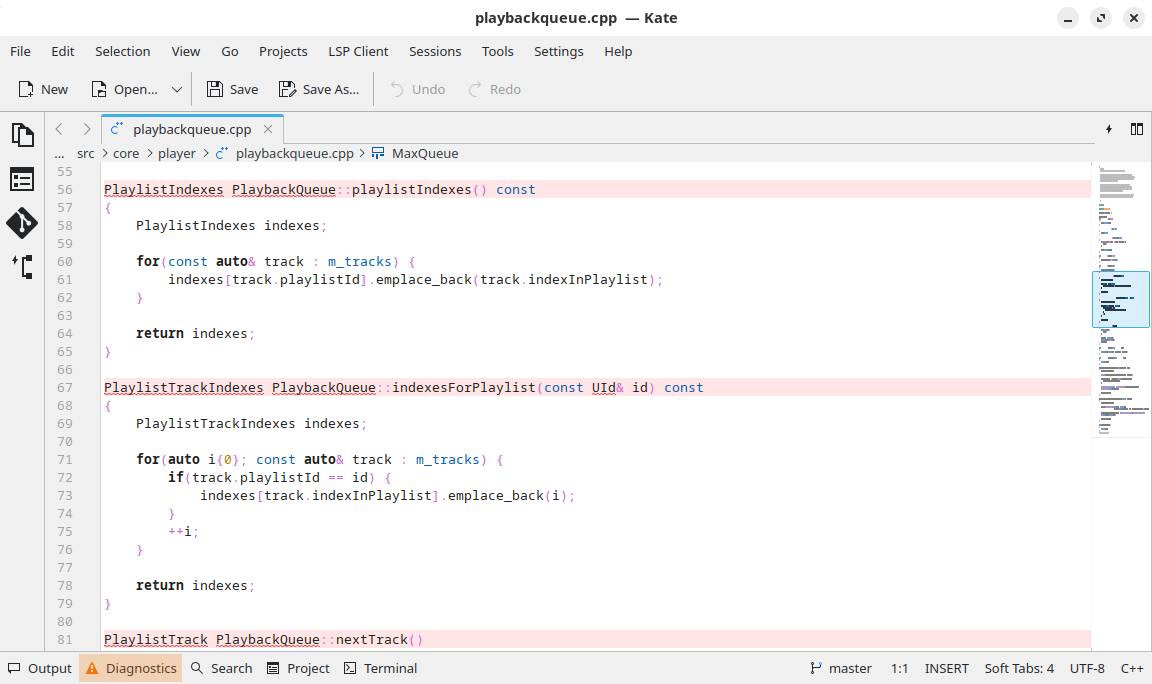
Kate is a multi document editor built on the KDE Frameworks and Qt.
With a multi-view editor like Kate you get a lot of advantages. You can view several instances of the same document and all instances are synced. Or you can view more files at the same time for easy reference or simultaneous editing. The terminal emulation and sidebar are docked windows that can be plugged out of the main window, or replaced therein according to your preference.
This is free and open source software.
Key Features
- Powerful syntax highlighting and bracket matching. Highlighting support for more than 180 languages.
- MDI, window splitting, window tabbing.
- Spell checking.
- CR, CRLF, LF newline support.
- Encoding support (utf-8, utf-16, ascii etc).
- Encoding conversion.
- Search and replace text using regular expressions.
- Drag and drop text editing.
- Code and text folding.
- Infinite undo/redo support.
- Block selection mode.
- Auto indentation.
- Auto completion support.
- Integrated shell.
- Wide protocol support (http, ftp, ssh, webdav etc).
- Plugin architecture for the application and editor component.
- Customizable shortcuts.
- Integrated command line.
- Full DCOP scripting.
- Mini-map scroll bar – shows a a mini-map in place of the scroll bar.
- Notification system – modifications are displayed when viewing remote files, or data recovery and swap files.
- Scriptable using JavaScript.
- Plugins.
Website: kate-editor.org
Support: Planet Kate, Support
Developer: KDE e.V.
License: MIT License or Lesser General Public License v2+
Kate is written in C++. Learn C++ with our recommended free books and free tutorials.
Related Software
| Simple GUI Based Text Editors | |
|---|---|
| Notepad Next | Cross-platform text and source code editor |
| Pulsar | Hyper-hackable text editor |
| Lite XL | Lightweight cross-platform text editor derived from lite |
| GNOME Text Editor | Default text editor for the GNOME desktop environment |
| CudaText | Replacement for the discontinued SynWrite |
| Pluma | Powerful text editor for MATE |
| Mousepad | Simple text editor for the Xfce desktop environment |
| FeatherPad | Lightweight Qt plain-text editor |
| Nota | Browse, create, and edit text files |
| CorePad | Document editor for C Suite, a minimalistic application suite |
| xed | Small and lightweight text editor |
| gedit | Small and lightweight text editor for GNOME |
| Jottr | Designed for writers, journalists and researchers |
| Kate | Multi-document editor |
| typobuster | Simplified text editor with transformations and automatic correction |
| Howl | General purpose editor |
| Janus | Simple native Linux notepad meant for text editing |
| Webkit Word | Text editor built with GTK4/Libadwaita |
| v2 | Local-first rich-text editor with versioning capabilities |
| Mini Text | Very small and basic text editor |
| Airpad | Basic, generic graphical text editor |
Read our verdict in the software roundup.
| HTML Editors | |
|---|---|
| Zed | Fast, multiplayer code editor built for serious development |
| VSCodium | VS Code binaries without Microsoft branding or telemetry |
| Bluefish | Powerful editor for writing websites, scripts and programming code |
| NetBeans | Java based integrated development environment |
| Pulsar | Community-led Atom continuation for highly customizable editing |
| SeaMonkey | All-in-one internet application suite |
| Phoenix Code | Browser-based editor with live preview and collaborative coding |
| Webstudio | Visual website builder aimed at open, code-friendly design |
| Geany | Lightweight IDE offering speed, simplicity, and broad language support |
| Kate | KDE’s powerful text editor with sessions, projects, and plugins |
Read our verdict in the software roundup.
 Explore our comprehensive directory of recommended free and open source software. Our carefully curated collection spans every major software category. Explore our comprehensive directory of recommended free and open source software. Our carefully curated collection spans every major software category.This directory is part of our ongoing series of informative articles for Linux enthusiasts. It features hundreds of detailed reviews, along with open source alternatives to proprietary solutions from major corporations such as Google, Microsoft, Apple, Adobe, IBM, Cisco, Oracle, and Autodesk. You’ll also find interesting projects to try, hardware coverage, free programming books and tutorials, and much more. Discovered a useful open source Linux program that we haven’t covered yet? Let us know by completing this form. |
Please read our Comment Policy before commenting.