

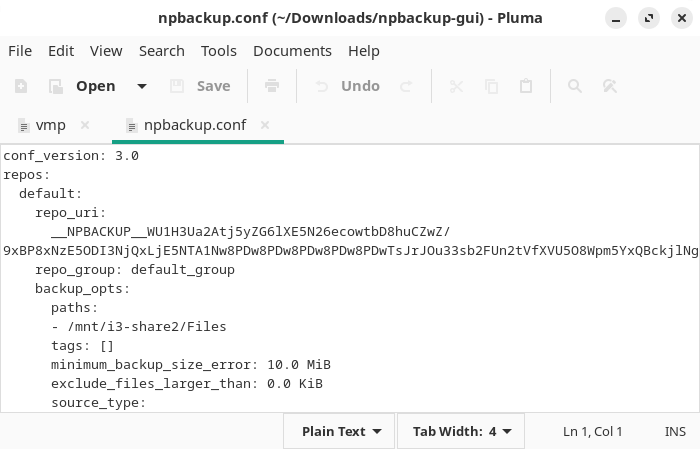
Pluma is the text editor developed for the MATE desktop environment. It provides a traditional graphical editing experience suited to plain text, source code and system configuration files.
The editor supports multiple documents in tabs and integrates with MATE’s desktop services. Files can be dragged into Pluma from the Caja file manager, while remote documents can be accessed through the desktop’s virtual file system.
Pluma balances a straightforward interface with a useful set of programmer-oriented facilities. Optional plugins add features that are not required for every editing session and help keep the basic window relatively uncluttered.
This is free and open source software.
Key Features
- Tabbed multiple-document editing.
- Syntax highlighting for many programming and markup languages.
- Unicode text editing.
- Remote file access through GVfs.
- Search and replace.
- Undo and redo.
- Automatic indentation.
- Configurable word wrapping.
- Line numbers and current-line highlighting.
- Bracket matching.
- Automatic backup support.
- Document revert facility.
- Print preview and printing.
- Drag and drop integration with Caja.
- Plugins for spell checking, sorting and inserting dates and times.
- Optional file-browser and tag-list plugins.
Website: github.com/mate-desktop/pluma
Support:
Developer: Pluma team
License: GNU General Public License v2.0
Pluma is written in C. Learn C with our recommended free books and free tutorials.
Related Software
| Simple GUI Based Text Editors | |
|---|---|
| Notepad Next | Cross-platform text and source code editor |
| Pulsar | Hyper-hackable text editor |
| Lite XL | Lightweight cross-platform text editor derived from lite |
| Kate | Multi-document editor |
| GNOME Text Editor | Default text editor for the GNOME desktop environment |
| CudaText | Replacement for the discontinued SynWrite |
| Pluma | Powerful text editor for MATE |
| Mousepad | Simple text editor for the Xfce desktop environment |
| FeatherPad | Lightweight Qt plain-text editor |
| Nota | Browse, create, and edit text files |
| CorePad | Document editor for C Suite, a minimalistic application suite |
| xed | Small and lightweight text editor |
| gedit | Small and lightweight text editor for GNOME |
| Jottr | Designed for writers, journalists and researchers |
| typobuster | Simplified text editor with transformations and automatic correction |
| Jollpi | A nimble editor with syntax highlighting, tabs and a handy minimap |
| Howl | General purpose editor |
| Parchment | Strips away the clutter to put words firmly centre stage |
| Janus | Simple native Linux notepad meant for text editing |
| Webkit Word | Text editor built with GTK4/Libadwaita |
| v2 | Local-first rich-text editor with versioning capabilities |
| Mini Text | Very small and basic text editor |
Read our verdict in the software roundup.
 LinuxLinks helps you discover the best free and open source software for Linux. Explore our extensive collection of recommended applications, including alternatives to popular proprietary software. LinuxLinks helps you discover the best free and open source software for Linux. Explore our extensive collection of recommended applications, including alternatives to popular proprietary software.We also publish software reviews, Linux tutorials, hardware reviews, free programming books and articles covering the wider open source community. Browse our Linux resources to discover more. Know a useful free and open source Linux application we haven't covered? Suggest a program for inclusion. Has your software been featured on LinuxLinks? Display one of our Featured on LinuxLinks badges on your website or GitHub README. |
Please read our Comment Policy before commenting.
Pluma is my favorite Text Editor. 2nd is Geany.
My text editor of choice is Eight Megabytes and Constantly Swapping.
My first PC had 4MB of RAM. And Emacs did cause the machine to swap sometimes.