

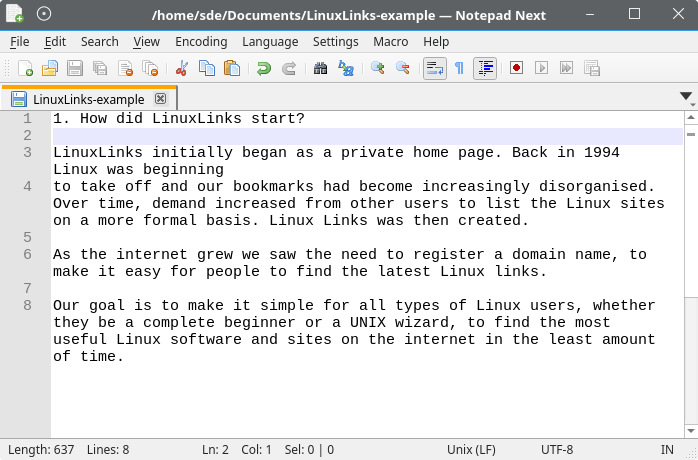
Notepad Next is a cross-platform text and source-code editor inspired by Notepad++. Its aim is to provide a familiar editing workflow on Linux and other platforms rather than requiring users to run the original Windows application.
The editor combines conventional tabbed document handling with source-oriented search and navigation facilities. Sessions can be restored between runs, which makes it practical to keep a working collection of documents open rather than treating each invocation as an isolated editing session.
Notepad Next also provides workspace and interface customisation features useful for larger groups of files. The project describes the application as usable while cautioning that some functionality may still contain rough edges, so important work should be backed up appropriately.
This is free and open source software.
Key Features
- Notepad++-inspired editing interface.
- Tabbed document handling.
- Folder workspace for navigating groups of files.
- Automatic session saving and restoration.
- Search-match highlighting.
- Find forwards or backwards through documents.
- Search results can be collected and copied.
- Bookmark lines while navigating larger files.
- Split-editor controls for viewing documents simultaneously.
- Configurable toolbar.
- Keyboard actions can have multiple shortcuts.
- Optional language-keyword completion.
- Commands for removing duplicate lines.
- Controls for showing line numbers and highlighting URLs.
- Support for UTF-16 little-endian and big-endian text.
- Flexible tab-closing and document-management commands.
Website: github.com/dail8859/NotepadNext
Support:
Developer: Justin Dailey
License: GNU General Public License v3.0
Notepad Next is written in C++ and Lua. Learn C++ with our recommended free books and free tutorials. Learn Lua with our recommended free books and free tutorials.
Related Software
| Simple GUI Based Text Editors | |
|---|---|
| Notepad Next | Cross-platform text and source code editor |
| Pulsar | Hyper-hackable text editor |
| Lite XL | Lightweight cross-platform text editor derived from lite |
| Kate | Multi-document editor |
| GNOME Text Editor | Default text editor for the GNOME desktop environment |
| CudaText | Replacement for the discontinued SynWrite |
| Pluma | Powerful text editor for MATE |
| Mousepad | Simple text editor for the Xfce desktop environment |
| FeatherPad | Lightweight Qt plain-text editor |
| Nota | Browse, create, and edit text files |
| CorePad | Document editor for C Suite, a minimalistic application suite |
| xed | Small and lightweight text editor |
| gedit | Small and lightweight text editor for GNOME |
| Jottr | Designed for writers, journalists and researchers |
| typobuster | Simplified text editor with transformations and automatic correction |
| Jollpi | A nimble editor with syntax highlighting, tabs and a handy minimap |
| Howl | General purpose editor |
| Parchment | Strips away the clutter to put words firmly centre stage |
| Janus | Simple native Linux notepad meant for text editing |
| Webkit Word | Text editor built with GTK4/Libadwaita |
| v2 | Local-first rich-text editor with versioning capabilities |
| Mini Text | Very small and basic text editor |
Read our verdict in the software roundup.
 LinuxLinks helps you discover the best free and open source software for Linux. Explore our extensive collection of recommended applications, including alternatives to popular proprietary software. LinuxLinks helps you discover the best free and open source software for Linux. Explore our extensive collection of recommended applications, including alternatives to popular proprietary software.We also publish software reviews, Linux tutorials, hardware reviews, free programming books and articles covering the wider open source community. Browse our Linux resources to discover more. Know a useful free and open source Linux application we haven't covered? Suggest a program for inclusion. Has your software been featured on LinuxLinks? Display one of our Featured on LinuxLinks badges on your website or GitHub README. |
Please read our Comment Policy before commenting.