

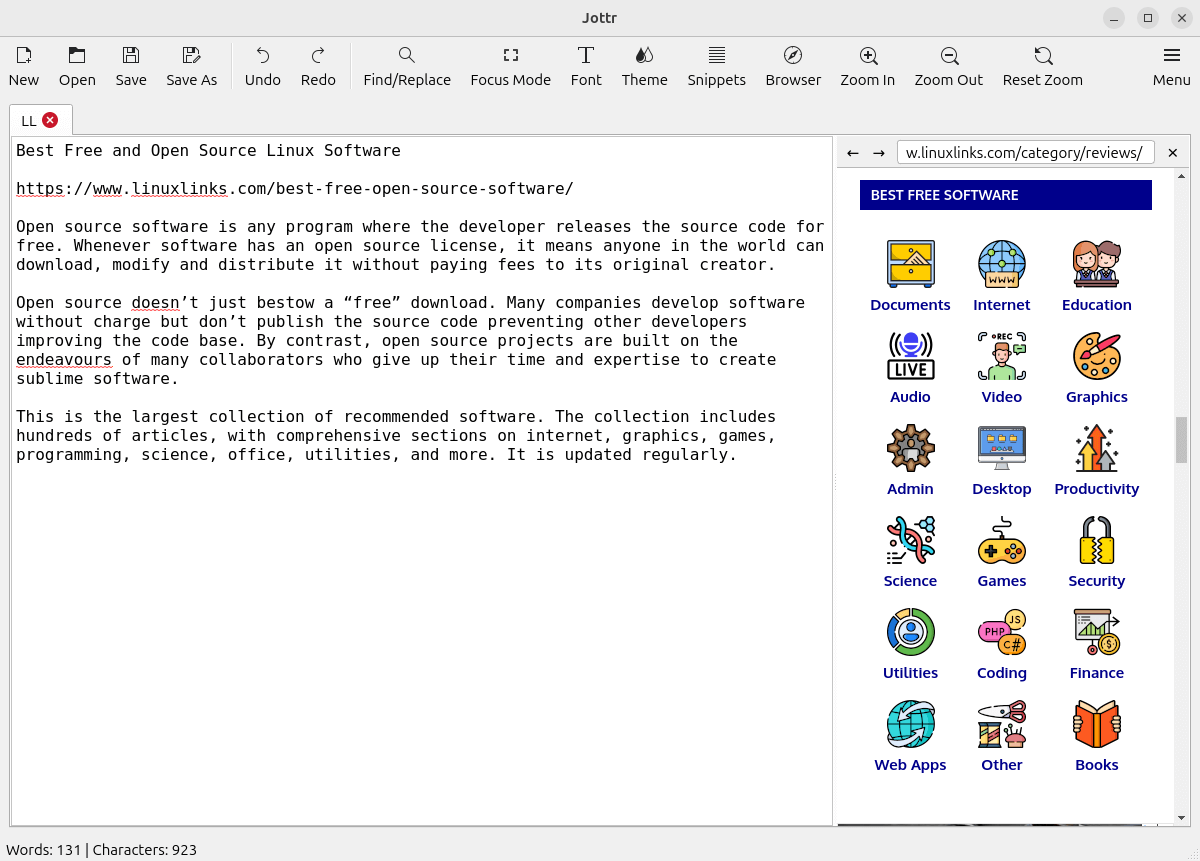
Jottr is a text and Markdown editor designed primarily for writers, journalists and researchers rather than software development. It presents a restrained writing environment while providing tools intended to reduce switching between the editor and supporting material.
The application can work with ordinary plain text or Markdown. A distraction-reducing focus mode gives the document more prominence, while snippets and completion facilities help with text that is entered repeatedly.
Jottr also has an extensible architecture. Its plugin system can add commands, interface elements and background functionality, allowing the basic writing environment to be adapted without forcing every feature into the core application.
This is free and open source software.
Key Features
- Plain-text and Markdown editing.
- Side-by-side Markdown preview.
- Focus mode for distraction-reduced writing.
- Reusable text snippets.
- Tab-triggered completion facilities.
- Integrated browser for consulting online material while writing.
- Site-specific search facilities.
- Colour themes including a sepia-style writing theme.
- Plugin system for extending the application.
- Plugins can register additional commands.
- Extensions can add toolbar actions and sidebar items.
- Plugins can provide custom panels and editor extensions.
- Background services can be implemented through the extension system.
- Designed around research and prose workflows rather than project-oriented software development.
Website: github.com/mfat/jottr
Support:
Developer: Mehdi
License: GNU General Public License v3.0
Jottr is written in Python. Learn Python with our recommended free books and free tutorials.
Related Software
| Simple GUI Based Text Editors | |
|---|---|
| Notepad Next | Cross-platform text and source code editor |
| Pulsar | Hyper-hackable text editor |
| Lite XL | Lightweight cross-platform text editor derived from lite |
| Kate | Multi-document editor |
| GNOME Text Editor | Default text editor for the GNOME desktop environment |
| CudaText | Replacement for the discontinued SynWrite |
| Pluma | Powerful text editor for MATE |
| Mousepad | Simple text editor for the Xfce desktop environment |
| FeatherPad | Lightweight Qt plain-text editor |
| Nota | Browse, create, and edit text files |
| CorePad | Document editor for C Suite, a minimalistic application suite |
| xed | Small and lightweight text editor |
| gedit | Small and lightweight text editor for GNOME |
| Jottr | Designed for writers, journalists and researchers |
| typobuster | Simplified text editor with transformations and automatic correction |
| Jollpi | A nimble editor with syntax highlighting, tabs and a handy minimap |
| Howl | General purpose editor |
| Parchment | Strips away the clutter to put words firmly centre stage |
| Janus | Simple native Linux notepad meant for text editing |
| Webkit Word | Text editor built with GTK4/Libadwaita |
| v2 | Local-first rich-text editor with versioning capabilities |
| Mini Text | Very small and basic text editor |
Read our verdict in the software roundup.
 LinuxLinks helps you discover the best free and open source software for Linux. Explore our extensive collection of recommended applications, including alternatives to popular proprietary software. We also publish software reviews, Linux tutorials, hardware reviews, free programming books and articles covering the wider open source community. Browse our Linux resources to discover more. Know a useful free and open source Linux application we haven't covered? Suggest a program for inclusion. Has your software been featured on LinuxLinks? Display one of our Featured on LinuxLinks badges on your website or GitHub README. |
Please read our Comment Policy before commenting.
I like its focus mode. Useful for me.