
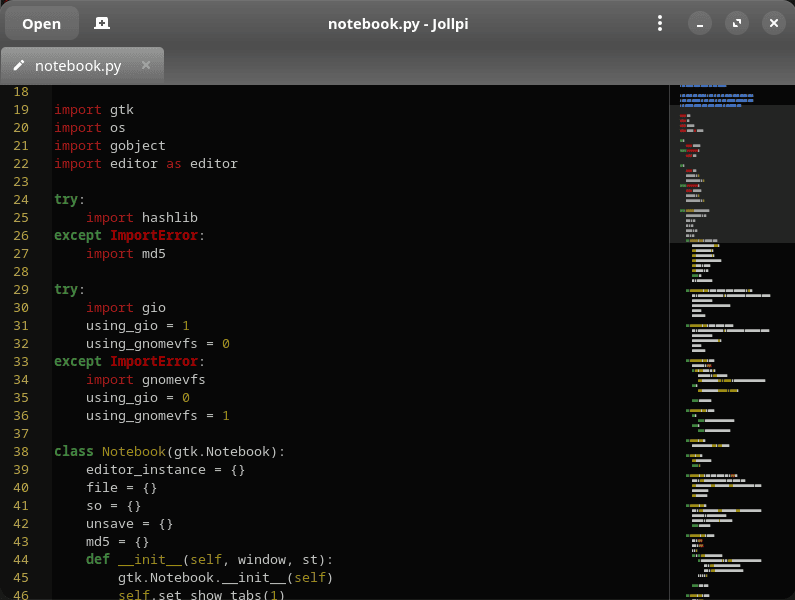
Jollpi is a lightweight graphical text editor for Linux built with Python 3, GTK 4, and GtkSourceView 5. It is a modern rewrite of the original Jollpi editor, which dates back to the Python 2 and GTK 2 era. The rewritten application retains the project’s emphasis on simplicity while adopting the current GNOME technology stack.
The editor sits between very basic notepad-style applications and heavyweight programming environments. Its interface remains uncomplicated, but GtkSourceView gives it facilities that make it useful for editing source code as well as ordinary text documents. Multiple documents can be kept open at once without introducing the project-management concepts associated with an IDE.
Particular attention has also been paid to file handling. Jollpi can open files asynchronously, with operations that can be cancelled, helping the graphical interface remain responsive when dealing with large documents. It can also watch open files for changes made by other applications, a useful facility when the same document is being processed by external tools.
This is free and open source software.
Key Features
- Syntax highlighting powered by GtkSourceView 5.
- Multiple documents with tabbed editing.
- Supports opening separate editor windows.
- Cancellable asynchronous file opening.
- Real-time monitoring for files changed outside the editor.
- Find and replace text and jump directly to a specified line.
- GtkSourceMap minimap provides an overview of longer documents.
- Automatic indentation and automatic bracket handling.
- Optional line numbers and line marks.
- Configurable fonts, colour themes, and text wrapping.
- Printing support.
- Launch files from the command line or through desktop file associations.
Website: gitlab.com/zulfian1732/jollpi-text-editor
Support:
Developer: Zulfian
License: GNU General Public License v3.0
Jollpi is written in Python. Learn Python with our recommended free books and free tutorials.
Related Software
| Simple GUI Based Text Editors | |
|---|---|
| Notepad Next | Cross-platform text and source code editor |
| Pulsar | Hyper-hackable text editor |
| Lite XL | Lightweight cross-platform text editor derived from lite |
| GNOME Text Editor | Default text editor for the GNOME desktop environment |
| CudaText | Replacement for the discontinued SynWrite |
| Pluma | Powerful text editor for MATE |
| Mousepad | Simple text editor for the Xfce desktop environment |
| FeatherPad | Lightweight Qt plain-text editor |
| Nota | Browse, create, and edit text files |
| CorePad | Document editor for C Suite, a minimalistic application suite |
| xed | Small and lightweight text editor |
| gedit | Small and lightweight text editor for GNOME |
| Jottr | Designed for writers, journalists and researchers |
| Kate | Multi-document editor |
| typobuster | Simplified text editor with transformations and automatic correction |
| Howl | General purpose editor |
| Janus | Simple native Linux notepad meant for text editing |
| Webkit Word | Text editor built with GTK4/Libadwaita |
| v2 | Local-first rich-text editor with versioning capabilities |
| Mini Text | Very small and basic text editor |
| Airpad | Basic, generic graphical text editor |
Read our verdict in the software roundup.
 Explore our carefully curated directory of recommended free and open source software, covering every major software category. Explore our carefully curated directory of recommended free and open source software, covering every major software category.The directory forms part of our extensive collection of articles for Linux enthusiasts. It includes hundreds of detailed reviews, together with free and open source alternatives to proprietary software from companies such as Google, Microsoft, Apple, Adobe, IBM, Cisco, Oracle, and Autodesk. LinuxLinks also covers interesting projects worth exploring, Linux-compatible hardware, free programming books and tutorials, and much more. Know a useful free and open source Linux application that we haven’t covered? Tell us about it using our submission form. |
Please read our Comment Policy before commenting.