

Rooster is a command-line password manager that concentrates on doing a few things well. It provides a straightforward way to manage login credentials without the complexity of a large password management suite.
The application is designed for people who prefer working in a terminal. It operates entirely offline, avoiding the need for a remote account or external service. Rooster deliberately limits the information it maintains to usernames and passwords associated with individual applications or services.
Rooster uses established cryptographic algorithms to protect stored credentials. Its relatively small scope makes it an interesting option for users who want a conventional password vault without browser integration or additional services.
This is free and open source software.
Key Features
- Stores credentials in a single encrypted local file, normally located at ~/.passwords.rooster.
- Uses AES-256-CBC for encryption, HMAC-SHA512 for authentication and scrypt for password-based key derivation.
- Allows users to adjust the scrypt parameters to increase the computational cost of deriving encryption keys.
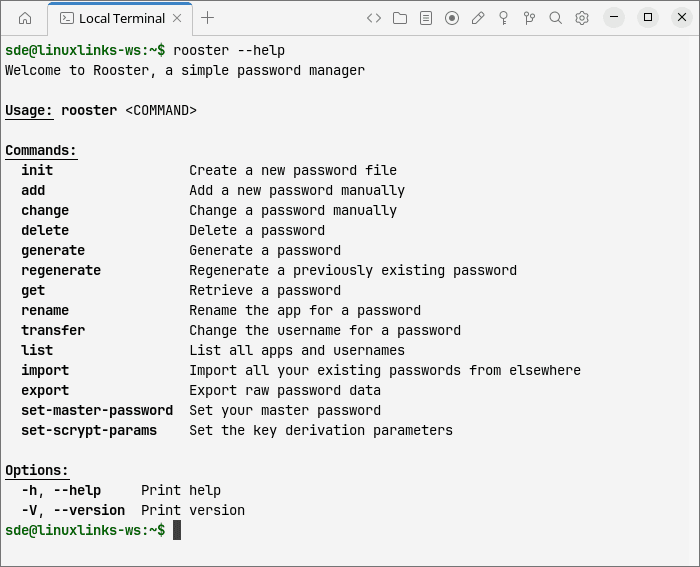
- Provides commands for adding, retrieving, changing, renaming and deleting stored credentials.
- Generates random passwords with configurable lengths and an option to restrict characters to letters and numbers.
- Supports searching for credentials by application or service name, including fuzzy matching.
- Can copy passwords to the system clipboard rather than displaying them directly in the terminal.
- Supports importing and exporting credentials in JSON and CSV formats, together with importing a legacy 1Password CSV layout.
- Provides facilities for changing the master password protecting the encrypted vault.
- Includes functionality for identifying potentially weak passwords.
- Allows the password file location to be customised using the ROOSTER_FILE environment variable.
- Cross-platform support – runs on Linux, macOS, and Windows.
Website: github.com/conradkleinespel/rooster
Support:
Developer: Conrad Kleinespel
License: Apache License 2.0
Rooster is written in Rust. Learn Rust with our recommended free books and free tutorials.
Related Software
| Terminal-Based Password Managers | |
|---|---|
| gopass | Simple but powerful password manager for your terminal |
| pass | Simple password manager using gpg and ordinary unix directories |
| prs | Secure, fast and convenient password manager for the terminal |
| Teller | Multi provider secret management tool |
| Bitwarden CLI | Password management for individuals, teams, and business organizations |
| ripasso | Simple command-line password manager using pass |
| Rooster | Simple password manager for geeks |
| passage | age-backed password manager |
| seniorpw | Password manager using age |
| pa | Simple password manager. Encryption support is provided via age |
| SpicyPass | Lightweight password manager |
| rbw | Unofficial Bitwarden CLI |
| MUTN | Self-hosted, SSH-synchronized password and note manager |
| pago | Go-based command-line password manager |
| kyp | Stores credentials in an encrypted SQLite database |
| Steelsafe | TUI password manager written in Rust |
| keydex | Password manager for KeePass databases |
| kpxhs | Keepass database interactive TUI viewer |
| kpcli | Command line interface to KeePass database files |
| cruxpass | Minimal command-line password manager written in C |
| vd | Terminal password manager with built-in OTP authentication |
| Puny Manager | Minimal, local, CLI password manager |
| privage | Password manager and general file encryption tool that uses age |
| passfzf | Simple fzf wrapper for pass |
| oxipass-tui | Terminal-based manager for securely storing encrypted passwords |
| cpass | Console UI for pass |
Read our verdict in the software roundup.
| GUI Password Managers | |
|---|---|
| KeePassXC | Safely store passwords and auto-type them |
| Bitwarden | Password management for individuals, teams, and organizations |
| KeeWeb | Password manager compatible with KeePass |
| Secrets | Password manager which makes use of the KeePass v.4 format |
| Proton Pass | Encrypted password vault with passkeys, aliases and TOTP support |
| Password Safe | Password manager using wxWidgets |
| QtPass | Graphical User Interface for pass |
| AuthPass | KeePass-compatible password manager with cloud sync and TOTP |
| KWalletManager | Password management tool with Blowfish and GPG encryption |
| OneKeePass | Supports the KeePass-compatible database |
| SpicyPass | Lightweight password manager |
| Seahorse | GNOME front end for GnuPG |
| Pasaffe | Easy to use password manager for GNOME |
| Rotor | Stateless password manager |
| Identities | Modern password-store client made for GNOME |
| FMP | Password manager written in memory-safe Rust |
| Password Manager | Qt password manager with encrypted local files and TOTP codes |
| Passy | Offline password manager with cross-platform synchronization |
| Password Gorilla | Stores login credentials in a master password-protected database |
| Keycord | Browse and edit password stores |
| Keybox | Minimal, encrypted, local password manager |
| Key Rack | View and edit passwords |
Read our verdict in the software roundup.
 LinuxLinks helps you discover the best free and open source software for Linux. Explore our extensive collection of recommended applications, including alternatives to popular proprietary software. We also publish software reviews, Linux tutorials, hardware reviews, free programming books and articles covering the wider open source community. Browse our Linux resources to discover more. Know a useful free and open source Linux application we haven't covered? Suggest a program for inclusion. Has your software been featured on LinuxLinks? Display one of our Featured on LinuxLinks badges on your website or GitHub README. |
Please read our Comment Policy before commenting.