

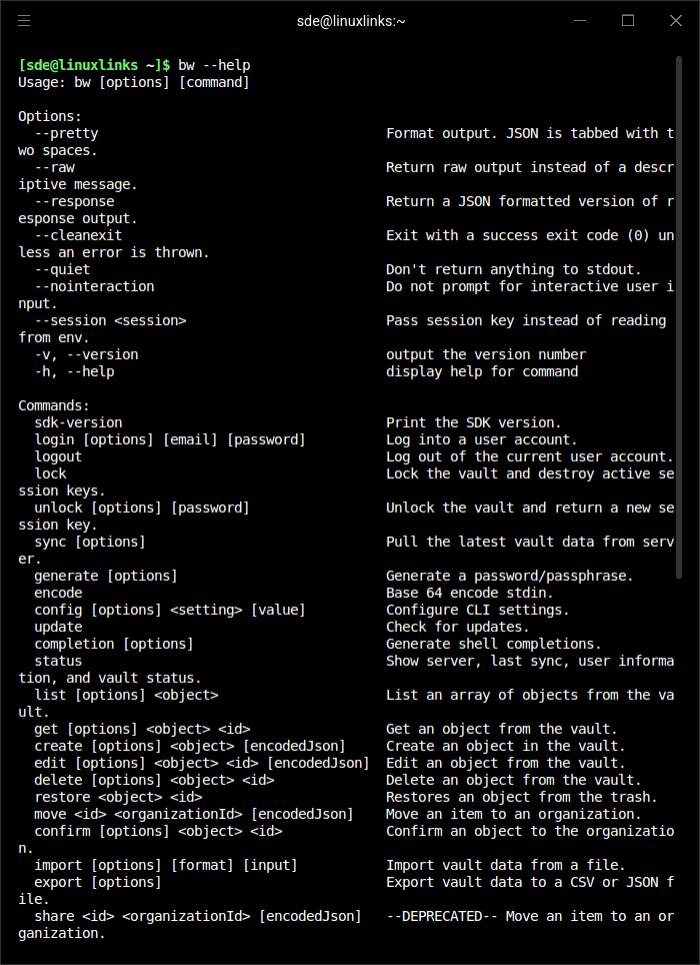
Bitwarden CLI is a command-line client for accessing and managing Bitwarden password vaults. It provides many of the capabilities found in Bitwarden’s desktop and browser clients, but makes them available through terminal commands.
The application is useful for people who regularly work with scripts, remote systems or development environments. Rather than opening a graphical application to retrieve a credential, users can interact with their vault directly and incorporate selected operations into automated workflows.
Bitwarden CLI communicates with a Bitwarden server and maintains a local copy of vault information. Access to encrypted data requires authentication and an unlocked session, with commands available for managing the session lifecycle.
This is free and open source software.
Key Features
- Supports authentication using a Bitwarden account, including personal API keys and supported two-step login methods.
- Provides commands for logging in, unlocking, locking and logging out of password vaults.
- Retrieves vault items, usernames, passwords, secure notes, attachments and other stored information.
- Lists and searches vault items, folders, collections and organisations, with filters for narrowing results.
- Supports creating, editing, moving and deleting vault entries using structured JSON data.
- Generates random passwords and passphrases with configurable length and character options.
- Retrieves time-based one-time passwords from vault items containing TOTP information.
- Supports importing passwords from other managers and exporting vault information in several formats, including encrypted exports.
- Provides access to organisation vaults and collection management for accounts with appropriate permissions.
- Synchronises encrypted vault data from the Bitwarden server using the bw sync command.
- Supports self-hosted Bitwarden installations through configurable server addresses.
- Produces JSON output suitable for shell scripts and tools such as jq.
- Offers shell completion and command-specific help.
- Cross-platform support – runs on Linux, macOS, and Windows.
Website: github.com/bitwarden/clients
Support:
Developer: Bitwarden Inc.
License: GNU General Public License v3.0
Bitwarden CLI is written in TypeScript. Learn TypeScript with our recommended free books and free tutorials.
Related Software
| Terminal-Based Password Managers | |
|---|---|
| gopass | Simple but powerful password manager for your terminal |
| pass | Simple password manager using gpg and ordinary unix directories |
| prs | Secure, fast and convenient password manager for the terminal |
| Teller | Multi provider secret management tool |
| Bitwarden CLI | Password management for individuals, teams, and business organizations |
| ripasso | Simple command-line password manager using pass |
| Rooster | Simple password manager for geeks |
| passage | age-backed password manager |
| seniorpw | Password manager using age |
| pa | Simple password manager. Encryption support is provided via age |
| SpicyPass | Lightweight password manager |
| rbw | Unofficial Bitwarden CLI |
| MUTN | Self-hosted, SSH-synchronized password and note manager |
| pago | Go-based command-line password manager |
| kyp | Stores credentials in an encrypted SQLite database |
| Steelsafe | TUI password manager written in Rust |
| keydex | Password manager for KeePass databases |
| kpxhs | Keepass database interactive TUI viewer |
| kpcli | Command line interface to KeePass database files |
| cruxpass | Minimal command-line password manager written in C |
| vd | Terminal password manager with built-in OTP authentication |
| Puny Manager | Minimal, local, CLI password manager |
| privage | Password manager and general file encryption tool that uses age |
| passfzf | Simple fzf wrapper for pass |
| oxipass-tui | Terminal-based manager for securely storing encrypted passwords |
| cpass | Console UI for pass |
Read our verdict in the software roundup.
 LinuxLinks helps you discover the best free and open source software for Linux. Explore our extensive collection of recommended applications, including alternatives to popular proprietary software. LinuxLinks helps you discover the best free and open source software for Linux. Explore our extensive collection of recommended applications, including alternatives to popular proprietary software.We also publish software reviews, Linux tutorials, hardware reviews, free programming books and articles covering the wider open source community. Browse our Linux resources to discover more. Know a useful free and open source Linux application we haven't covered? Suggest a program for inclusion. Has your software been featured on LinuxLinks? Display one of our Featured on LinuxLinks badges on your website or GitHub README. |
Please read our Comment Policy before commenting.