
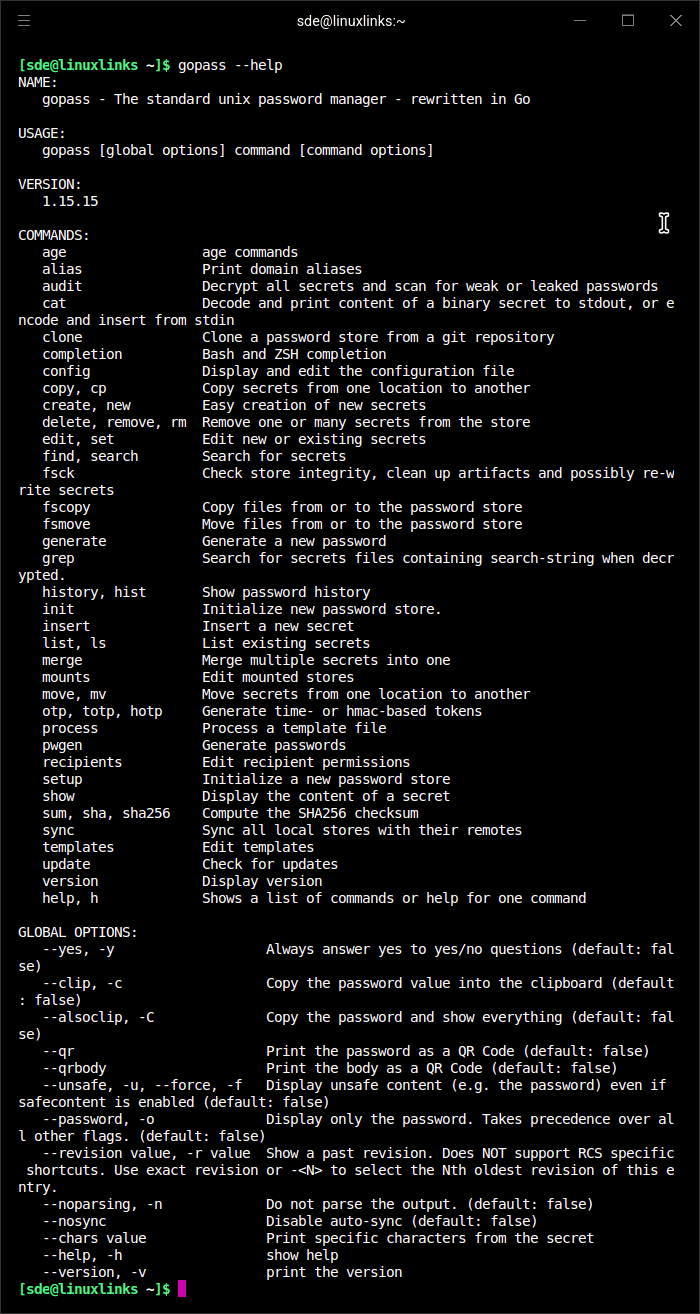
gopass is a command-line password manager designed for individuals and teams who want direct control over their credentials. It builds on the approach used by pass, but adds functionality for shared password stores and collaborative working.
The application can operate entirely offline, although encrypted stores can also be synchronised between computers. Its command-line interface makes it particularly suitable for administrators, developers and anyone who prefers working in a terminal.
gopass offers a choice of encryption and storage backends rather than tying users to a single arrangement. It can be used for a personal password collection or configured to share selected credentials with colleagues.
This is free and open source software.
Key Features
- Encrypts stored credentials using GPG by default, with age available as an alternative encryption backend.
- Supports Git-backed password stores, allowing encrypted credentials to be versioned and synchronised between machines.
- Provides facilities for sharing password stores with teams and managing the recipients authorised to decrypt secrets.
- Supports multiple mounted password stores, making it possible to separate personal, project and team credentials.
- Includes an interactive setup wizard for creating a password store or configuring an existing one.
- Can clone existing encrypted stores from Git repositories.
- Generates passwords and supports creating, editing, searching and removing stored secrets.
- Provides clipboard integration for copying credentials without manually displaying them on screen.
- Offers an interactive command-line mode for browsing and managing password entries.
- Supports integration with shell scripts, development workflows and continuous integration environments.
- Cross-platform support – runs on Linux, macOS, BSD, and Windows.
Website: github.com/gopasspw/gopass
Support:
Developer: JustWatch GmbH and contributors
License: MIT License
gopass is written in Go. Learn Go with our recommended free books and free tutorials.
Related Software
| Terminal-Based Password Managers | |
|---|---|
| gopass | Simple but powerful password manager for your terminal |
| pass | Simple password manager using gpg and ordinary unix directories |
| prs | Secure, fast and convenient password manager for the terminal |
| Teller | Multi provider secret management tool |
| Bitwarden CLI | Password management for individuals, teams, and business organizations |
| ripasso | Simple command-line password manager using pass |
| Rooster | Simple password manager for geeks |
| passage | age-backed password manager |
| seniorpw | Password manager using age |
| pa | Simple password manager. Encryption support is provided via age |
| SpicyPass | Lightweight password manager |
| rbw | Unofficial Bitwarden CLI |
| MUTN | Self-hosted, SSH-synchronized password and note manager |
| pago | Go-based command-line password manager |
| kyp | Stores credentials in an encrypted SQLite database |
| Steelsafe | TUI password manager written in Rust |
| keydex | Password manager for KeePass databases |
| kpxhs | Keepass database interactive TUI viewer |
| kpcli | Command line interface to KeePass database files |
| cruxpass | Minimal command-line password manager written in C |
| vd | Terminal password manager with built-in OTP authentication |
| Puny Manager | Minimal, local, CLI password manager |
| privage | Password manager and general file encryption tool that uses age |
| passfzf | Simple fzf wrapper for pass |
| oxipass-tui | Terminal-based manager for securely storing encrypted passwords |
| cpass | Console UI for pass |
Read our verdict in the software roundup.
 LinuxLinks helps you discover the best free and open source software for Linux. Explore our extensive collection of recommended applications, including alternatives to popular proprietary software. We also publish software reviews, Linux tutorials, hardware reviews, free programming books and articles covering the wider open source community. Browse our Linux resources to discover more. Know a useful free and open source Linux application we haven't covered? Suggest a program for inclusion. Has your software been featured on LinuxLinks? Display one of our Featured on LinuxLinks badges on your website or GitHub README. |
Please read our Comment Policy before commenting.