

keydex is a terminal-based password manager for KeePass databases. It provides a compact interface for accessing credentials stored in the widely used KDBX format, without requiring users to navigate a conventional graphical password manager.
The application combines an interactive editor with commands designed for shell use. This dual approach makes it suitable both for occasional manual credential retrieval and for established terminal workflows.
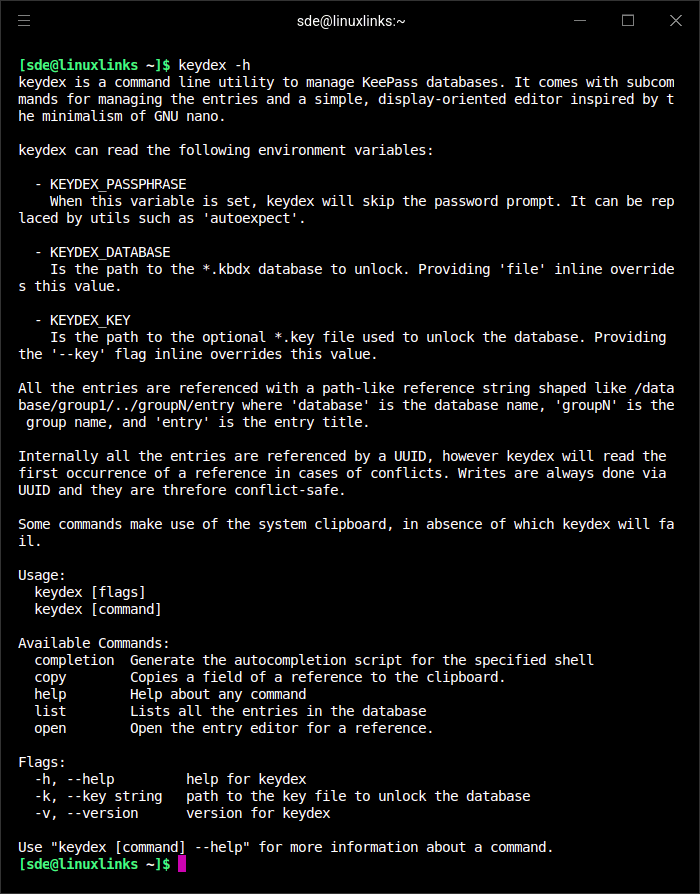
keydex is designed to integrate with other command-line utilities. It accepts input through standard input, allowing users to combine database operations with filtering and selection tools. Database paths and authentication information can also be supplied through environment variables, reducing repetitive command arguments.
This is free and open source software.
Key Features
- Opens existing KeePass-compatible KDBX password databases.
- Provides an interactive, display-oriented entry editor inspired by GNU nano.
- Lists stored database entries through a dedicated command.
- Copies individual entry fields to the system clipboard.
- Allows users to reference credentials by their position in the database hierarchy.
- Supports opening the editor directly at a specified entry.
- Accepts input from standard input for integration with shell pipelines.
- Can combine entry listing with external interactive selectors such as fzf.
- Uses environment variables to supply a default database location.
- Supports supplying the database passphrase through a configured environment variable.
- Provides shell command completion support.
- Includes command-specific help for discovering available operations.
- Cross-platform support – runs on Linux, macOS, and Windows.
Website: github.com/shikaan/keydex
Support:
Developer: Manuel Spagnolo
License: MIT License
keydex is written in Go. Learn Go with our recommended free books and free tutorials.
Related Software
| Terminal-Based Password Managers | |
|---|---|
| gopass | Simple but powerful password manager for your terminal |
| pass | Simple password manager using gpg and ordinary unix directories |
| prs | Secure, fast and convenient password manager for the terminal |
| Teller | Multi provider secret management tool |
| Bitwarden CLI | Password management for individuals, teams, and business organizations |
| ripasso | Simple command-line password manager using pass |
| Rooster | Simple password manager for geeks |
| passage | age-backed password manager |
| seniorpw | Password manager using age |
| pa | Simple password manager. Encryption support is provided via age |
| SpicyPass | Lightweight password manager |
| rbw | Unofficial Bitwarden CLI |
| MUTN | Self-hosted, SSH-synchronized password and note manager |
| pago | Go-based command-line password manager |
| kyp | Stores credentials in an encrypted SQLite database |
| Steelsafe | TUI password manager written in Rust |
| keydex | Password manager for KeePass databases |
| kpxhs | Keepass database interactive TUI viewer |
| kpcli | Command line interface to KeePass database files |
| cruxpass | Minimal command-line password manager written in C |
| vd | Terminal password manager with built-in OTP authentication |
| Puny Manager | Minimal, local, CLI password manager |
| privage | Password manager and general file encryption tool that uses age |
| passfzf | Simple fzf wrapper for pass |
| oxipass-tui | Terminal-based manager for securely storing encrypted passwords |
| cpass | Console UI for pass |
Read our verdict in the software roundup.
 LinuxLinks helps you discover the best free and open source software for Linux. Explore our extensive collection of recommended applications, including alternatives to popular proprietary software. We also publish software reviews, Linux tutorials, hardware reviews, free programming books and articles covering the wider open source community. Browse our Linux resources to discover more. Know a useful free and open source Linux application we haven't covered? Suggest a program for inclusion. Has your software been featured on LinuxLinks? Display one of our Featured on LinuxLinks badges on your website or GitHub README. |
Please read our Comment Policy before commenting.