
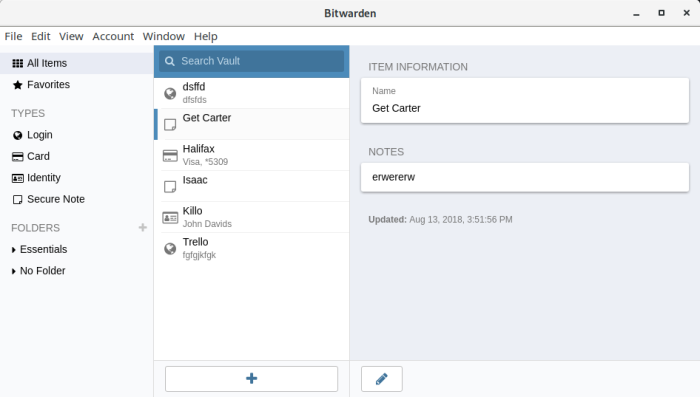
Bitwarden is a secure and free password manager for all of your devices.
The software stores all of your logins in an encrypted vault that syncs across all of your devices. Since it’s fully encrypted before it ever leaves your device, only you have access to your data. Data is sealed with AES-256 bit encryption, salted hashing, and PBKDF2 SHA-256.
Bitwarden can store other types of information including secure notes and credit card information.
The Bitwarden desktop app is written using Electron and Angular. There is also a web application, as well as a command-line Interface (CLI) tool, the latter reveals a powerful API into your Bitwarden vault which lets you write and execute scripts on your Bitwarden vault. The CLI is written with TypeScript and Node.js.
Bitwarden provides offer free hosted password management services with clients available for multiple popular platforms.
Key Features
- Access and install all Bitwarden apps.
- Sync all of your devices, no limits.
- Store unlimited items in your vault.
- Search your vault.
- Logins, secure notes, cards, & identities.
- Two-step authentication (2FA) which requires the user to complete a secondary step while logging into Bitwarden (in addition to their master password).
- TOTP key support.
- Multiple URI support with match detection settings.
- Secure password generator, define the length, where capital letters, lower case letters, numbers and special characters are used. You can also define the minimum numbers, minimum special characters, and avoid ambiguous characters.
- Password history.
- Export and import passwords ,secure notes, and other secure notes to a comma separated value (CSV) format with headers denoting each value.
- Password history – the last 5 changes to an item’s password (and hidden custom fields) are available under “Password History” when viewing the item.
- Import data from LastPass, a popular proprietary password manager.
- Self-host on your own server (optional).
- Bitwarden CLI lets you search your vault, fetch login credentials & TOTP codes, check passwords against the HIBP Pwned Passwords service, create & edit logins, generate secure passwords, and much more.
- Extensions for popular web browsers.
- Themes – change the application’s colour theme. Choose from default, light, dark, and nord.
- Cross-platform support – there are desktop apps for Linux, macOS, and Windows. Additionally there are mobile apps for Android and iOS, as well as browser extensions for most popular web browsers including Chrome, Firefox, Opera, Vivaldi, Brave, Tor Browser, Safari, and Edge.
- Cross-Linux distribution support with AppImage and snap.
- Internationalization support – a wide range of languages are supported.
Website: bitwarden.com
Support: Ctrl blog, Interview with developer, Blog, GitHub Code Repository
Developer: 8bit Solutions LLC
License: GNU General Public License v3.0
Bitwarden is written in C#. Learn C# with our recommended free books and free tutorials.
Related Software
| GUI Password Managers | |
|---|---|
| KeePassXC | Safely store passwords and auto-type them into websites and software |
| Bitwarden | Password management for individuals, teams, and business organizations |
| KeeWeb | Password manager compatible with KeePass |
| Secrets | Password manager which makes use of the KeePass v.4 format |
| Password Safe | Password manager using wxWidgets |
| QtPass | Graphical User Interface for pass |
| KWalletManager | Password management tool with Blowfish and GPG encryption |
| Rooster | Simple password manager for geeks |
| OneKeePass | Supports the KeePass-compatible database |
| SpicyPass | Lightweight password manager |
| KeePassX | Multi-platform port of KeePass |
| Seahorse | GNOME front end for GnuPG |
| Pasaffe | Easy to use password manager for GNOME |
| Rotor | Stateless password manager |
| Identities | Modern password-store client made for GNOME |
| FMP | Password manager written in memory-safe Rust |
| Passy | Offline password manager with cross-platform synchronization |
| Keycord | Browse and edit password stores |
| Keybox | Minimal, encrypted, local password manager |
| Key Rack | View and edit passwords |
| FPM2 | GTK2 port from Figaro’s Password Manager |
| Buttercup | Simple password manager based on NodeJS |
Read our verdict in the software roundup.
 Explore our comprehensive directory of recommended free and open source software. Our carefully curated collection spans every major software category. Explore our comprehensive directory of recommended free and open source software. Our carefully curated collection spans every major software category.This directory is part of our ongoing series of informative articles for Linux enthusiasts. It features hundreds of detailed reviews, along with open source alternatives to proprietary solutions from major corporations such as Google, Microsoft, Apple, Adobe, IBM, Cisco, Oracle, and Autodesk. You’ll also find interesting projects to try, hardware coverage, free programming books and tutorials, and much more. Discovered a useful open source Linux program that we haven’t covered yet? Let us know by completing this form. |
Please read our Comment Policy before commenting.