

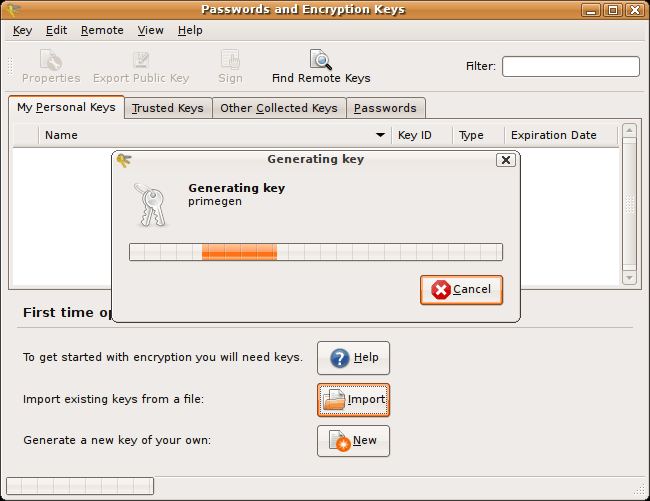
Seahorse, also known as Passwords and Keys, is a GNOME application for managing encryption keys, SSH credentials and passwords saved in desktop keyrings. It provides a graphical interface to several security facilities that otherwise require specialist commands or separate configuration tools.
The program is useful for managing keys used to encrypt or sign messages and for examining secrets stored by compatible desktop applications. Seahorse is therefore closer to a key and keyring manager than a conventional service for synchronizing website logins across devices. Its capabilities depend on the GNOME keyring and the installed cryptographic components.
This is free and open source software.
Key Features
- Creates and manages OpenPGP keys for encrypting and signing information.
- Imports and exports OpenPGP keys and key material.
- Allows users to sign keys and manage their associated identities.
- Retrieves and publishes public keys through supported key servers.
- Creates, imports and manages SSH public and private keys.
- Provides tools for backing up cryptographic keys.
- Displays saved passwords and other records in compatible desktop keyrings.
- Creates keyrings and supports locking and unlocking them.
- Allows users to view, edit and remove selected stored passwords.
- Integrates with GNOME’s password and security infrastructure.
Website: gitlab.gnome.org/GNOME/seahorse
Support:
Developer: GNOME contributors
License: GNU General Public License v2.0
Seahorse is written in Vala. Learn Vala with our recommended free books and free tutorials.
Related Software
| GUI Password Managers | |
|---|---|
| KeePassXC | Safely store passwords and auto-type them |
| Bitwarden | Password management for individuals, teams, and organizations |
| KeeWeb | Password manager compatible with KeePass |
| Secrets | Password manager which makes use of the KeePass v.4 format |
| Proton Pass | Encrypted password vault with passkeys, aliases and TOTP support |
| Password Safe | Password manager using wxWidgets |
| QtPass | Graphical User Interface for pass |
| AuthPass | KeePass-compatible password manager with cloud sync and TOTP |
| KWalletManager | Password management tool with Blowfish and GPG encryption |
| OneKeePass | Supports the KeePass-compatible database |
| SpicyPass | Lightweight password manager |
| Seahorse | GNOME front end for GnuPG |
| Pasaffe | Easy to use password manager for GNOME |
| Rotor | Stateless password manager |
| Identities | Modern password-store client made for GNOME |
| FMP | Password manager written in memory-safe Rust |
| Password Manager | Qt password manager with encrypted local files and TOTP codes |
| Passy | Offline password manager with cross-platform synchronization |
| Password Gorilla | Stores login credentials in a master password-protected database |
| Keycord | Browse and edit password stores |
| Keybox | Minimal, encrypted, local password manager |
| Key Rack | View and edit passwords |
Read our verdict in the software roundup.
| GnuPG Frontends | |
|---|---|
| GpgFrontend | Awesome Qt-based cross-platform frontend |
| KGpg | Simple interface for GnuPG |
| Kleopatra | KDE tool for managing X.509 and OpenPGP certificates |
| Lock | Sports an attractive LibAdwaita GUI |
| Seahorse | GNOME application for managing encryption keys and passwords |
| GPA | GNU Privacy Assistant |
| Hideout | File encryption and decryption |
Read our verdict in the software roundup.
 LinuxLinks helps you discover the best free and open source software for Linux. Explore our extensive collection of recommended applications, including alternatives to popular proprietary software. LinuxLinks helps you discover the best free and open source software for Linux. Explore our extensive collection of recommended applications, including alternatives to popular proprietary software.We also publish software reviews, Linux tutorials, hardware reviews, free programming books and articles covering the wider open source community. Browse our Linux resources to discover more. Know a useful free and open source Linux application we haven't covered? Suggest a program for inclusion. Has your software been featured on LinuxLinks? Display one of our Featured on LinuxLinks badges on your website or GitHub README. |
Please read our Comment Policy before commenting.