

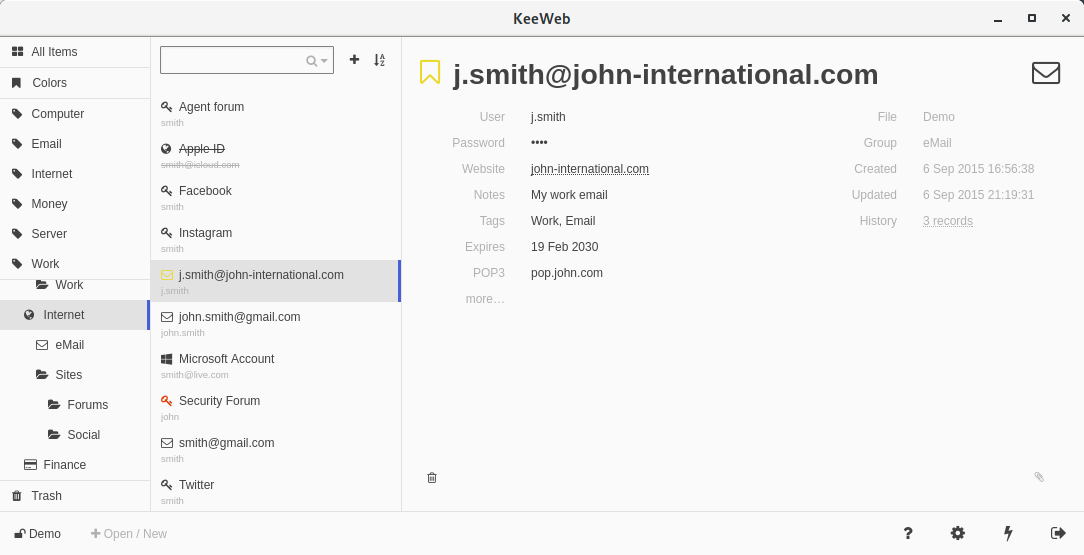
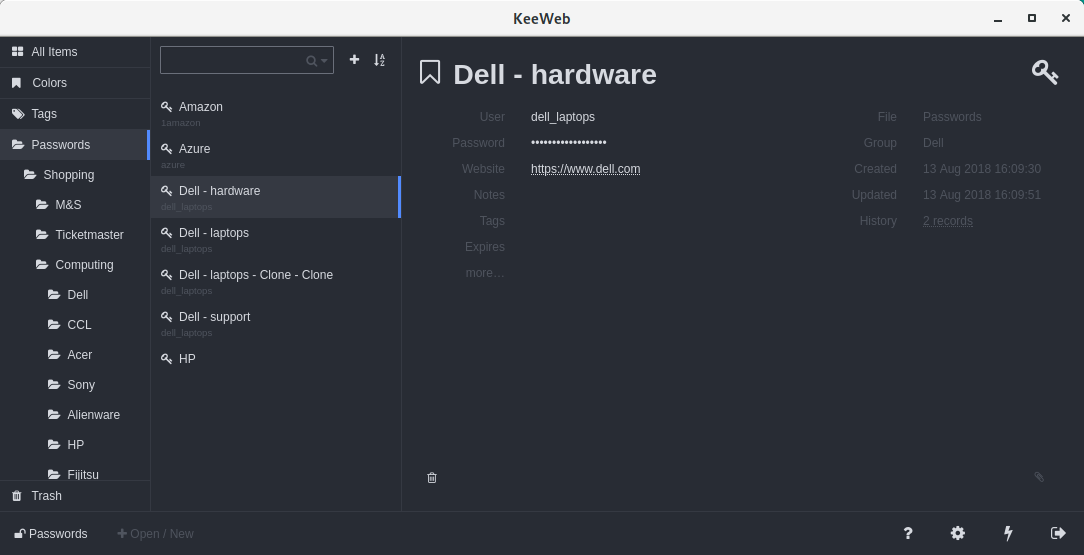
KeeWeb is a browser and desktop password manager compatible with KeePass databases. Only kdbx (KeePass v2), not kdb (KeePass v1) is supported. You can use KeePass to convert between them.
The software is named KeeWeb because it’s built with web technologies.
The app conveniently remembers the recently used databases, you don’t need to select them manually.
The app uses the Electron framework, the backbone JavaScript framework, underscore – a utility-belt library for JavaScript, jQuery a fast feature-rich JavaScript library, and handlebars provides semantic templates.
Key Features
- Multiple files support.
- Easy tags input.
- Protected fields.
- Automatically save and sync.
- 2-factor authentication code generating.
- Generate passwords of any desired length.
- Search works for all files.
- Advanced search options.
- History.
- Themes – flat blue, dark brown, solarized dark, solarized light, white, terminal, and high contrast.
- Keyboard shortcuts.
- Drop entry attachments and database files right to the app.
- Color favorites – mark items with color and easily find them using Colors tab.
- Inline image viewer – attach images to entries and click to view.
- Plugins add features, themes, and languages:
- KeeWeb Plugin Creation Tool – helps to create plugins.
- Plugin signature validation.
- Storage – supports WebDAV, Dropbox, Google Drive, One Drive.
- Import XML.
- Auto lock – configurable time limit when the app is inactive.
- API:
- for browser plugins using keepasshttp protocol.
- for browser console, e.g. you can get settings.
- The software is offline, all data is stored locally and not sent over the network.
- Cross-platform support – runs under Linux, macOS and Windows. There’s also an offline web app. The developer provides Debian packages.
- Internationalization support – the software is available in English, French and German. Plugins are available for Chinese, Czech, Dutch, Estonian, Italian, Norwegian, Polish, Portuguese (Brazilian), Russian, Spanish, Swedish, and Ukrainian. There’s partial support for other languages.
Website: keeweb.info
Support: GitHub Code Repository
Developer: Antelle and contributors
License: MIT License
KeeWeb is written in JavaScript. Learn JavaScript with our recommended free books and free tutorials.
Related Software
| GUI Password Managers | |
|---|---|
| KeePassXC | Safely store passwords and auto-type them into websites and software |
| Bitwarden | Password management for individuals, teams, and business organizations |
| KeeWeb | Password manager compatible with KeePass |
| Secrets | Password manager which makes use of the KeePass v.4 format |
| Password Safe | Password manager using wxWidgets |
| QtPass | Graphical User Interface for pass |
| KWalletManager | Password management tool with Blowfish and GPG encryption |
| Rooster | Simple password manager for geeks |
| OneKeePass | Supports the KeePass-compatible database |
| SpicyPass | Lightweight password manager |
| KeePassX | Multi-platform port of KeePass |
| Seahorse | GNOME front end for GnuPG |
| Pasaffe | Easy to use password manager for GNOME |
| Rotor | Stateless password manager |
| Identities | Modern password-store client made for GNOME |
| FMP | Password manager written in memory-safe Rust |
| Passy | Offline password manager with cross-platform synchronization |
| Keycord | Browse and edit password stores |
| Keybox | Minimal, encrypted, local password manager |
| Key Rack | View and edit passwords |
| FPM2 | GTK2 port from Figaro’s Password Manager |
| Buttercup | Simple password manager based on NodeJS |
Read our verdict in the software roundup.
 Explore our comprehensive directory of recommended free and open source software. Our carefully curated collection spans every major software category. Explore our comprehensive directory of recommended free and open source software. Our carefully curated collection spans every major software category.This directory is part of our ongoing series of informative articles for Linux enthusiasts. It features hundreds of detailed reviews, along with open source alternatives to proprietary solutions from major corporations such as Google, Microsoft, Apple, Adobe, IBM, Cisco, Oracle, and Autodesk. You’ll also find interesting projects to try, hardware coverage, free programming books and tutorials, and much more. Discovered a useful open source Linux program that we haven’t covered yet? Let us know by completing this form. |
Please read our Comment Policy before commenting.