
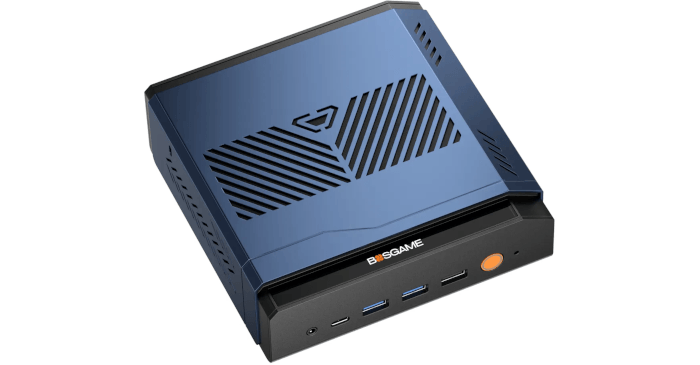
In my first article on Lemonade Server on the BOSGAME VTA-439, I looked at its model management, browser interface and inference engines. This time, I’m testing Qwen3 4B alongside two 35B mixture-of-experts models, Qwen3.6 and Ornith, using both Vulkan and ROCm on the Radeon 890M.
My VTA-439 has a Ryzen AI 9 HX 470 and 64GB of DDR5-5600 memory, shared between the CPU, integrated graphics and applications. That gives larger models plenty of room, but fitting a model into memory is only the first hurdle. I want to know whether it responds quickly enough to use while I’m working. These are the same models and scenarios I tested on the Minisforum M2 Pro, with its Intel Arc B390 graphics and 32GB of faster LPDDR5X-7467 memory.
What is a large language model?
A large language model (LLM) writes its reply in pieces called tokens, which can be words, parts of words or punctuation. It first processes the question, then generates the answer. The question, earlier messages and reply all take up space in its context window.
The two larger models have roughly 35 billion parameters, but their mixture-of-experts design uses around 3 billion for each token. That’s where A3B comes from. Different experts contribute as the reply develops, so all the weights still need to be available. All three models use GGUF files for llama.cpp, with quantisation reducing their size. The Q4 builds store many weights at around four bits, although memory is also needed for the context cache and working buffers.
Lemonade Server
Lemonade Server downloads models, starts the engine that runs them and provides browser chat and an OpenAI-compatible API. Its command-line tools make it straightforward to try different backends and repeat benchmarks. Here, both Vulkan and ROCm run the same GGUF models on the Radeon 890M. Vulkan also runs on the M2 Pro’s Intel graphics, giving me a common starting point for the comparison.
Installation
On CachyOS, install Lemonade Server and enable its service.
sudo pacman -S lemonade-server
sudo systemctl enable --now lemond
Open http://localhost:13305 in a browser. Back in the terminal, list the available backends and install the Vulkan and ROCm builds of llama.cpp.
lemonade backends
lemonade backends install llamacpp:vulkan
lemonade backends install llamacpp:rocm
Memory allocation
The BOSGAME had 48GB allocated to integrated graphics for these tests, increased from the default 4GB through a hidden BIOS setting. This comes from the machine’s 64GB of system memory; it is not additional graphics memory. Lemonade reported around 22-23GB of GPU memory use with the larger models, alongside their separately reported RAM use.
Qwen3 4B (Q4_0)
At about 2.4GB, Qwen3 4B is a quick download and a useful first check that the backend is working.
lemonade pull Qwen3-4B-GGUF
lemonade run Qwen3-4B-GGUF --llamacpp vulkan --ctx-size 4096
The run command opens browser chat. Try asking it to explain the difference between a hard link and a symbolic link. To use ROCm instead, unload the model and change the backend:
lemonade unload
lemonade run Qwen3-4B-GGUF --llamacpp rocm --ctx-size 4096
Qwen3.6 35B-A3B MTP (UD-Q4_K_M)
Qwen3.6 is my general-purpose 35B model. This Unsloth build occupies about 22.7GB on disk and matches the one used on the M2 Pro.
lemonade pull unsloth/Qwen3.6-35B-A3B-MTP-GGUF:UD-Q4_K_M
lemonade run user.Qwen3.6-35B-A3B-MTP-GGUF-UD-Q4_K_M --llamacpp vulkan --ctx-size 4096
The user-prefixed name is Lemonade’s identifier for the downloaded model. As with Qwen3 4B, replace --llamacpp vulkan with --llamacpp rocm to try the other backend.
Ornith 1.5 35B-A3B (Q4_K_M)
I picked Ornith for the coding side. Its developers tuned it for coding agents that work with tools and repositories. The Q4_K_M build in Lemonade’s catalogue is about 22.6GB.
lemonade pull Ornith-1.5-35B-A3B-GGUF
lemonade run Ornith-1.5-35B-A3B-GGUF --llamacpp vulkan --ctx-size 4096
The benchmarks measure response speed, not the quality of its code. Judging that would require checking its answers and using it on actual projects.
Benchmark setup
I ran two chat scenarios and three coding scenarios covering writing, explaining and debugging code. Each ran five times per model and backend, with a 4,096-token context window and no separate warm-up runs. The models, quantisation settings and scenarios match the M2 Pro tests.
Time to first token (TTFT) measures the wait before a reply begins. Generation speed measures how quickly the remaining tokens arrive. Both matter: faster generation does not necessarily mean a shorter wait for a complete answer. The command below tests both backends and saves the results as JSON.
lemonade unload

lemonade bench \
  Qwen3-4B-GGUF \
  user.Qwen3.6-35B-A3B-MTP-GGUF-UD-Q4_K_M \
  Ornith-1.5-35B-A3B-GGUF \
  --backend vulkan --backend rocm \
  --ctx-size 4096 --runs 5 \
  --scenarios chat-short --scenarios chat-long-output \
  --scenarios code-short --scenarios code-explain \
  --scenarios code-debug \
  --output vta-439-lemonade.json
These tests use short prompts rather than filling the context window, so they do not establish performance with long conversations or large source files. The BOSGAME ran Lemonade 2026.45.3, with llama.cpp b11846 for Vulkan and b11836 for ROCm. The different backend builds are worth bearing in mind when comparing their results.
Vulkan results
| Scenario | Qwen3 4B Q4_0 |
Qwen3.6 35B-A3B MTP / UD-Q4_K_M |
Ornith 1.5 35B-A3B Q4_K_M |
|---|---|---|---|
| Short chat 20 output tokens |
31.8 tokens/s 62 ms |
38.4 tokens/s 399 ms |
30.8 tokens/s 358 ms |
| Long chat reply 256 output tokens |
31.5 tokens/s 78 ms |
31.7 tokens/s 419 ms |
29.2 tokens/s 407 ms |
| Short coding task 60 output tokens |
31.7 tokens/s 64 ms |
38.7 tokens/s 400 ms |
40.1 tokens/s 392 ms |
| Code explanation 128 output tokens |
31.3 tokens/s 201 ms |
34.4 tokens/s 684 ms |
34.7 tokens/s 662 ms |
| Code debugging 100 output tokens |
31.1 tokens/s 324 ms |
34.9 tokens/s 1,120 ms |
31.5 tokens/s 1,141 ms |
| Peak reported RAM | 2.2 GB | 2.6 GB | 2.4 GB |
| Peak reported GPU memory | 3.4 GB | 22.9 GB | 22.0 GB |
ROCm results
| Scenario | Qwen3 4B Q4_0 |
Qwen3.6 35B-A3B MTP / UD-Q4_K_M |
Ornith 1.5 35B-A3B Q4_K_M |
|---|---|---|---|
| Short chat 20 output tokens |
31.1 tokens/s 101 ms |
39.4 tokens/s 422 ms |
31.3 tokens/s 327 ms |
| Long chat reply 256 output tokens |
31.2 tokens/s 72 ms |
33.9 tokens/s 471 ms |
30.9 tokens/s 369 ms |
| Short coding task 60 output tokens |
31.3 tokens/s 68 ms |
40.5 tokens/s 453 ms |
42.0 tokens/s 360 ms |
| Code explanation 128 output tokens |
31.1 tokens/s 204 ms |
36.6 tokens/s 717 ms |
35.5 tokens/s 640 ms |
| Code debugging 100 output tokens |
30.8 tokens/s 318 ms |
37.2 tokens/s 1,115 ms |
36.4 tokens/s 1,076 ms |
| Peak reported RAM | 2.4 GB | 2.9 GB | 2.6 GB |
| Peak reported GPU memory | 3.2 GB | 22.7 GB | 22.0 GB |
Comparison with the Minisforum M2 Pro
With Vulkan on both machines, Qwen3 4B generates text approximately 14-16% more slowly on the BOSGAME. It starts sooner in the chat tests and short coding task, but the advantage is only 15-46ms. For this model, the M2 Pro’s faster generation is the more noticeable difference.
Qwen3.6 is much closer. The BOSGAME generates text about 7% faster in short chat, with the other scenarios within 4% of the M2 Pro. It also starts replying much sooner: time to first token is approximately 54-68% lower. In debugging, that means waiting 1.12 seconds rather than 2.42 seconds before the answer begins.
Ornith tells a similar story. Generation is almost identical in short chat and short coding, while the M2 Pro leads in the other three scenarios. The BOSGAME nevertheless cuts the initial wait by approximately 56-68%. Its debugging response starts in 1.14 seconds, compared with 2.68 seconds on the M2 Pro, giving it a useful head start despite slower generation.
Both machines used Lemonade 2026.45.3 and the same Vulkan build of llama.cpp (b11846). The benchmark logs don’t record the power settings or how many model layers ran on each GPU, so I can’t attribute the differences to hardware alone.
What changes with ROCm?
Qwen3 4B gains nothing from ROCm in these tests. Generation is around 1-2% slower than BOSGAME Vulkan, and each reply takes slightly longer to finish. I would stick with Vulkan for this model.
Qwen3.6 benefits more. ROCm increases its generation speed by approximately 3-7% over BOSGAME Vulkan, putting it about 3-10% ahead of the M2 Pro’s Vulkan results across all five scenarios. The initial wait rises slightly in four tests, but remains much shorter than on the M2 Pro. The longer chat reply finishes in 7.99 seconds, down from 8.47 seconds with BOSGAME Vulkan.
Ornith improves in every scenario, both in generation speed and time to first token. Debugging shows the largest percentage reduction in completion time. The reply takes 3.80 seconds with ROCm, down from 4.29 seconds with Vulkan, a reduction of about 11%. Its generation speed now nearly matches the M2 Pro, while the initial wait is 1.08 seconds rather than 2.68 seconds. Across all five tests, BOSGAME ROCm starts Ornith’s replies approximately 57-71% sooner than the M2 Pro.
Summary
The VTA-439 makes these 35B models practical for everyday chat and short coding requests. I’d choose ROCm for Qwen3.6 and Ornith, and Vulkan for Qwen3 4B. The M2 Pro generates text faster with the small model, but the BOSGAME’s much shorter wait for the larger models to begin answering is its strongest result here. Its 64GB of memory also gives me more room to work with larger models.
Complete list of articles in this series:
| BOSGAME VTA-439 Mini PC | |
|---|---|
| Introduction | Introduction to the series and interrogation of the machine |
| Benchmarks | Benchmarking the BOSGAME VTA-439 Mini PC |
| Power | Testing and comparing the power consumption |
| Easy Diffusion | Local Stable Diffusion package with a browser-based GUI |
| BIOS | Explore the machine's BIOS |
| Noise | How quiet is this mini PC? |
| NPU | Running LLMs on the Ryzen AI 9 HX 470 NPU |
| VirtualBox | Run VirtualBox on the Ryzen AI 9 HX 470's Zen 5 Cores |
| Lemonade Server | Local AI server on the BOSGAME VTA-439 |
| Compiling Software - Mini PC Performance Compared | Real-world compilation benchmarks comparing three mini PCs with Intel and AMD processors. |
| Gaming with the Radeon 890M | |
| Shadow of the Tomb Raider | Comparing graphics presets and frame rates |
| Tiny Tina’s Wonderlands | How well does this demanding shooter perform? |
| The Callisto Protocol | Pushing the integrated GPU with a demanding title |
| Deus Ex: Mankind Divided | Performance across the graphics presets |
| World War Z | Comparing Linux and Windows gaming performance |
| Total War: WARHAMMER III | Campaign and battle benchmark performance |
| Thief | Testing the integrated GPU in this stealth-action game |
Please read our Comment Policy before commenting.