

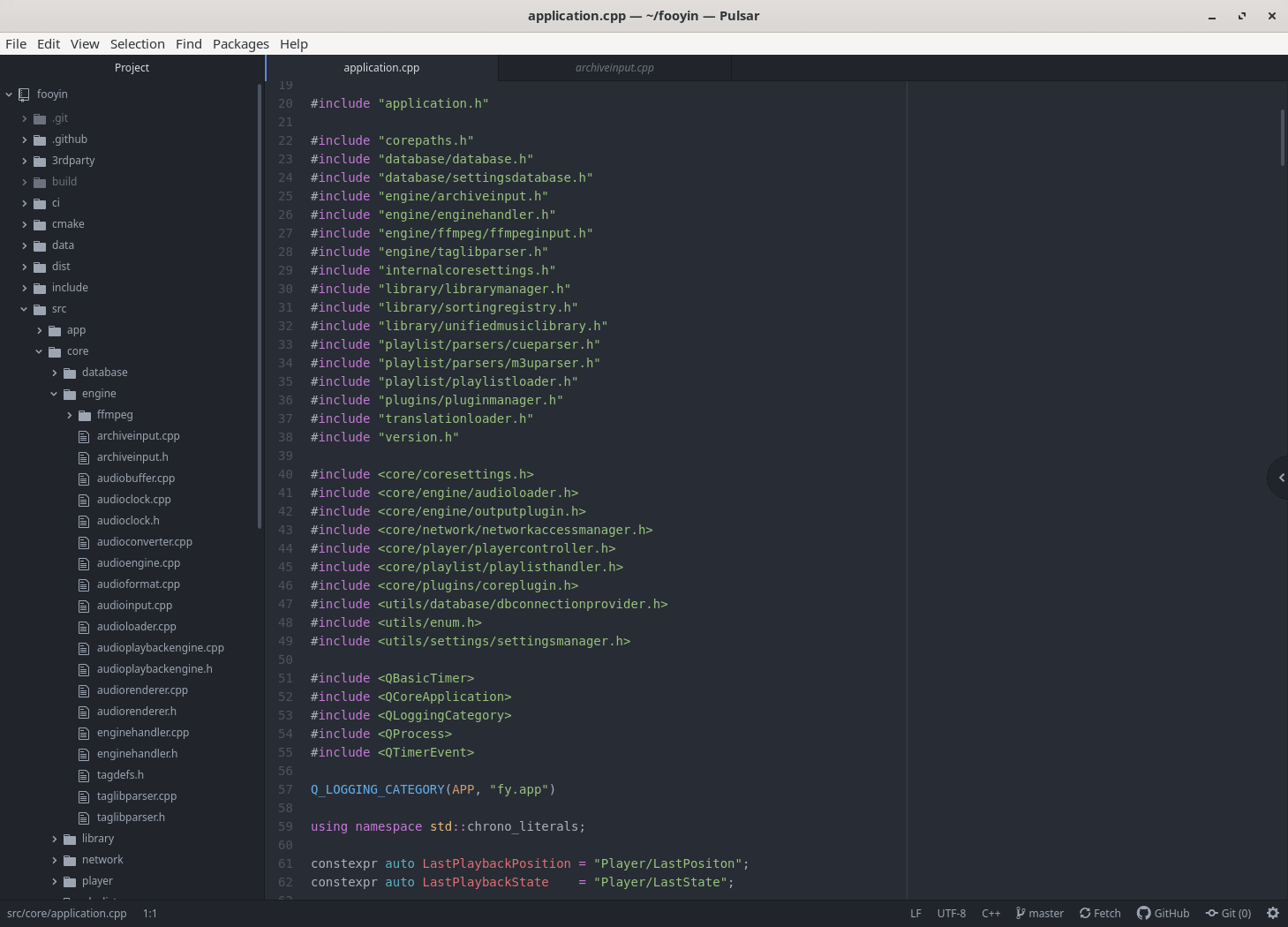
Pulsar is a highly customisable text editor derived from Atom and maintained by a community-led project. It retains Atom’s package-oriented design, making the editor particularly suitable for users who want to assemble their own development environment from a flexible base.
The application can be used as a conventional source editor or extended towards IDE-style workflows. Packages can add language intelligence, interface components and specialised tools without requiring those facilities to be part of the core editor.
Pulsar also places considerable emphasis on personalisation. Behaviour, appearance and keyboard shortcuts can be changed extensively, while users comfortable with web technologies can modify the editor at a deeper level.
This is free and open source software.
Key Features
- Built-in package management for extending the editor.
- Project-wide search and replace.
- File-system browser.
- Multiple panes for editing files side by side.
- Multiple cursors and selections.
- Reusable text snippets.
- Code folding and syntax-aware editing.
- Git integration within the editor.
- GitHub-oriented workflow facilities.
- Language Server Protocol integrations can provide completion, navigation, diagnostics and refactoring tools.
- Command palette for quickly invoking editor actions.
- Customisable keybindings.
- Interface styling can be modified with CSS.
- Behaviour can be extended with JavaScript.
- Large ecosystem inherited from Atom’s extensible design.
Website: github.com/pulsar-edit/pulsar
Support:
Developer: Pulsar-Edit
License: MIT License
Pulsar is written in JavaScript. Learn JavaScript with our recommended free books and free tutorials.
Related Software
| Simple GUI Based Text Editors | |
|---|---|
| Notepad Next | Cross-platform text and source code editor |
| Pulsar | Hyper-hackable text editor |
| Lite XL | Lightweight cross-platform text editor derived from lite |
| GNOME Text Editor | Default text editor for the GNOME desktop environment |
| CudaText | Replacement for the discontinued SynWrite |
| Pluma | Powerful text editor for MATE |
| Mousepad | Simple text editor for the Xfce desktop environment |
| FeatherPad | Lightweight Qt plain-text editor |
| Nota | Browse, create, and edit text files |
| CorePad | Document editor for C Suite, a minimalistic application suite |
| xed | Small and lightweight text editor |
| gedit | Small and lightweight text editor for GNOME |
| Jottr | Designed for writers, journalists and researchers |
| Kate | Multi-document editor |
| typobuster | Simplified text editor with transformations and automatic correction |
| Howl | General purpose editor |
| Janus | Simple native Linux notepad meant for text editing |
| Webkit Word | Text editor built with GTK4/Libadwaita |
| v2 | Local-first rich-text editor with versioning capabilities |
| Mini Text | Very small and basic text editor |
| Airpad | Basic, generic graphical text editor |
Read our verdict in the software roundup.
| HTML Editors | |
|---|---|
| Zed | Fast, multiplayer code editor built for serious development |
| VSCodium | VS Code binaries without Microsoft branding or telemetry |
| Bluefish | Powerful editor for writing websites, scripts and programming code |
| NetBeans | Java based integrated development environment |
| Pulsar | Community-led Atom continuation for highly customizable editing |
| SeaMonkey | All-in-one internet application suite |
| Phoenix Code | Browser-based editor with live preview and collaborative coding |
| Webstudio | Visual website builder aimed at open, code-friendly design |
| Geany | Lightweight IDE offering speed, simplicity, and broad language support |
| Kate | KDE’s powerful text editor with sessions, projects, and plugins |
Read our verdict in the software roundup.
 Explore our carefully curated directory of recommended free and open source software, covering every major software category. Explore our carefully curated directory of recommended free and open source software, covering every major software category.The directory forms part of our extensive collection of articles for Linux enthusiasts. It includes hundreds of detailed reviews, together with free and open source alternatives to proprietary software from companies such as Google, Microsoft, Apple, Adobe, IBM, Cisco, Oracle, and Autodesk. LinuxLinks also covers interesting projects worth exploring, Linux-compatible hardware, free programming books and tutorials, and much more. Know a useful free and open source Linux application that we haven’t covered? Tell us about it using our submission form. |
Please read our Comment Policy before commenting.
The first link has an extra “h” in the beginning of “https” Website:
Thanks, typo removed.