
Friture is a real-time audio analyzer.
The purpose of Friture is to help analyze an audio signal to understand the characteristics of this signal (fundamental, harmonics, feedback, etc.), to describe the source/room/receiver behaviour (reverberation, gain peaks, etc.), or to make adjustments in the preprocessing (room equalization). This is achieved by providing a set of widgets to visualize audio data.
This program can be useful to analyze and equalize the audio response of a hall, or for educational purposes, and more.
Friture is free and open source software.
Key Features
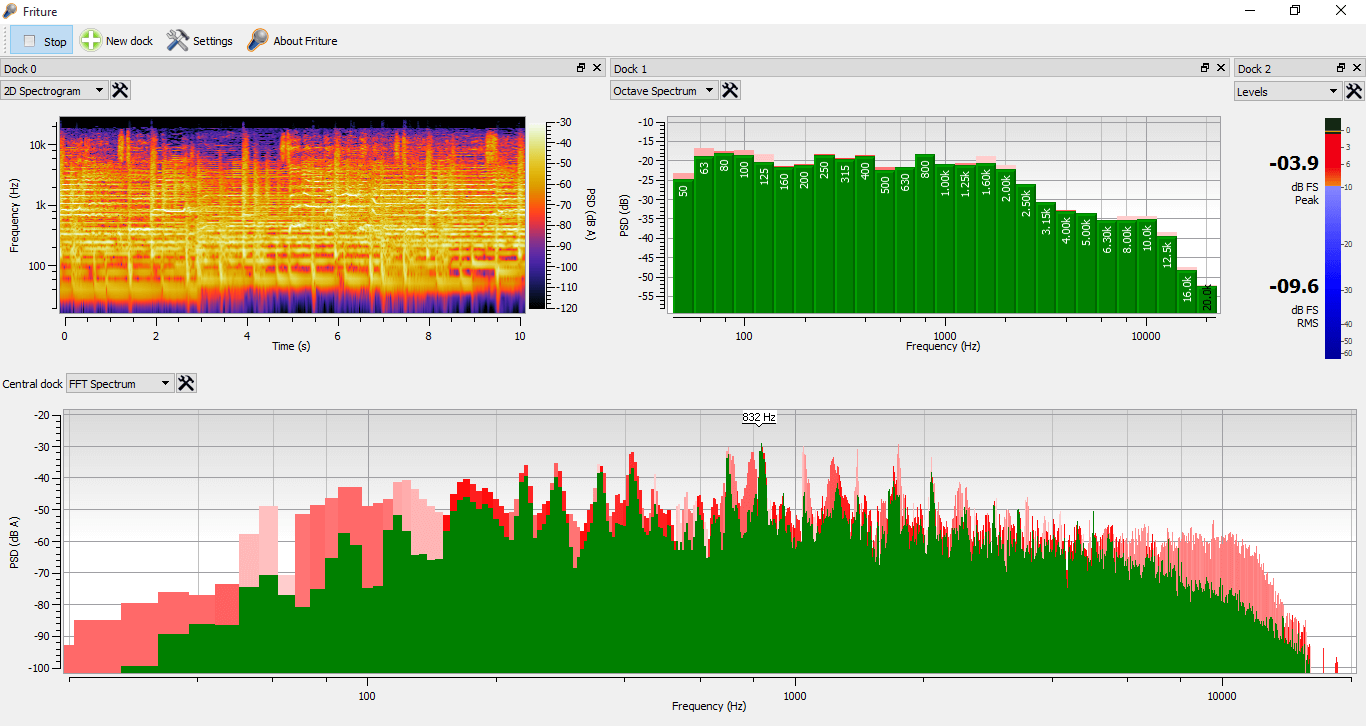
- Spectrum widget – displays audio data versus frequency. This is very appropriate to visualize the characteristics of tha signal: fundamental frequency, harmonics, feedback frequencies, etc. The response time of the display is configurable. The minimum response time is linked to the window length of the Fourier transform. For a FFT of 1024 points, and given the sampling rate of 48000 Hz used by Friture, the minimum response time is 1024/48000 = 21.3 ms. Additionally, the widget draws peaks for each frequency component. These peaks mark the recent maxima of the spectrum, and start to decrease shortly after the peak was reached. Finally, a label identifies the frequency of the global maximum of the spectrum.
- 2D Spectrogram widget – displays audio data versus both frequency and time, in a rolling-against-time fashion. The time-frequency resolution of the display is fixed by the window length of the Fourier transform (as for the minimum response time of the spectrum widget). It is also limited by the resolution of your display in pixels.
- Fraction-of-octave analyzer – displays audio data versus time, similarly to the Spectrum widget. Audio data is grouped in frequency bins with fraction-of-octave widths. Each frequency bin is the result of a fraction-of-octave filter.
- Delay estimator – computes the time delay between the 2 input channels. This is useful to align speakers in a room. The delay estimation is achieved using a cross-correlation algorithm. It only works when the 2-channel mode is enabled.
- Level widget – displays peak power (25 ms response time, i.e. instantaneous) and RMS power (300 ms response time) in dBFS (dB Full Scale). When the 2-channels mode is enabled, it displays the levels of each channel on a separate scale.
- Scope widget – displays audio data versus time. The time scale is configurable. The display is synchronized with regards to a leading-edge of the signal positioned in the center of the time axis, as a traditional scope would do.
Website: friture.org
Support: GitHub Code Repository
Developer: Timothée Lecomte
License: GNU General Public License v3.0
Friture is written in Python. Learn Python with our recommended free books and free tutorials.
Related Software
| Audio Analyzers | |
|---|---|
| Sonic Visualiser | View and analyse the contents of music audio files |
| Friture | Visualize and analyze live audio data in real-time |
| Spek | Acoustic spectrum analyser |
| projectM | Music visualizer originally based on Milkdrop |
| SongRec | Open source Shazam client |
| Cava | Cross-platform audio visualizer |
| sndpeek | Real-time audio visualization tool (animated, 3D) |
| MasVisGtk | Powerful and comprehensive audio analysis tool |
| Mousai | Simple application that can identify songs similar to Shazam |
| AudMeS | System for audio measurement through a sound card in the PC |
| Cavalier | Audio visualizer based on Cava |
| Open Sound Meter | Measurement application for tuning sound systems in real time |
| Le Biniou | Music visualization / VJing tool |
| Cavasik | Fork of Cavalier |
| GLava | OpenGL audio spectrum visualizer |
| Spek-rs | Acoustic spectrum analyser |
| Soundscope | Analyzing audio data |
| Partiels | Audio analysis tool |
| rtspeccy | Real time spectrum analyzer |
| FMIT | Graphical utility for tuning musical instruments |
| shaq | Bare-bones CLI client for Shazam |
| audioprism | Spectrogram tool for PulseAudio and WAV files |
| spectroterm | Curses based terminal spectrum analyzer |
| Music Radar | Simple application that can identify songs similar to Shazam |
| cli-visualizer | Command line visualizer for MPD, ALSA and PulseAudio |
Read our verdict in the software roundup.
 Explore our comprehensive directory of recommended free and open source software. Our carefully curated collection spans every major software category. Explore our comprehensive directory of recommended free and open source software. Our carefully curated collection spans every major software category.This directory is part of our ongoing series of informative articles for Linux enthusiasts. It features hundreds of detailed reviews, along with open source alternatives to proprietary solutions from major corporations such as Google, Microsoft, Apple, Adobe, IBM, Cisco, Oracle, and Autodesk. You’ll also find interesting projects to try, hardware coverage, free programming books and tutorials, and much more. Discovered a useful open source Linux program that we haven’t covered yet? Let us know by completing this form. |
Please read our Comment Policy before commenting.