

Linux Candy is a series of articles covering interesting eye candy software. We only feature open source software in this series.
Some of the programs in this series are purely cosmetic, frivolous pieces of fun. Candy at their finest. But we also include some programs that aren’t purely decorative.
There’s a diverse range of programs included in this series. Programs such as eDEX-UI and Variety are actually highly practical programs. ASCIIQuarium has soothing and relaxing qualities for your desktop. Other programs included in this series (such as lolcat, cacafire) are included purely for their decorative qualities. And then there’s some really fun software that just raises a smile or two.
I’ve previously included LOLCAT in this series, but it hasn’t seen any development for the past 5 years. And I recently saw the release of Lolcat++, a rewrite of lolcat. The original is written in Ruby, whereas this rewrite is in C++ which should help shave execution time.
Installation
I evaluated Lolcat++ with Manjaro. That’s an Arch-based distribution. I often used Manjaro as it offers access to the Arch User Repository (AUR), a community-driven repository for Arch Linux users that contains package build scripts (PKGBUILDs) for software not in the official repositories.
There’s a couple of packages for Lolcat++ in the AUR. I went with the binary release.
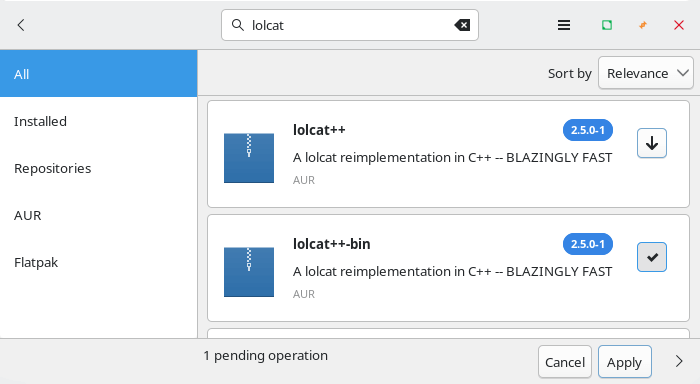
No issues to report with installation. The developer also provides a binary for Linux, macOS, and Windows.
In Operation
lolcat concatenates files, or standard input, to standard output, and adds rainbow coloring to it. If you start lolcat with just the command, it’ll add rainbow coloring to the text you type. But it’s more fun to pipe some text to it. Here’s an example using misfortune and boxes.
misfortune | boxes -a c -d parchment | lolcat
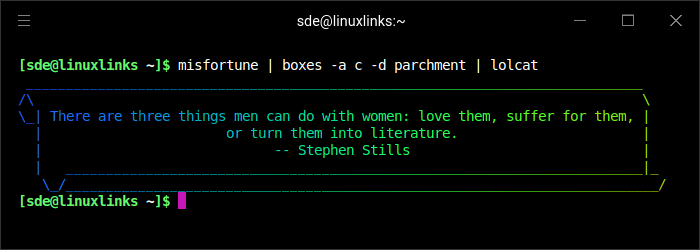
As you can see, lolcat++ has added a colorful, rainbow-gradient effect to the text.
Other features include:
- Animation: Animate the colors using the -a option.
- Customization: It offers options to control animation speed (-s), duration (-d), and rainbow spread (-p).
- Piping: It’s good with pipes, offering the ability to colorize other commands, and not just standard input.
Summary
lolcat+_ has the same options as the original lolcat, so you shouldn’t need to rewrite any init scripts you have that use it already. The image below shows the available options.
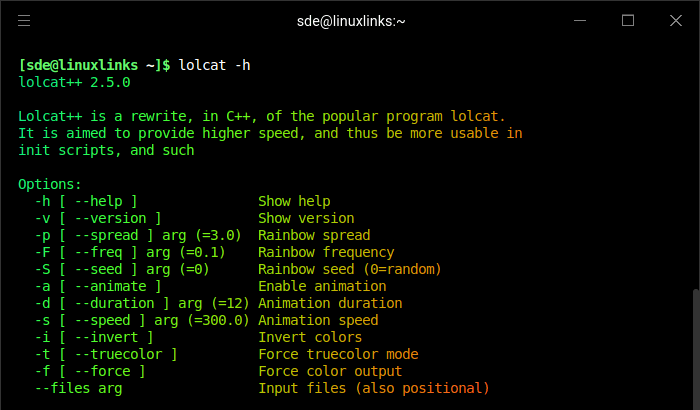
The reason for lolcat++ is to offer quicker speed and therefore a better fit for init scripts and such like. I’ve replaced lolcat with lolcat++ in the Linux Candy table.
Website: github.com/lolcatpp/lolcatpp
Support:
Developer: Love Billenius
License: BSD 3-Clause “New” or “Revised” License
Lolcat++ is written in C++. Learn C++ with our recommended free books and free tutorials.
Complete list of articles in this series:
| Linux Candy | |
|---|---|
| ASCIIQuarium | Embrace marine life from the terminal with beautiful ASCII art |
| ASCII Art Converter | A small utility that converts images into ASCII art |
| asciify | Turn images into attractive ASCII art |
| ascii_moon | Displays the moon phase |
| BobRossQuotes | Collection of quotes from Bob Ross |
| Boxes | Command line ASCII boxes |
| Buoh | Online strips comics reader |
| cacafire | Color ASCII fire |
| catclock | xclock with an enhanced cat mode |
| catspeak | Like cowsay but catty |
| cbonsai | Generate bonsai trees in the terminal |
| christmasfetch | Festive cheer on the desktop |
| chucknorris | Chuck Norris jokes in your terminal |
| Clairvoyant | Like a magic 8-ball inspired fortune teller |
| cornyjokes | Corny jokes for the terminal |
| CMatrix | ncurses program that simulates the display from “The Matrix” |
| ctree | A Christmas tree right on your terminal |
| cutieascii | Displays random ASCII art emojis |
| doge | Simple motd script |
| eDEX-UI | Sci-fi computer terminal emulator and system monitor |
| emoj | Simple tool that to find suitable emojis for pasting to your clipboard |
| Emote | Modern popup emoji picker |
| Evolvotron | Interactive generative art |
| Fantascene | Dynamic wallpaper changer |
| Fondo | Find beautiful wallpapers from Unsplash |
| Fractal Art | Desktop wallpaper generator |
| gti | Typo-based curio inspired by Steam Locomotive |
| Hidamari | Python-based app that offers video wallpaper for Linu |
| Hollywood | Fill your console with Hollywood melodrama technobabble |
| lifecycler | Aquarium right in your terminal |
| linuxwave | Generate music from the entropy of Linux |
| Lolcat++ | Rainbows and unicorns |
| Meme | Fun tool to create memes |
| No More Secrets | Recreates the data decryption effect from the Sneakers movie |
| nook | Plays Animal Crossing hourly themes on the hour |
| nyancat | Terminal-based Pop Tart Cat Animation |
| oneko | Animal chasing fun |
| Picture Of The Day | Your daily wallpaper |
| pipes.sh | Animated pipes terminal screensaver |
| ponysay | cowsay reimplemention for ponies |
| projectM | Music visualizer originally based on Milkdrop |
| pscircle | A different take on the venerable ps command |
| PyBonsai | Generates procedural ASCII art trees |
| pyjokes | One line jokes for programmers |
| Pywal | Generate color schemes on the fly (not actively developed) |
| Relaxator | Relax to soothing sounds |
| ricksay | Rick and Morty quotes of the day |
| Rusty Aquarium | Monitoring by visualization |
| shuffle | ASCII art with a cool shuffle effect |
| sigye | Customizable terminal clock with Pomodoro functionality |
| Steam Locomotive | C program written in 295 lines. It's harmless fun |
| tanuki | Hourly animal crossing vibes |
| Ternimal | Animated lifeform in the terminal |
| terminal-parrot | Party parrot time |
| tetris | Tile-matching puzzle video game in your terminal |
| Variety | Wallpaper manager with many desktops and wallpaper sources |
| WallGen | Generate HQ poly wallpapers with a few arguments. |
| WallpaperDownloader | Download, change, and manage wallpapers |
| WallPicker | Modern GTK4/Libadwaita wallpaper picker |
| wallust | Create 16 color palettes |
| walrs | Fast colorscheme generator |
| WSelector | Browse, download, and set wallpapers from Wallhaven.cc |
| xcowsay | Displays a cow on your desktop with message |
| XDecorations | Add some festive cheer to your desktop |
| XScreenSaver | Framework and collection of screensavers |
| yosay | Like cowsay but with less cow |