
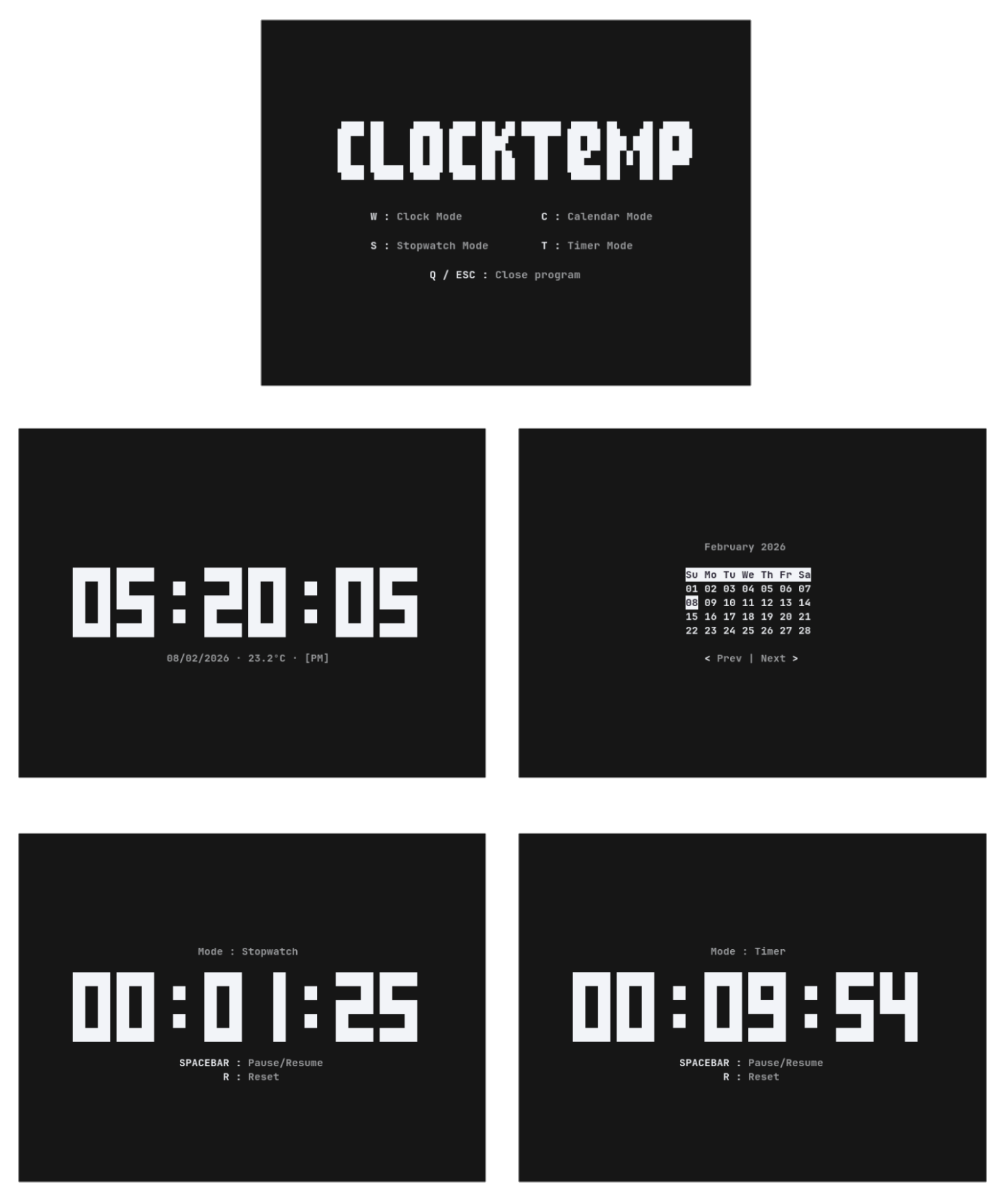
ClockTemp is an interactive terminal clock that combines a digital time display with weather information, a calendar, stopwatch and countdown timer. Inspired by tty-clock, it provides large characters that are easy to read while retaining the convenience of a keyboard-driven interface.
The application is organised into four modes that can be selected using keyboard shortcuts. Clock mode displays the current time, date and temperature, while calendar mode allows users to browse different months. Stopwatch and timer modes provide controls for pausing, resuming and resetting elapsed or remaining time.
ClockTemp retrieves temperature information from Open-Meteo using geographic coordinates supplied by the user. Its appearance and display settings can be customised through command-line options, including the time format, date format, foreground and background colours, and temperature units.
This is free and open source software.
Key Features
- Large digital clock display within the terminal.
- Clock mode displays the current time, date and temperature.
- Choose between 12-hour and 24-hour time formats.
- Option to display or hide seconds.
- Customisable date formatting using day/month or month/day ordering.
- Temperature information retrieved from the Open-Meteo API.
- Configure geographic latitude and longitude for weather information.
- Display temperatures in Celsius or Fahrenheit.
- Calendar mode displays the current month.
- Navigate to previous and subsequent months using keyboard shortcuts.
- Stopwatch for measuring elapsed time.
- Countdown timer for tracking a specified duration.
- Pause and resume the stopwatch or timer using the spacebar.
- Reset the stopwatch or timer using a keyboard shortcut.
- Configure whether reset also stops the active stopwatch or timer.
- Customise foreground and background colours.
- Optional bold text display.
- Keyboard shortcuts for switching between modes.
Website: github.com/arthur-dnts/ClockTemp
Support:
Developer: Arthur D.
License: GNU General Public License v3.0
ClockTemp is written in Python. Learn Python with our recommended free books and free tutorials.
Related Software
| Terminal-Based Clocks | |
|---|---|
| sigye | Much more sophisticated than the typical tray |
| Peaclock | Customizable clock, timer, and stopwatch for the terminal |
| ClockTemp | Inspired by tty-clock that displays the time, date, temperature and more |
| tty-clock | Terminal digital clock |
| talking-clock | Highly configurable talking clock |
| shalarm | Bash script that functions like an alarm clock |
| arttime | Stylish time manager with timers and visual flair |
| mongoclock | Humongous clock for the terminal |
| clock-tui | Clock app in terminal which supports local clock, timer and stopwatch |
| clock-rs | Customisable digital time display with themes, colours, and calendar |
| TetroTime | Clock, timer, and stopwatch that renders time using falling tetromino shapes |
| Tenki | Animated weather effects bring forecasts to life in your terminal |
| worldclock-tty | Track local times across the globe from one polished terminal view |
| stardial | Space-anime themed terminal clock |
| Clox | Geeky clock for terminal enthusiasts |
Read our verdict in the software roundup.
 LinuxLinks helps you discover the best free and open source software for Linux. Explore our extensive collection of recommended applications, including alternatives to popular proprietary software. We also publish software reviews, Linux tutorials, hardware reviews, free programming books and articles covering the wider open source community. Browse our Linux resources to discover more. Know a useful free and open source Linux application we haven't covered? Suggest a program for inclusion. Has your software been featured on LinuxLinks? Display one of our Featured on LinuxLinks badges on your website or GitHub README. |
Please read our Comment Policy before commenting.