

oStorybook can be used to prepare and manage a work such as a book, a play, a film script, etc.
Its primary purpose is to offer authors a complete and well integrated tool to manage their work. But oStorybook can also be used in the academic field to allow the structured analysis of a literary work.
This is free and open source software.
The logical structure of a book, as used by oStorybook, is as follows:
- A book consists of one or more parts.
- Each part is composed of one or more chapters.
- A chapter consists of one or more scenes.
- In general, a scene takes place in a single location, but oStorybook allows description of scenes taking place in several locations.
- A scene shows one or more characters in action.
- The action can also contain objects.
- General layout can follow different threads, or points of view.
Features include:
- Typist mode as user interface.
- 4 views:
- The Chronological View shows the scenes sorted by date. Each strand has it’s own column.
- The Manage Chapters and Scenes view shows all chapters and their assigned scenes. Scenes can be moved and renumbered by Drag-and-Drop.
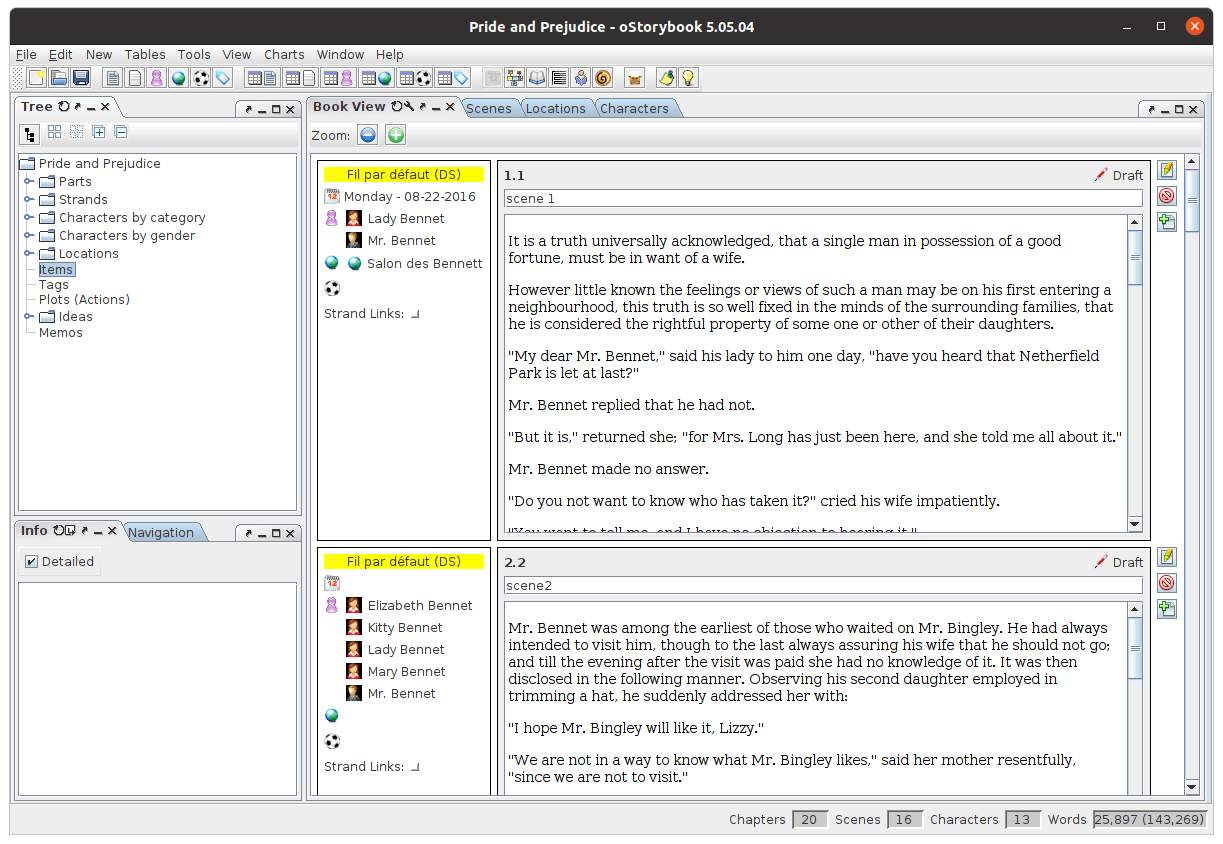
- The Book View shows all chapters and their assigned scenes sorted by chapter and scene numbers, as you would read it in the final book.
- The Reading View shows the text as in a final book. Strands can be shown or hidden.
- Strands (Plot-Lines): Each scene belongs to a primary strand. Optionally, other related secondary-strands can be linked to a scene.
- Characters: Add, edit or remove characters and assign them to scenes. A character’s gender can be male or female, or you can add your own genders, too.
- Locations: Add, edit or remove locations and assign them to scenes.
- Tags and items: Tags and items can be assigned to scenes, locations and characters. The time frame can be defined by setting a start scene and end scene. A table overview shows all assigned objects.
- Chapters: Define your chapters and assign scenes to them.
- Parts: Large projects can be split into well-arranged parts.
- Object Tree: A hierarchic tree shows all characters, locations, tags and items as well as chapters and their assigned scenes. Below the tree all important information about the selected object is shown. If scenes are missing or exist twice, a warning informs you.
- Global Ideas: While writing authors have all kind of ideas that come up suddenly. No more Post-it needed! With the “Global Ideas” feature, you can save your ideas anytime and assign them to the levels “Not started”, “Started”, “Completed” and “Abandoned”.
- Adjustable view: All views can be re-sized to fit to screen or to get a better overview. Even more working space is available if you hide the information panel with a simple click on the tool bar.
- Task List and Navigation: The task list shows all scenes with a status other than “done”. With the “Go to date” respectively “Go to chapter” navigation you can easily jump to the desired date or chapter-number.
- Spell Check: Your text can be checked for spelling. New words can be added to your personal user directory.
- Internationalization support.
Website: ostorybook.tuxfamily.org
Support:
Developer: Franz-Albert Van Den Bussche (aka FaVdB), Jean Rebillat, Bruno Raoult, Bernard Méhaut
License: GNU General Public License v3.0
oStorybook is written in Java. Learn Java with our recommended free books and free tutorials.
Related Software
| Writing Tools | |
|---|---|
| FocusWriter | Simple, distraction-free word processor |
| Ren'Py | Used to create over a thousand visual novels, games, and other works |
| novelWriter | Plain text editor designed for writing novels |
| CherryTree | Hierarchical note taking application packed with features |
| Zettlr | Markdown editor for the 21st Century |
| oStorybook | Offers authors a complete and well integrated tool |
| Twine | Visual tool for creating interactive stories |
| Manuskript | Snowflake method can help you grow your idea into a book |
| Quoll Writer | Java tool to help you focus on writing and your words |
| Joplin | Note taking and to-do application with synchronisation capabilities |
| Hammer | Simple tool for building stories |
| Bibisco | Write your story, in a simple way |
| WareWoolf | Minimalist novel-writing system built specifically for fiction writing |
| Scriptorium | Write short stories and novels |
| Skribisto | Born from the ashes of Plume Creator |
| novelibre | Novel organizer for writers who use LibreOffice or OpenOffice |
| Plume Creator | Project manager and rich text editor for writers |
| NovProg | Graphs your progress when writing a novel |
Read our verdict in the software roundup.
 Explore our comprehensive directory of recommended free and open source software. Our carefully curated collection spans every major software category. Explore our comprehensive directory of recommended free and open source software. Our carefully curated collection spans every major software category.This directory is part of our ongoing series of informative articles for Linux enthusiasts. It features hundreds of detailed reviews, along with open source alternatives to proprietary solutions from major corporations such as Google, Microsoft, Apple, Adobe, IBM, Cisco, Oracle, and Autodesk. You’ll also find interesting projects to try, hardware coverage, free programming books and tutorials, and much more. Discovered a useful open source Linux program that we haven’t covered yet? Let us know by completing this form. |
Please read our Comment Policy before commenting.