

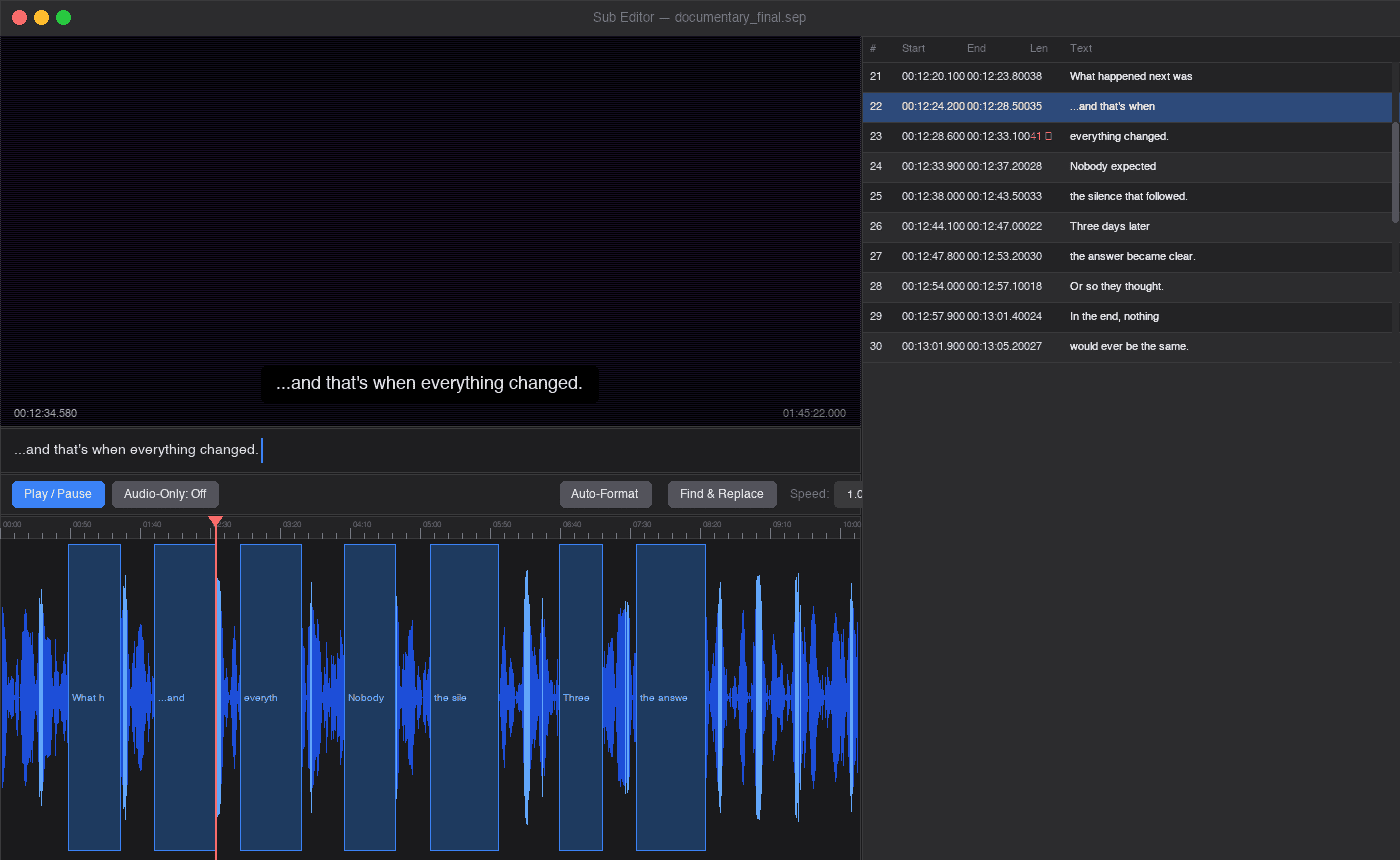
Sub Editor is a visual subtitle editor designed for accurate timing and keyboard-driven operation.
It presents video, subtitles and an audio waveform in a single interface, allowing subtitle blocks to be positioned and adjusted directly on the timeline.
This is free and open source software.
Key Features
- Displays audio peaks and subtitle blocks on a waveform timeline.
- Moves, resizes and snaps subtitle blocks with precision.
- Previews subtitles over the video while editing.
- Edits subtitle text directly within the list view.
- Splits text and duration proportionally at the cursor position.
- Detects CJK and Latin text and applies separate character limits.
- Provides pre-roll playback for hearing dialogue in context.
- Offers an audio-only mode for detailed timing work.
- Performs regular expression searches and replacements.
- Automatically saves work every 60 seconds and provides crash recovery.
- Restores the playhead position and timeline zoom level from project files.
- Supports drag-and-drop opening of video and audio files.
- Automatically loads a matching SRT file alongside the media.
- Exports subtitles in SRT and plain text formats.
- Runs on Linux, macOS and Windows.
Website: github.com/shfire616/Subtitle-Editor
Support:
Developer: shfire616
License: GNU General Public License v3.0
Sub Editor is written in Python. Learn Python with our recommended free books and free tutorials.
Related Software
| Subtitle Editors | |
|---|---|
| Subtitle Edit | Versatile and feature-laden editor for video subtitles |
| Gaupol | Editor for text-based subtitle files |
| Aegisub | Highly customizable tool for creating and modifying subtitles |
| AutoSubs | Subtitles made simple |
| Subtitle Composer | Editor that supports basic and advanced operations |
| Jubler | Author new subtitles - convert, transform, correct and refine |
| Gnome Subtitles | Video subtitling for the GNOME desktop |
| Tero Subtitler | Feature-rich subtitle creation, translation and validation tool |
| YTSubConverter | Create styled YouTube subtitles |
| Subtitle Forge | Desktop application for working with subtitles across the full workflow |
| Sub Editor | Visual, keyboard-driven subtitle editor with waveform timing |
| Subtitle Editor | GTK+3 tool to edit subtitles |
| Subtitld | Edit, transcribe and create subtitles |
| subedit | Command-line editor written in Bash |
Read our verdict in the software roundup.
 Explore our carefully curated directory of recommended free and open source software, covering every major software category. Explore our carefully curated directory of recommended free and open source software, covering every major software category.The directory forms part of our extensive collection of articles for Linux enthusiasts. It includes hundreds of detailed reviews, together with free and open source alternatives to proprietary software from companies such as Google, Microsoft, Apple, Adobe, IBM, Cisco, Oracle, and Autodesk. LinuxLinks also covers interesting projects worth exploring, Linux-compatible hardware, free programming books and tutorials, and much more. Know a useful free and open source Linux application that we haven’t covered? Tell us about it using our submission form. |
Please read our Comment Policy before commenting.