

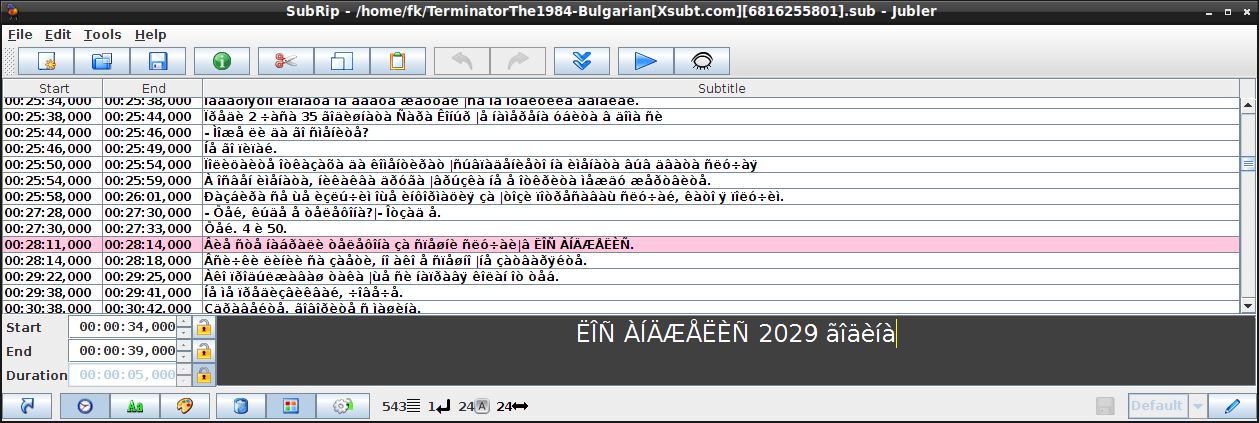
Jubler is a graphical subtitle editor for creating captions and modifying existing subtitle files. It supports a broad selection of text-based formats, providing tools for timing corrections, translation, formatting and conversion. The application combines a subtitle list with video playback and timeline controls so that captions can be checked while viewing the accompanying media.
Jubler allows users to create subtitle entries manually or import existing files for further editing. A timeline displays the positions and durations of individual captions, which can be moved or resized to match the dialogue. Waveform visualisation provides additional information about the audio, helping users place captions near speech boundaries. Two-point synchronisation is available when a subtitle file needs to be adjusted to a different video.
The application supports character and paragraph styling for formats that permit it. Users can adjust text formatting, perform searches and replacements, and apply timing changes to selected entries or entire documents. Quality checks identify potential problems with subtitle duration and reading speed, while spelling dictionaries help correct text errors.
Jubler includes a translation mode for comparing original and translated captions. It can use Azure Translator for automated translation where the service is configured. Additional functions support searching external subtitle services and integrating command-line tools for specialised operations such as speech recognition or synchronisation.
The current application has a Qt-based interface, with configurable shortcuts, interface scaling and appearance settings. Command-line facilities can also be used for batch processing.
This is free and open source software.
Key Features
- Create, edit and convert between more than twenty subtitle formats.
- Support for SRT, SSA, ASS, WebVTT, MicroDVD, TTML and other formats.
- Interactive subtitle timeline with draggable timing boundaries.
- Video playback and frame preview while editing captions.
- Audio waveform visualisation for synchronising dialogue.
- Two-point synchronisation of subtitle timings.
- Frame-rate conversion and time shifting.
- Split and merge subtitle entries and complete files.
- Character-level and paragraph-level formatting for compatible formats.
- Spell checking with configurable dictionaries.
- Regular expression search and replacement.
- Quality checks for subtitle reading speed and timing.
- Translation editing and optional Azure Translator integration.
- Search and retrieve subtitles from supported online providers.
- External tool integration for additional subtitle processing operations.
- Command-line facilities for batch conversion and automation.
- Configurable keyboard shortcuts and interface scaling.
- Dark appearance and multilingual user interface.
- Cross-platform support – runs on Linux, macOS, and Windows.
Website: github.com/teras/Jubler
Support:
Developer: Panayotis Katsaloulis
License: GNU Affero General Public License v3.0
Jubler is written in C++. Learn C++ with our recommended free books and free tutorials.
Related Software
| Subtitle Editors | |
|---|---|
| Subtitle Edit | Versatile and feature-laden editor for video subtitles |
| Gaupol | Editor for text-based subtitle files |
| Aegisub | Highly customizable tool for creating and modifying subtitles |
| AutoSubs | Subtitles made simple |
| Subtitle Composer | Editor that supports basic and advanced operations |
| Jubler | Author new subtitles - convert, transform, correct and refine |
| Gnome Subtitles | Video subtitling for the GNOME desktop |
| Tero Subtitler | Feature-rich subtitle creation, translation and validation tool |
| YTSubConverter | Create styled YouTube subtitles |
| Subtitle Forge | Desktop application for working with subtitles across the full workflow |
| Sub Editor | Visual, keyboard-driven subtitle editor with waveform timing |
| Subtitle Editor | GTK+3 tool to edit subtitles |
| Subtitld | Edit, transcribe and create subtitles |
| subedit | Command-line editor written in Bash |
Read our verdict in the software roundup.
 LinuxLinks helps you discover the best free and open source software for Linux. Explore our extensive collection of recommended applications, including alternatives to popular proprietary software. We also publish software reviews, Linux tutorials, hardware reviews, free programming books and articles covering the wider open source community. Browse our Linux resources to discover more. Know a useful free and open source Linux application we haven't covered? Suggest a program for inclusion. Has your software been featured on LinuxLinks? Display one of our Featured on LinuxLinks badges on your website or GitHub README. |
Please read our Comment Policy before commenting.