
The HHKB HYBRID Type-S is a compact 60-key keyboard with a very particular audience in mind. It isn’t a conventional small keyboard, nor is it trying to be one. Its appeal comes from the unusual HHKB layout, 45g Topre electrostatic-capacitive switches, Bluetooth and USB-C connectivity, and a design philosophy built around reducing hand movement for programming, terminal work, and focused typing.
From a Linux perspective, it’s an interesting keyboard to review because the hardware works well, but official Linux support is absent. There’s no native Linux version of PFU’s keymap or firmware tools, so any deeper customisation has to be handled through third-party software or desktop environment settings. Fortunately, the keyboard’s core functions work without fuss, and Linux users have good options for remapping keys when needed.
What’s in the box
Keyboard
2 AA Alkaline batteries
User’s Guide
Safety Precautions
Insert the two batteries and press the power button.
Design and layout
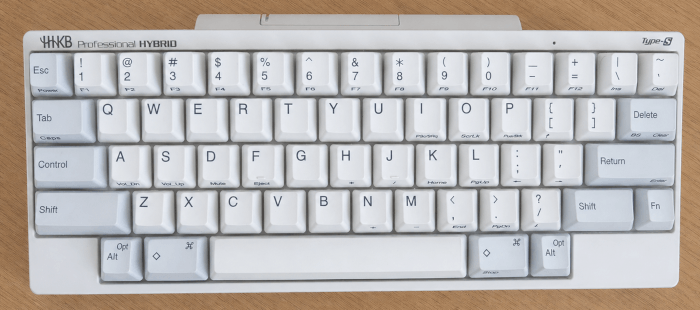
The HHKB layout is the main event. With just 60 keys, this keyboard is 40% smaller than a standard model.
On paper, it looks like a 60% keyboard, but it isn’t simply a shrunken ANSI board. The Control key sits where Caps Lock usually lives, Escape is moved closer to the number row, Delete/Backspace is in a different place, and cursor/navigation keys live behind the Fn layer. That gives the keyboard its famous “hacker” feel: once learned, it encourages minimal hand travel and makes shell, Vim, Emacs, coding, and text navigation feel very direct.
The downside is obvious: the learning curve is real. If you use lots of shortcuts built around a standard layout, or you frequently switch between ordinary laptop keyboards and full-size boards, the HHKB can feel disruptive at first. The layout is powerful for developers and terminal users, but less naturally suited to general office users or writers who don’t want to adapt.
Typing feel
The HHKB HYBRID Type-S uses 45g Topre electrostatic-capacitive switches. They combine a rubber dome, conical spring, and capacitive sensing system, producing a feel that sits somewhere between a premium rubber-dome keyboard and a mechanical tactile switch, but doesn’t quite behave like either. Leaving aside the technical details, the premium switches deliver a silky-smooth typing feel and satisfying sound, with a lifespan of up to 50 million key presses.
The best description is soft at the bottom, tactile near the top, controlled through the stroke, and unusually fatigue-resistant. It doesn’t have the sharp bump of many MX-style tactiles, and it doesn’t have the scratch, spring ping, or clack that often comes with mechanical switches. I’d describe the feeling as smooth, cushioned, and quiet, especially compared with conventional mechanical keyboards.
Sound
The HHKB sound is one of its charms: low-pitched, rounded, and less brittle than many mechanical boards. But it also won’t satisfy everyone in the modern custom-keyboard world.
Build quality
The build is better in use than it sounds on a spec sheet. The case is plastic, the board is light, and there’s a raised battery compartment at the back for the AA batteries. At this price, many buyers expect aluminium, gasket mounting, RGB, or a heavier chassis. The HHKB offers none of that.
That said, the plastic case is part of the HHKB identity. It keeps the board light and portable, and it contributes to the soft acoustic profile.
The HHKB HYBRID Type-S uses high-quality textured PBT keycaps with dye-sublimated legends. They have a dry, slightly grainy feel, resist shine well, and are built for Topre/HHKB stems rather than standard MX switches.
Connectivity and support
The HHKB HYBRID Type-S supports both Bluetooth and USB-C and can pair with up to four Bluetooth devices.
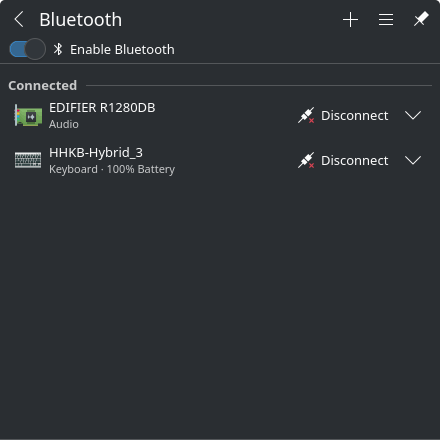
The use of AA batteries may not be the most environmentally friendly choice, but they are easy to replace and avoid the long-term ageing problem of sealed lithium packs. For a keyboard with a reputation for lasting years, replaceable batteries make sense.
The keyboard supports Windows, macOS, iOS, and Android, but there is no official Linux support. Keymap and firmware tools are available for Windows and macOS. For firmware upgrades, I’d only recommend using Windows or macOS.
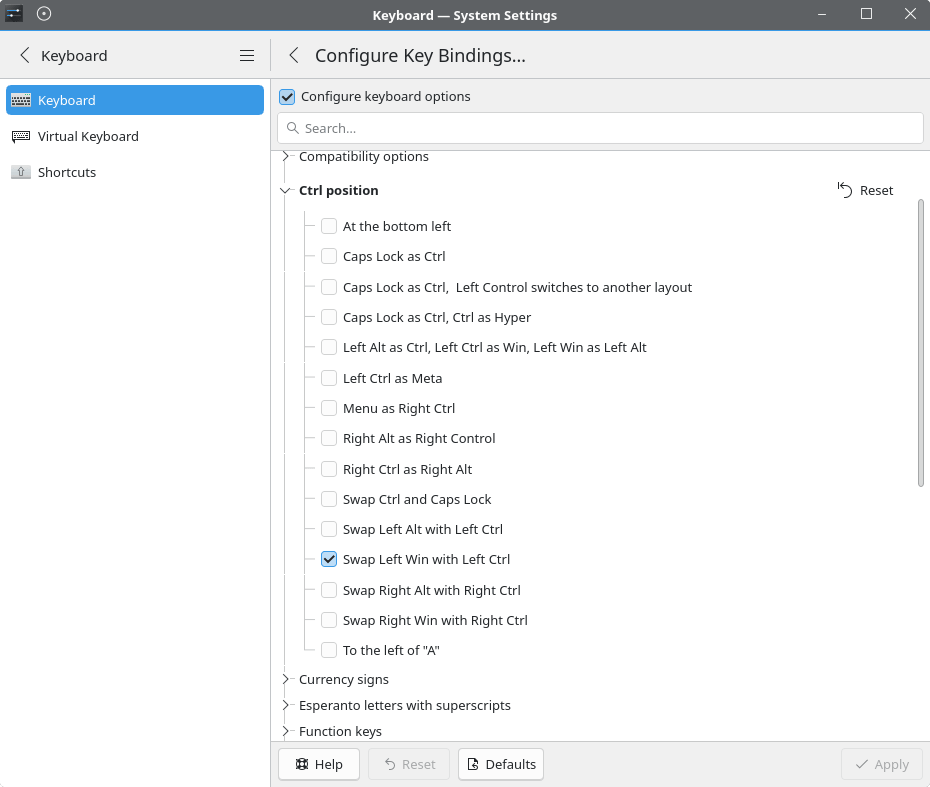
Keymapping is something I’ll do rarely, but it’s easy to remap keys in Linux. Options include command-line tools and GUI tools such as KDE’s System Settings.
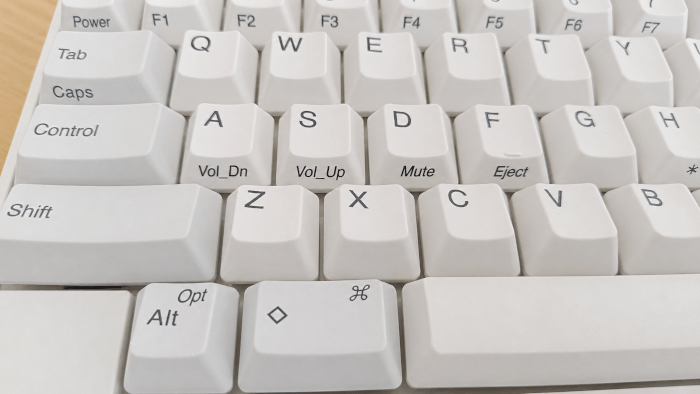
Here’s an example of remapping keys in Linux. There’s a lot for many users to adjust to, and I know some people may want Control on the bottom row, at least temporarily.
In Linux, we can remap keys with evtest, an input device event monitor and query tool that identifies how each key is reported. We can then use keyd for remapping. Many remaps can also be configured in KDE Plasma’s System Settings.
Everyday use
For typing, coding, and terminal work, the HHKB is exceptional. The Control placement is a big part of that. Once your muscle memory adjusts, Control shortcuts feel more natural, and the compact footprint reduces hand movement. The Fn layer also puts arrows and navigation close to the home row, which can be faster than reaching for a dedicated cluster.
For casual office work, spreadsheets, gaming, or mixed shared-computer use, the HHKB is harder to recommend. The missing arrow cluster, non-standard Delete/Backspace area, and lack of function row can become annoying if you don’t fully buy into the layout.
DIP switches
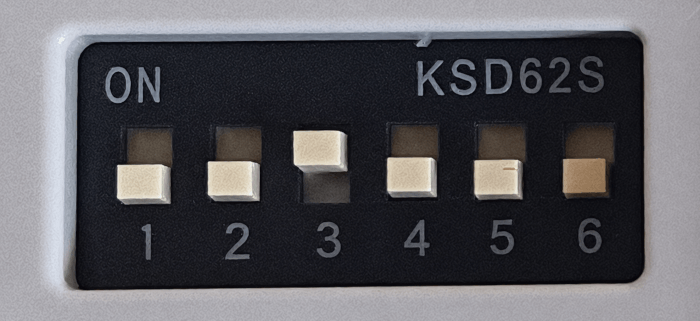
DIP switches allow for a personalised user experience. They’re hidden away on the underside of the keyboard under a small flap. Turn the power off before changing any of them. The keyboard comes with all the DIP switches set in the OFF position. You don’t need to change any of them for the keyboard to work in Linux. But some Linux users will prefer having SW3 set to ON, as this makes the top-right Delete key send Backspace. Without that change, Backspace requires Fn + Delete.
The only other DIP switch I’d consider changing to ON is SW6. With it on, power saving for Bluetooth is disabled. So far, I haven’t found the Bluetooth sleep annoying. It only turns off Bluetooth after 30 minutes, and it also conserves the AA batteries.
Summary
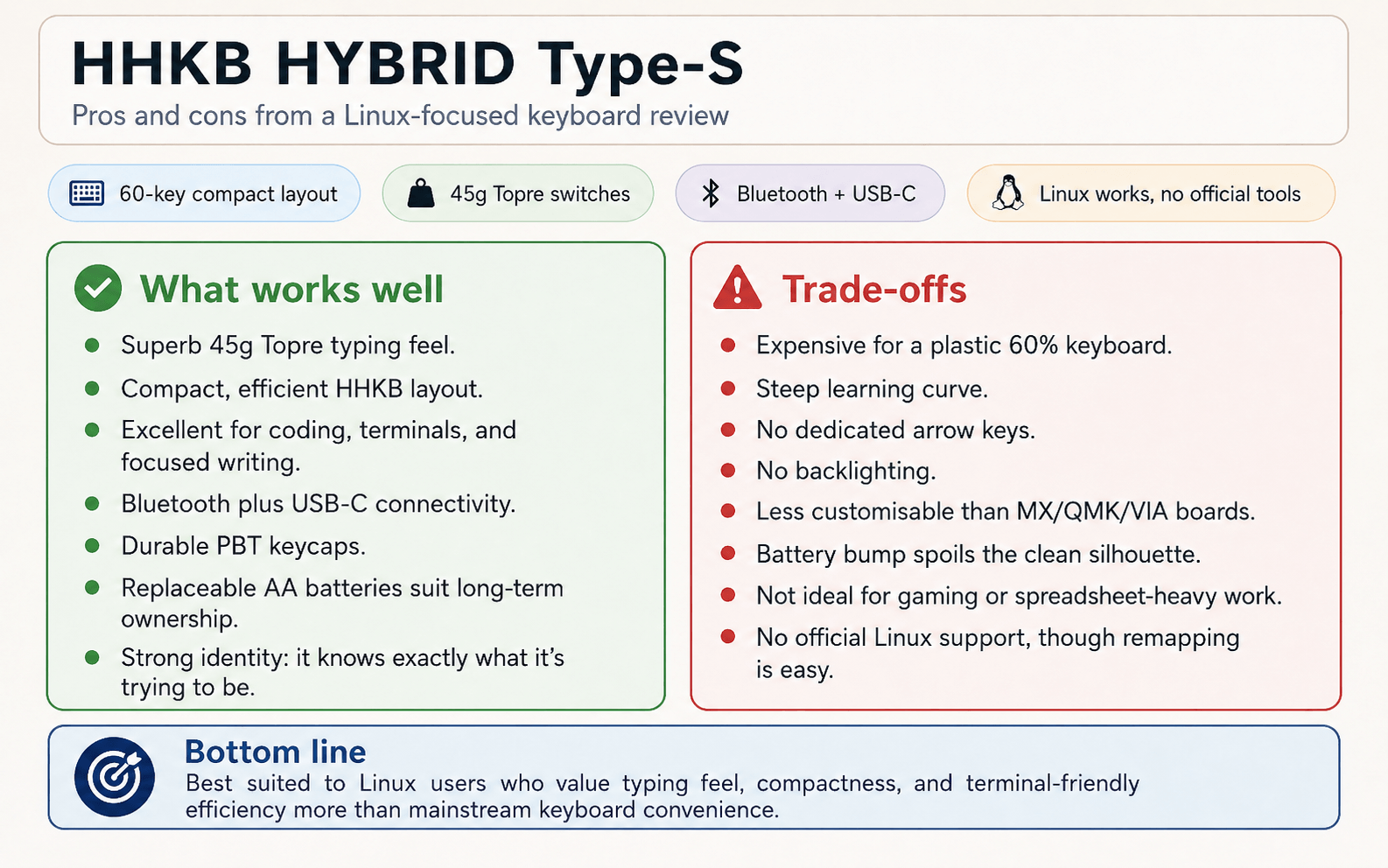
This is a keyboard that takes time to really shine, but that time is well spent. It’s glorious to type on.
This is not a keyboard for everyone. It’s expensive, plastic, lacks dedicated arrow keys, and demands a period of adjustment. But for users who value typing feel, compactness, portability, and an efficient layout for shells, editors, and code, the HHKB HYBRID Type-S remains one of the most distinctive keyboards available.
The keyboard is sold through Amazon and other retailers. It’s available on Amazon UK for £269.99. This is not an affiliate link.
Please read our Comment Policy before commenting.
Have you heard of MNT keyboards? You might like to give one a go.
I’m next going to be reviewing another HHKB keyboard. But I will check MNT out.
Interesting. Not sure I could manage without arrow keys.