

The Biwin Black Opal NV7400 1TB is a PCIe 4.0 NVMe SSD aimed squarely at users who want high-end Gen4 headline speeds without paying premium-drive prices. It’s a single-sided M.2 2280 drive, uses the NVMe 2.0 protocol, and is rated at up to 7,400 MB/s reads and 6,500 MB/s writes for the 1TB model.
On paper, this is a very attractive Linux storage upgrade. The drive is fast enough to saturate most practical PCIe 4.0 desktop workloads, thin enough for laptops and mini PCs, and backed by a generous 1,000 TBW endurance rating. It’s also a DRAM-less SSD, which is the key compromise. Instead of onboard DRAM, it uses Host Memory Buffer (HMB), borrowing a small amount of system memory to help with mapping and performance.
The NV7400 presents itself as a standard NVMe SSD, so there’s no vendor driver to install. Modern Linux distributions detect it through the kernel’s NVMe stack, and it can be partitioned and formatted like any other SSD. ext4, XFS, and Btrfs are all sensible choices depending on your workload. For CachyOS/Arch-style desktop use, I normally use Btrfs for the root filesystem because snapshots are genuinely useful. But bear in mind that Btrfs can be slower than ext4 and XFS in some write-heavy workloads, especially with default copy-on-write enabled. I therefore mostly tested the drive with XFS.
Design
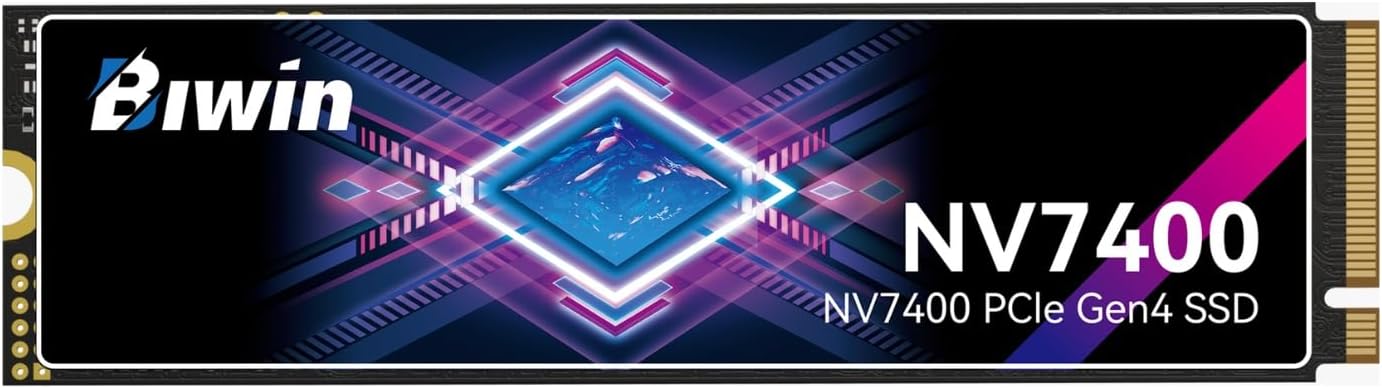
The single-sided design is a genuine advantage. It makes the NV7400 easier to fit in laptops, mini PCs, external NVMe enclosures, and motherboards with tight clearance around M.2 slots. It also helps avoid the compatibility issues that sometimes crop up with double-sided high-capacity drives.
Benchmarks
I first tested the drive using KDiskMark, a popular free and open source graphical front end for fio, the Flexible I/O tester. The software provides a comprehensive set of benchmark results that’s easy to view and interpret, similar to CrystalDiskMark on Windows. I also tested the drive with CrystalDiskMark.
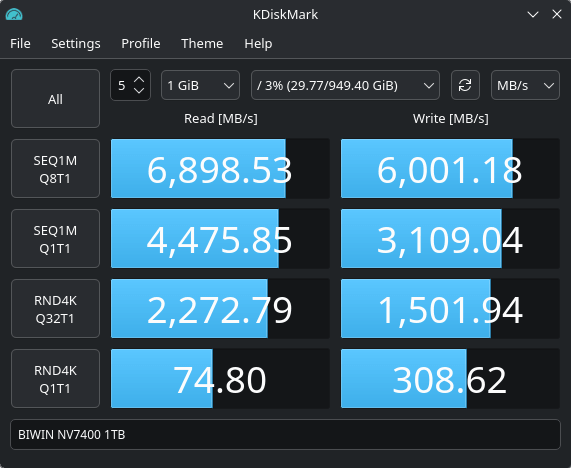
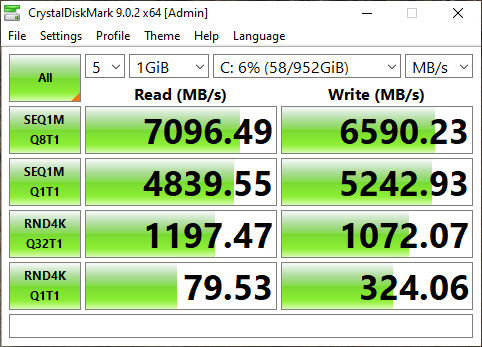
The two results tell the same broad story: the BIWIN NV7400 1TB is a fast PCIe 4.0 NVMe drive, with sequential reads around the 7GB/s mark and very strong random write performance. But the individual numbers aren’t directly interchangeable because CrystalDiskMark and KDiskMark aren’t the same benchmark running on the same software stack.
The biggest discrepancy is the SEQ1M Q1T1 write result: 5,243MB/s in CrystalDiskMark versus 3,109MB/s in KDiskMark. That doesn’t necessarily mean Linux is 40% slower. Single-queue sequential writes are very sensitive to the benchmark engine, filesystem, caching behaviour, write barriers, I/O scheduler, power management, and how the test file is created and flushed. CrystalDiskMark on Windows and KDiskMark on Linux are not identical workloads, even when the labels look the same.
The random high-queue figures go the other way. KDiskMark reports much faster RND4K Q32T1 results, especially reads: 2,273MB/s versus 1,197MB/s. That’s likely down to differences between the Windows and Linux storage stacks, the way the benchmark engine submits queued I/O, and how effectively the kernel/NVMe driver keeps the drive busy. High-queue random tests are useful for stressing the controller, but they’re less representative of typical desktop use.
On balance, my testing of the 1TB model shows read and write speeds close to the advertised specification in short synthetic tests. That’s useful for large file reads, copying big archives, loading games, and general desktop responsiveness. For a Linux desktop, the drive feels very quick.
Sequential write performance is lower under KDiskMark, particularly in the single-queue test, but the low-queue random 4K results are very close. That’s the most useful sign for desktop responsiveness, and the NV7400 behaves very well under Linux.
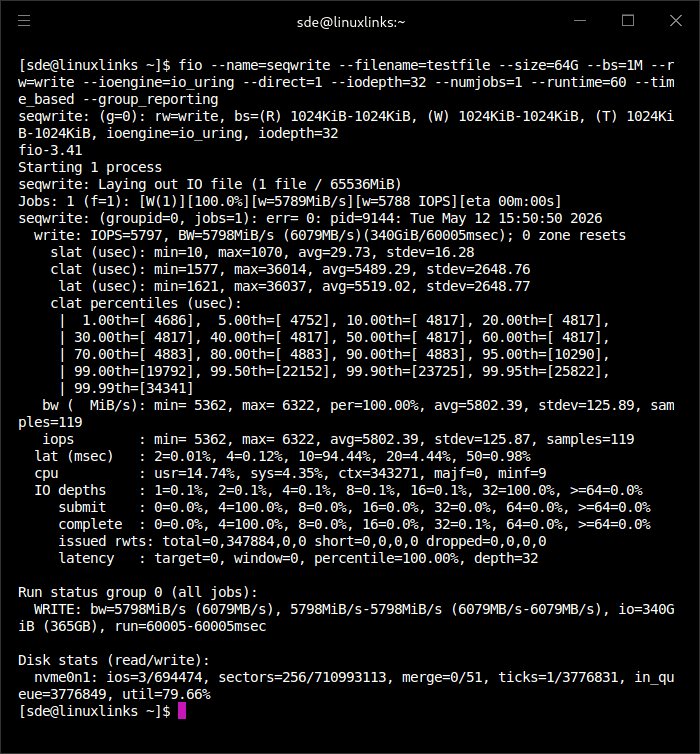
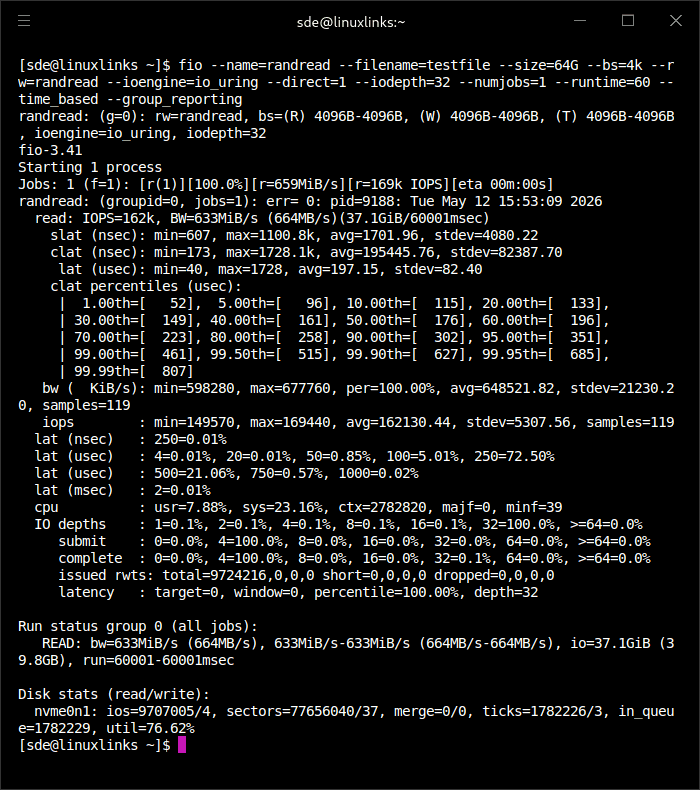
Here are a couple of example benchmarks using fio with direct I/O. The first is a sequential write test.
This one is the output from a 4K random read test.
Real-world Linux file tests
I performed a variety of real-world file tests including:
- Copying 75GB of mixed installed files to another fast drive.
- Unpacking large compressed archives.
- Copying a directory tree with thousands of small files.
- Installing packages on the drive.
- Moving large media files.
These tests showed that the Biwin 1TB drive performed better than the TEAMGROUP Z44A7 and Fanxiang S880 drives I’ve previously reviewed.
I also tested the drive to see what performance was like when the cache ran out. The important technique is to bypass Linux’s RAM page cache while still writing a huge file to the SSD. That way the drop we see is the SSD’s own write cache/SLC cache exhausting, not Linux buffering. I used fio to write one very large test file to the SSD with direct I/O. This bypasses Linux’s RAM cache but still exercises the SSD’s own write cache.
The drive’s headline sequential write speed is impressive, but it’s heavily dependent on its fast pseudo-SLC cache. In my sustained write test, the drive maintained very high write speeds for the first 29 seconds, averaging around 5.6GiB/s. In this test, that points to roughly 160GiB of fast pseudo-SLC cache. The drive’s pseudo-SLC cache is reasonably generous for a 1TB PCIe 4.0 NVMe SSD, on the upper end of a mainstream drive. The weakness isn’t the cache size, but what happens after it’s exhausted: sustained write speed settles at around 640MiB/s, which is fairly modest for a modern Gen4 NVMe drive.
This is still adequate for everyday desktop workloads, but large file transfers expose a sizeable gap between the headline sequential write rating and the drive’s native sustained write performance.
| Fast cache size: | Good for 1TB |
| Burst speed: | Very good |
| Post-cache speed: | Weak |
| Overall behaviour: | Strong short writes, weak post-cache writes for Gen4 |
Thermals
Thermals are mixed and depend heavily on airflow. It’s hard to give a definitive verdict because the machines I’ve tested it in have different airflow implementations. If your motherboard includes an M.2 heatsink, use it. In a cramped mini PC, monitor temperatures during a long fio write before declaring the drive thermally sorted.
Summary
The Biwin Black Opal NV7400 1TB is a strong budget-to-mainstream Gen4 NVMe SSD for Linux users. It’s a fast PCIe 4.0 NVMe SSD that’s affordable by today’s standards and well suited to everyday Linux use. Its TLC NAND, high endurance rating, single-sided design, and strong sequential performance make it a compelling choice for desktops, laptops, and mini PCs. Just don’t confuse it with a premium workstation SSD. Its DRAM-less design and weaker small random I/O performance mean it’s best for mainstream use, gaming, and general Linux workloads rather than punishing write-heavy tasks. The weaknesses are predictable: no DRAM, weaker low-queue random performance than premium drives, and reduced write speed after the pSLC cache is exhausted.
For a Linux boot drive, gaming drive, application drive, or general-purpose SSD in a desktop or mini PC, it’s easy to like. For heavy sustained writes or professional workstation storage, look higher up the stack.
The NVMe is available from Amazon US and Amazon UK. At the time of writing, the UK price is £128.99. These are not affiliate links.
Please read our Comment Policy before commenting.