
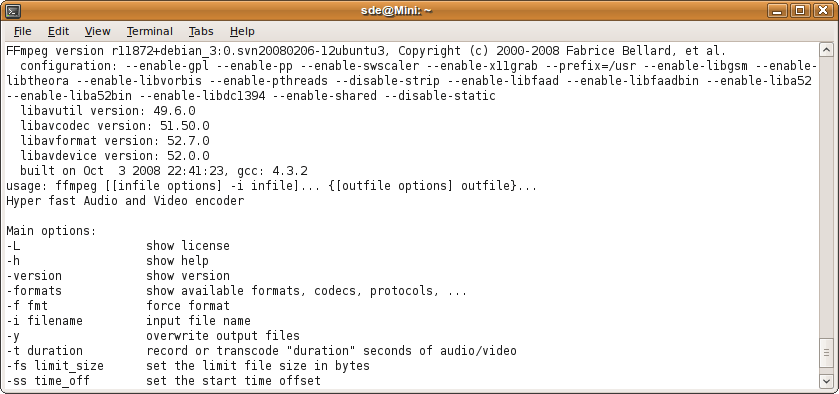
FFmpeg is a hyper fast real time audio/video encoder, a streaming server and a generic audio and video file converter. It is a command line tool that is composed of a collection of free software / open source libraries. It includes libavcodec, an audio/video codec library used by several other projects, and libavformat, an audio/video container mux and demux library.
It can grab from a standard Video4Linux video source and convert it into several file formats based on DCT/motion compensation encoding. Sound is compressed in MPEG audio layer 2 or using an AC3 compatible stream.
The command line interface is designed to be intuitive, in the sense that FFmpeg tries to figure out all parameters that can possibly be derived automatically. You usually only have to specify the target bitrate you want.
FFmpeg can also convert from any sample rate to any other, and resize video on the fly with a high quality polyphase filter.
The FFmpeg project consists of two main parts: FFmpeg, which encodes and decodes the multimedia streams, and FFserver, which provides streams via HTTP for various multimedia clients. FFMpeg is completely portable since it does not rely on proprietary DLLs. Other components of the project include ffplay (a simple media player), and various libraries.
Key Features
- Grabs video and audio.
- Can also grab the X11 display.
- Convert from one audio and video format to another format in real time.
- FFserver:
- Streams several formats at several bit rates and resolutions simultaneously.
- Handles thousands of concurrent users.
- Uses the HTTP protocol to be compatible with all major players including Icecast (aka mpg123, xmms, winamp), MTV (to play streaming MPEG video and audio), “Real” compatible players and Windows Media Player.
- Allows time shifting of live streams.
- One FFserver instance can stream from multiple live encoding sources and/or multiple static files.
- FFprobe tool.
- VorbisComment writing for FLAC, Ogg FLAC and Ogg Speex files.
Website: ffmpeg.org
Support: Documentation
Developer: FFmpeg team
License: GNU General Public License v2.0
FFmpeg is written in C and Assembly. Learn C with our recommended free books and free tutorials. Learn Assembly with our recommended free books and free tutorials.
Related Software
| Screen Recorders | |
|---|---|
| OBS Studio | Complete video recording and live streaming solution |
| GPU Screen Recorder | Minimizes system performance by recording using the GPU only |
| vokoscreenNG | Easy to use screencast creator |
| Kooha | Simple GTK-based app to “elegantly record your screen” |
| screenkey | Screencasting software inspired by Screenflick |
| FFmpeg | Record, convert and stream audio and video |
| SimpleScreenRecorder | Easy to use screencast creator |
| wf-recorder | Utility for wlroots-based Wayland compositors |
| Casterr | Screen recorder, editor and video browse |
| Green Recorder | Simple screen recorder supporting Xorg and Wayland |
| Blue Recorder | Simple screen recorder written in Rust |
| wl-screenrec | wlroots screen recording, featuring hardware encoding |
| peek | Animated GIF screen recorder |
| wayfarer | Screen recorder for GNOME / Wayland / Pipewire |
| ScreenStudio | Streaming made easy |
| Kazam | Well designed and easy to use interface |
Read our verdict in the software roundup.
| Video Converters | |
|---|---|
| HandBrake | Multithreaded cross-platform media transcoding application |
| FFmpeg | Multimedia player, server and encoder |
| Shutter Encoder | Graphical frontend to FFmpeg with editing features |
| FastFlix | GUI for H.264, HEVC and AV1 hardware and software encoding |
| Videomass | Cross-platform GUI for FFmpeg and youtube-dl |
| avconv | Part of libav-tools; fork of FFmpeg |
| VLC | Vdeo player which also converts multimedia to different formats |
| mpv | Cross-platform media player with video encoding support |
| MEncoder | MEncoder is included in MPlayer |
| FFQueue | Graphical frontend to FFmpeg written in C++ |
| Edconv | User-friendly FFmpeg GUI |
| transcode | Utility to encode raw video/audio streams |
| OmniGet | Uses FFmpeg to perform the video conversion |
| MystiQ | GUI for FFmpeg, a powerful media converter |
| Frame | Desktop media conversion utility |
| ffdash | VP9 video encoder |
| Constrict | Compress videos to target sizes |
| Leonardo | Media conversion application |
| Ciano | Easy way to convert your multimedia files to the most popular formats |
| Recoder | GTK4 video transcoding application |
| VidCom | Simple utility for video archiving and compression |
Read our verdict in the software roundup.
| Audio Converters | |
|---|---|
| fre:ac | High quality audio converter and CD ripper |
| FFmpeg | Record, convert and stream audio and video |
| Flacon | Split single audio file containing an album into separate audio tracks |
| SoX | Swiss Army knife of sound processing programs |
| SoundConverter | GNOME-powered sound conversion |
| Perl Audio Converter | Supports a wide range of audio formats and video extensions |
| Ecasound | Software package designed for multitrack audio processing |
| FFaudioConverter | Graphical audio converter and filter tool |
| Audimorf | Straightforward tool for changing the format of your audio files |
| soundKonverter | Frontend to various audio converters |
| Gnac | Audio converter for GNOME |
| caudec | Multiprocess audio converter supporting many formats |
Read our verdict in the software roundup.
| DVD Tools | |
|---|---|
| VLC | Multimedia player and streamer |
| mpv | Media player supporting a wide range of formats |
| HandBrake | Multithreaded DVD to MPEG-4 converter |
| QMPlay2 | Qt based video and audio player |
| fre:ac | Audio converter and CD ripper |
| Subtitle Edit | Editor for video subtitles |
| Asunder | Audio CD ripper and encoder |
| FFmpeg | Record, convert and stream audio and video |
| grip | cd-player and cd-ripper for the Gnome desktop |
| Shutter Encoder | Accessible and efficient video converter tool |
| cyanrip | Fully featured CD ripping software |
| GCstar | Manages a movie collection |
| Gaupol | Subtitle editor for text-based subtitle files |
| DataCrow | Media cataloger and media organiser software |
| Tellico | Collection manager for KDE |
| MPlayer | Very popular movie player |
| DVDStyler | DVD authoring application |
| Aegisub | Tool for creating and modifying subtitles |
| Q DVD-Author | GUI frontend for dvdauthor and related tools |
| whipper | Python CD-DA ripper |
| DVDAuthor | Generate a DVD-Video movie from a valid MPEG-2 stream |
Read our verdict in the software roundup.
 Explore our comprehensive directory of recommended free and open source software. Our carefully curated collection spans every major software category. Explore our comprehensive directory of recommended free and open source software. Our carefully curated collection spans every major software category.This directory is part of our ongoing series of informative articles for Linux enthusiasts. It features hundreds of detailed reviews, along with open source alternatives to proprietary solutions from major corporations such as Google, Microsoft, Apple, Adobe, IBM, Cisco, Oracle, and Autodesk. You’ll also find interesting projects to try, hardware coverage, free programming books and tutorials, and much more. Discovered a useful open source Linux program that we haven’t covered yet? Let us know by completing this form. |
Please read our Comment Policy before commenting.
Total pants, no longer makes videos that play on my DVD or TV.
Sounds like your system is broken.
WinFF is a great GUI (“Graphical User Interface”) front-end for FFmpeg.
If that fails, then try HandBrake.
WinFF has its own page as does HandBrake.