

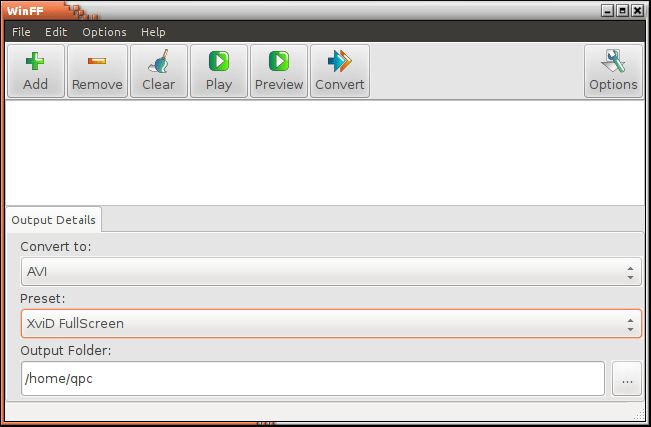
WinFF is a graphical frontend for FFmpeg. The user interface helps make it easier for users to convert video files.
WinFF allows users to convert multiple files in multiple formats at one time. For example, WinFF lets users convert mpeg’s, flv’s, and mov’s into avi’s (or DVD/VCD format or MPEG or 3gp etc) all at once.
This package provides a variety of preset conversion settings for common formats and devices. These presets are intended to hit the “sweet spot” for each individual codec. They have been written with a tip of the balance to quality.
Features include:
- Easy to use interface.
- Fast encoding (due to FFmpeg).
- High quality output.
- Converts multiple different files all to the same format at once.
- Convert video to audio.
- Convert between audio formats.
- No external codecs are required.
- Includes a variety of preset conversion settings for common formats and devices.
- Import presets.
- Preset conversions can be created to encode to any format FFmpeg supports.
- Easy access to common conversion options such as bitrate, frame size, frame rate.
- Specify additional command line parameters for advanced users (options button).
- Easily change FFmpeg versions.
- Supports FFmpeg’s multi threading for dual core processors.
- Option to shutdown the machine when the encoding has finished.
- Multilingual: Brazilian Portuguese, Bulgarian, Chinese Traditional, Danish, English, French, German, Greek, Hebrew, Italian, Norwegian, Polish, Portugese, Russian, Serbian, Slovenian, Spanish, and Turkish.
Website: github.com/WinFF/winff
Support:
Developer: Matthew Weatherford, Ian Stoffberg, Neil Hinton, Alexey Osipov
License: GNU General Public License v3.0
WinFF is written in Pascal. Learn Pascal with our recommended free books and free tutorials.
| Explore Linux | |
|---|---|
 | Best Free and Open Source Software - A huge collection of recommended free and open source software covering every major category. |
 | In-depth Linux Software Reviews - Detailed assessments of Linux software covering features, usability and overall quality. |
 | The Big List of Active Linux Distros - An extensive collection of actively developed Linux distributions. |
 | Open Source Alternatives - Alternatives to software and services from Google, Microsoft, Apple, Adobe, IBM, Autodesk, Oracle and others. |
 | Essential Linux System Tools - Indispensable utilities for monitoring, maintaining and managing Linux systems. |
 | Linux Productivity Tools - Useful utilities for improving productivity and streamlining everyday tasks. |
 | Alternatives to Popular CLI Tools - Modern alternatives to familiar command-line utilities supplied with Linux systems. |
 | Awesome Free Linux Game Tools - Tools, utilities and companion software that improve gaming on Linux. |
 | Machine Learning on Linux - Machine learning and deep learning software, self-hosted applications and practical tools. |
 | Saving Money with Linux - Practical ways to reduce electricity consumption and lower computing costs with Linux. |
 | Linux Candy - Fun, entertaining and sometimes delightfully quirky software from the lighter side of Linux. |