
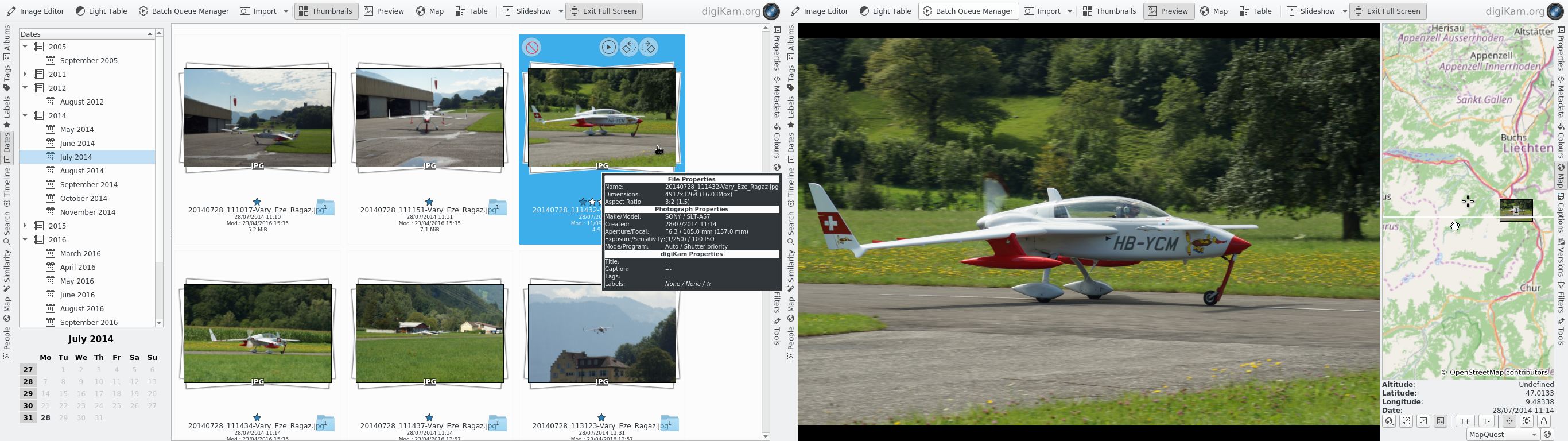
digiKam is an advanced digital photo management application for the K Desktop Environment (KDE). This software makes importing and organizing digital photos seamless. Photos can be organized in albums chronologically, by directory layout or by custom collections.
An easy to use interface is provided to connect to your digital camera, preview the images and download and/or delete them.
digiKam offers image enhancement tools through its KIPI (KDE Image Plugins Interface) framework and its own plugins, like red-eye removal, color management, image filters, or special effects.
The digiKam Image Editor has its own plugin subsystem with some common tools e.g. red eye correction or Gamma correction.
Flickr support is also built in to this application.
It has many provides professional level features, as highlighted in the feature list below.
Key Features
- Organization of photos in albums and sub-albums.
- Automatic sorting of Photo Albums in chronological order: By folder, collection name, and creation date.
- Automatic sorting of album items in chronological order: By name, path, date and file size.
- Albums can be organized into Collections.
- Tags, Rating, Date and Time, Comments, Photographers ID, and Copyrights are stored in EXIF and/or IPTC metadata tags embedded in pictures. Comments are also stored in JPEG files to JFIF section. digiKam tags are stored in IPTC Keywords tags and digiKam rating in IPTC Urgency tag. That is, image files include your comments and all others information you set to it!
- DateTime/PhotographerId/Copyright EXIF metadata and/or IPTC tags can be set on the fly.
- Metadata from new images imported to digiKam album collection are scanned automatically.
- A SQLite database is used to store all albums and items meta-information for quick access and filtering.
- Drag & drop support between digiKam and other KDE applications.
- Support for RAW pictures, TIFF, PNG, JPEG, JPEG2000, PSD and many other popular file formats.
- digiKam core, Image Editor and image filters support 16 bits color depth pictures (RAW, TIFF, PNG, JPEG2000).
- Support of more than 240 proprietary RAW camera file formats.
- Using Kipi plugin architecture so that new plugins can be written for added functions.
- GPS Editor.
- Raw Converter.
- IPTC Editor.
- Image Editor has a full Color Management support using ICC color profiles.
- Setup Color Management.
- Thumbnail sizes can be adapted to you screen size on the fly.
- Sidebar used everywhere to display:
- metadata:
- EXIF information.
- Makernote information.
- IPTC information.
- GPS coordinates with worldmap viewer.
- image properties:
- comments/tags/rating/date.
- tag filter information.
- colors information: histogram and ICC profile.
- file properties:
- size.
- location.
- owner.
- metadata:
- Fast preview pictures mode embedded into albums interface with zoom and panning features.
- IPTC Metadata Viewer.
- ICC Profile Viewer.
- Fast Image Editor with keyboard shortcuts and basic photo editing/management features (all without losing EXIF/IPTC information). The Image Editor core options available are:
- 16 bits image color depth support.
- RAW camera image support.
- Color Management support.
- Red eyes correction.
- Brightness / Contrast / Gamma correction.
- Hue / Saturation / Luminosity correction.
- Color balance.
- Invert colors.
- Color auto-correction tools: Auto-levels / Normalize / Equalize / Stretch Contrast.
- Blur / Sharpen.
- EXIF/MakerNote/IPTC/GPS viewer.
- Histogram viewer.
- ICC profile viewer.
- Ratio-cropping with proportion aids and composing tools based on Fibonacci rules.
- Free cropping.
- Exporting to another image format.
- Printing images.
- Removing images from current Album.
- Image comments editing.
- Image file properties.
- Black and White and tonality converter using curves adjustments.
- Rotation.
- Flipping.
- Zooming.
- ICC profiles tool to perform advanced color corrections into images.
- The digiKam image editor provides a plugins architecture to add new options.
- Driving all digital camera types supported by Gphoto2 project:
- Over 800 digital camera devices supported.
- Serial connection.
- USB connection.
- USB/IEEE Mass storage connection.
- Connecting autodetection of camera using HAL/KDE service.
- Importing pictures from digital still cameras. Operations currently supported are:
- Deleting images.
- Uploading images.
- Lock images.
- Auto-rename pictures during import.
- Auto-rotate pictures during import.
- Auto-creation of albums during import.
- LossLess conversion during import.
- Advanced camera information.
- Setup Camera.
- Camera Interface.
- Easy comparing similar pictures using Light Table:
- Raw files support.
- Advanced panning and zooming.
- Navigation by pair.
- Versioning – allows you to save each edited version of an original photo as a separate image complete with a list of all applied actions.
- Geolocation – streamline the process of geotagging photos.
- Color Labels allows you to assign color codes to your photos.
- Pick Labels.
- Tags Keyboard shortcusts – simplifies tagging operations.
- Supports XMP metadata.
Website: www.digikam.org
Support: Documentation
Developer: Gilles Caulier, Marcel Wiesweg, and other contributors
License: GNU General Public License v2.0
digiKam is written in C++. Learn C++ with our recommended free books and free tutorials.
Related Software
| RAW Processing Tools | |
|---|---|
| Darktable | Virtual lighttable and darkroom for photographers |
| digiKam | Professional photo management |
| RawTherapee | RAW image processing application |
| LightZone | Professional-level digital darkroom software |
| ART | Fork of RawTherapee |
| ansel | Fork of Darktable |
| RapidRAW | Non-destructive, and GPU-accelerated RAW image editor |
| Filmulator | RAW photo editing application with library management |
| Photivo | Photo processor for RAW and Bitmap images |
| nUFRaw | Import and edit RAW images from digital cameras |
| UFRaw | Standalone tool to import RAW data from high-end digital cameras |
| Rawstudio | RAW image converter |
| vkdt | Workflow toolbox for raw stills and video |
| DNGLab | Camera RAW utility and DNG converter |
| GTKRawGallery | Workflow oriented photo retouching software |
| rawbit | Camera RAW image preprocessor and importer |
Read our verdict in the software roundup.
| Camera Tools | |
|---|---|
| darktable | Virtual lighttable and darkroom for photographers |
| digiKam | Digital photo management application with revamped camera support |
| gPhoto | Digital camera command-line client |
| ExifTool | Library and program to read and write meta information in multimedia files |
| RawTherapee | RAW image processing application |
| RapidRAW | Non-destructive, and GPU-accelerated RAW image editor |
| DCamProf | Digital camera profiling tool |
| Rawstudio | RAW image converter |
| nufraw | Import and edit RAW images from digital cameras |
| Entangle | Tethered camera control and capture |
| UFRaw | Standalone tool to import RAW data from high-end digital cameras |
| Kamera | KDE integration for gphoto2 cameras |
| fspy | Quick and easy still image camera matching |
| cameractrls | Set camera controls |
| rawbit | Camera RAW image preprocessor and importer |
Read our verdict in the software roundup.
| Photo Management Software | |
|---|---|
| digiKam | Image organiser and editor using KDE |
| darktable | Photography workflow application and raw developer |
| TagStudio | Tag-based photo and file organization program |
| gThumb | Image viewer and organizer for the GNOME desktop environment |
| Shotwell | Personal photo management |
| KPhotoAlbum | Tool for indexing, searching and viewing images for KDE |
| Pix | Image viewer and browser utility which is based on gThumb |
| Tropy | Explore your research photos |
| Rapid Photo Downloader | Photo and video downloader |
| Allusion-rafauc | Fork of Allusion |
| Allusion | Organize your visual library |
| GNOME Photos | Access, organize and share your photos on GNOME |
| Snu Photo Manager | Feature-rich photo manager |
Read our verdict in the software roundup.
| Flickr Tools | |
|---|---|
| Frogr | Manage your accounts in the Flickr image hosting website |
| digiKam | Has built-in support for Flickr |
| Shotwell | Personal photo management with Flickr support |
| gallery-dl | Download image galleries and collections |
| GNOME Photos | Access, organize and share your photos on GNOME |
| Photini | Digital photograph metadata editing application |
| Rodeo | Command-line utility for uploading images to Flickr |
| Nautilus Flickr Uploader | Upload pictures to the Flickr service from the Nautilus file browser |
Read our verdict in the software roundup.
| Photo Metadata Editors | |
|---|---|
| Photini | Easy to use digital photograph metadata editor |
| ExifTool | CLI application and library for reading and writing meta information |
| Exiv2 | C++ library and a command line utility to manage image metadata |
| digiKam | Provides tools for viewing and editing metadata |
| jExifToolGUI | Graphical frontend to ExifTool |
| Jhead | Exif Jpeg header manipulation tool |
| Scramble | Privacy-focused image metadata removal tool |
| Phatch | Simple to use cross-platform GUI photo batch processor |
| Metamorphosis | Inspect and change embedded metadata |
Read our verdict in the software roundup.
 Explore our comprehensive directory of recommended free and open source software. Our carefully curated collection spans every major software category. Explore our comprehensive directory of recommended free and open source software. Our carefully curated collection spans every major software category.This directory is part of our ongoing series of informative articles for Linux enthusiasts. It features hundreds of detailed reviews, along with open source alternatives to proprietary solutions from major corporations such as Google, Microsoft, Apple, Adobe, IBM, Cisco, Oracle, and Autodesk. You’ll also find interesting projects to try, hardware coverage, free programming books and tutorials, and much more. Discovered a useful open source Linux program that we haven’t covered yet? Let us know by completing this form. |
Please read our Comment Policy before commenting.