

Photini is a graphical application for editing the metadata associated with digital photographs. It lets photographers add descriptive information, ownership details and geographical locations without modifying the visible image.
The application supports Exif, IPTC and XMP metadata standards, helping maintain compatibility with photo management software and online image services. Information can be stored directly within supported image files or in separate XMP sidecar files.
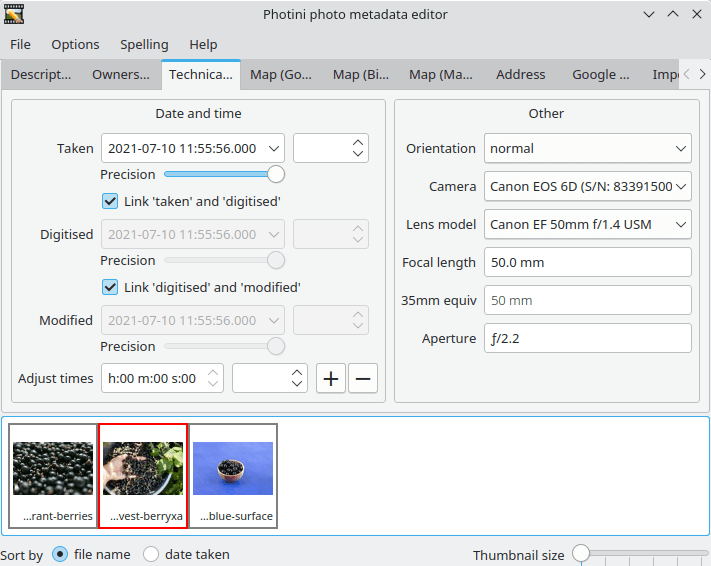
Photini uses a tabbed interface with an image selector for working through collections of photographs. It is particularly useful for cataloguing images, correcting camera information and preparing photographs for publication or sharing.
This is free and open source software.
Key Features
- Edit photo titles, descriptions, headlines, keywords and other descriptive metadata.
- Set copyright notices, creator names, contact details and ownership information.
- Modify metadata for multiple photographs simultaneously.
- Read and write Exif, IPTC and XMP metadata.
- Save metadata directly within images or in separate XMP sidecar files.
- Adjust photograph timestamps, including date, time and time zone information.
- Geotag photographs by searching for locations or positioning images on interactive maps.
- Choose between different map providers and compare their geographical information.
- Import GPX track logs and use their recorded positions to assist with photo geotagging.
- Convert GPS coordinates into geographical addresses using reverse geocoding.
- Manually edit, copy or remove stored geographical coordinates.
- View and edit selected technical metadata fields.
- Add metadata identifying regions within photographs.
- Import photographs from compatible digital cameras on supported systems.
- Upload photographs to Flickr, Ipernity and Pixelfed while reusing stored metadata.
- Optional spelling assistance for selected text fields and limited video metadata support.
- Cross-platform support – runs on Linux, macOS, and Windows.
Website: github.com/jim-easterbrook/Photini
Support:
Developer: Jim Easterbrook
License: GNU General Public License v3.0
Photini is written in Python. Learn Python with our recommended free books and free tutorials.
Related Software
| Photo Metadata Editors | |
|---|---|
| Photini | Easy to use digital photograph metadata editor |
| ExifTool | CLI application and library for reading and writing meta information |
| Exiv2 | C++ library and a command line utility to manage image metadata |
| digiKam | Provides tools for viewing and editing metadata |
| jExifToolGUI | Graphical frontend to ExifTool |
| Jhead | Exif Jpeg header manipulation tool |
| Scramble | Privacy-focused image metadata removal tool |
| Phatch | Simple to use cross-platform GUI photo batch processor |
| mat2 | Remove metadata from files to improve privacy |
| Metadata Cleaner | Inspect and remove metadata from files |
| Kleaner | Clean metadata from images with a simple graphical interface |
| Metamorphosis | Inspect and change embedded metadata |
Read our verdict in the software roundup.
| Photo Geotagging Tools | |
|---|---|
| Photini | Digital photograph metadata editing application |
| GpsPrune | View, edit and convert coordinate data from GPS systems |
| KGeoTag | Photo geotagging written in C++/Qt |
| GPS Correlate | Correlates digital images with GPS data filling EXIF fields |
| Geotag | Match date/time information from photos |
| Geotagging | Photography geotagging tool |
| GottenGeography | Photo geotagging application for the GNOME desktop environment |
Read our verdict in the software roundup.
| Flickr Tools | |
|---|---|
| Frogr | Manage your accounts in the Flickr image hosting website |
| digiKam | Has built-in support for Flickr |
| Shotwell | Personal photo management with Flickr support |
| gallery-dl | Download image galleries and collections |
| GNOME Photos | Access, organize and share your photos on GNOME |
| Photini | Digital photograph metadata editing application |
| Rodeo | Command-line utility for uploading images to Flickr |
| Nautilus Flickr Uploader | Upload pictures to the Flickr service from the Nautilus file browser |
Read our verdict in the software roundup.
 Explore our carefully curated directory of recommended free and open source software, covering every major software category. Explore our carefully curated directory of recommended free and open source software, covering every major software category.The directory forms part of our extensive collection of articles for Linux enthusiasts. It includes hundreds of detailed reviews, together with free and open source alternatives to proprietary software from companies such as Google, Microsoft, Apple, Adobe, IBM, Cisco, Oracle, and Autodesk. LinuxLinks also covers interesting projects worth exploring, Linux-compatible hardware, free programming books and tutorials, and much more. Know a useful free and open source Linux application that we haven’t covered? Tell us about it using our submission form. |
Please read our Comment Policy before commenting.