

Photini is an easy to use digital photograph metadata (EXIF, IPTC, XMP) editing application.
This application enables users to quickly add information to photos. It can set textual information such as title, description, and copyright as well as geolocation information by browsing a map or setting coordinates directly.
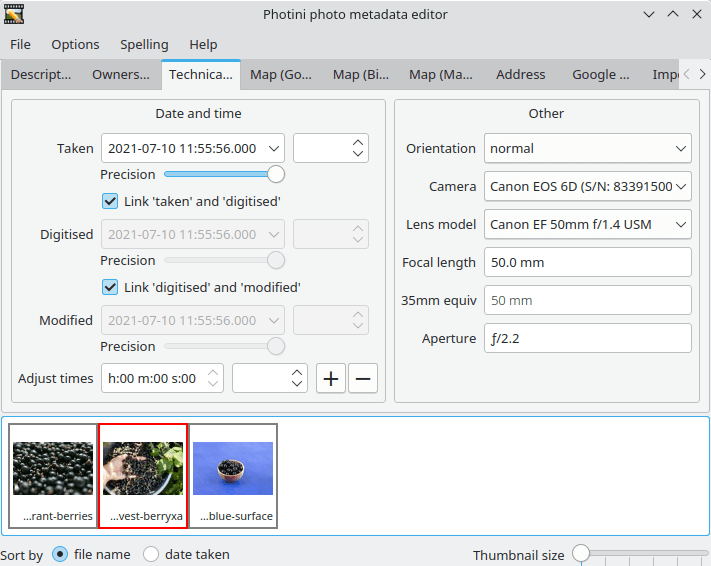
The Photini GUI has two main areas. The upper part has a set of tabs to select different functions. The lower part is an image selector that is common to all the tabs.
Key Features
- Easy to use graphical interface.
- Set photo title, description, keywords, copyright and creator fields.
- Can set metadata for multiple images simultaneously.
- Search map to find places of interest.
- Choice of map providers – instantly switch to compare details.
- Drag and drop images onto map to set GPS location.
- Edit coordinates if required, or clear to unset GPS data.
- Reads EXIF, IPTC or XMP metadata, writes all three to maximise compatibility with other software.
- Tabs to adjust time & date and to upload to Flickr.
Website: github.com/jim-easterbrook/Photini
Support:
Developer: Jim Easterbrook
License: GNU General Public License v3.0
Photini is written in Python. Learn Python with our recommended free books and free tutorials.
Related Software
| Photo Metadata Editors | |
|---|---|
| Photini | Easy to use digital photograph metadata editor |
| ExifTool | CLI application and library for reading and writing meta information |
| Exiv2 | C++ library and a command line utility to manage image metadata |
| digiKam | Provides tools for viewing and editing metadata |
| jExifToolGUI | Graphical frontend to ExifTool |
| Jhead | Exif Jpeg header manipulation tool |
| Scramble | Privacy-focused image metadata removal tool |
| Phatch | Simple to use cross-platform GUI photo batch processor |
| Metamorphosis | Inspect and change embedded metadata |
Read our verdict in the software roundup.
| Photo Geotagging Tools | |
|---|---|
| Photini | Digital photograph metadata editing application |
| GpsPrune | View, edit and convert coordinate data from GPS systems |
| KGeoTag | Photo geotagging written in C++/Qt |
| GPS Correlate | Correlates digital images with GPS data filling EXIF fields |
| Geotag | Match date/time information from photos |
| Geotagging | Photography geotagging tool |
| GottenGeography | Photo geotagging application for the GNOME desktop environment |
Read our verdict in the software roundup.
| Flickr Tools | |
|---|---|
| Frogr | Manage your accounts in the Flickr image hosting website |
| digiKam | Has built-in support for Flickr |
| Shotwell | Personal photo management with Flickr support |
| gallery-dl | Download image galleries and collections |
| GNOME Photos | Access, organize and share your photos on GNOME |
| Photini | Digital photograph metadata editing application |
| Rodeo | Command-line utility for uploading images to Flickr |
| Nautilus Flickr Uploader | Upload pictures to the Flickr service from the Nautilus file browser |
Read our verdict in the software roundup.
 Explore our comprehensive directory of recommended free and open source software. Our carefully curated collection spans every major software category. Explore our comprehensive directory of recommended free and open source software. Our carefully curated collection spans every major software category.This directory is part of our ongoing series of informative articles for Linux enthusiasts. It features hundreds of detailed reviews, along with open source alternatives to proprietary solutions from major corporations such as Google, Microsoft, Apple, Adobe, IBM, Cisco, Oracle, and Autodesk. You’ll also find interesting projects to try, hardware coverage, free programming books and tutorials, and much more. Discovered a useful open source Linux program that we haven’t covered yet? Let us know by completing this form. |
Please read our Comment Policy before commenting.