

The ATK Dragonfly A9 Air Ultimate is an ultra-lightweight wireless gaming mouse weighing just 47g. It combines a high-performance sensor, an 8K wireless receiver and a compact, ergonomic design.
This review examines its build quality, Linux compatibility, responsiveness, battery life and overall usability.
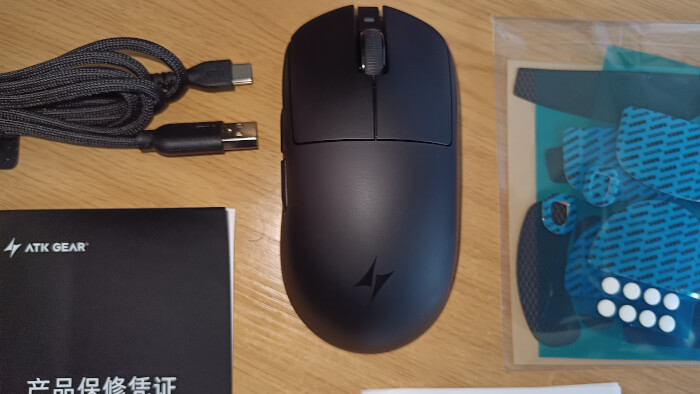
What’s in the Box
- Black gaming mouse with two main buttons, scroll wheel, DPI button and side buttons
- Braided USB-A to USB-C charging/data cable
- Product warranty certificate and user guide
- Clear packet containing pre-cut blue-and-black textured pads for the mouse
- Receiver
Mouse Specifications
- ATK Dragonfly A9 Air Ultimate Lightweight Wireless Mouse
- Colour: Black
- Weight: 47g
- Battery capacity: 300mAh
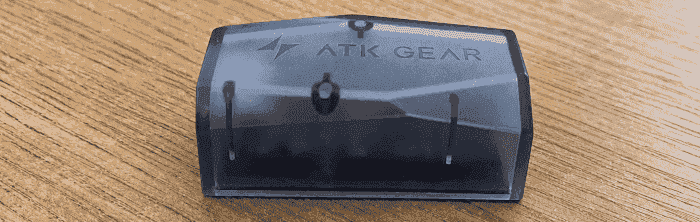
The receiver is particularly interesting. It is a compact desktop unit housed in translucent dark-grey plastic that handles the mouse’s high-polling-rate wireless connection. Internally, it uses a 128MHz Arm Cortex-M33 processor.
Build Quality
The A9 Air feels considerably more substantial than its 47g weight suggests. There is very little flex in the shell, with no obvious creaking or rattling when pressure is applied to the sides or base. The panels fit together cleanly, and the mouse avoids the hollow, fragile feel that can affect some ultra-lightweight designs.
The matte coating provides a secure grip without feeling excessively rubberised. The scroll wheel and side buttons are firmly mounted, while the main buttons feel crisp, with little pre-travel and only modest post-travel. There is a small amount of lateral movement in the main buttons, but it is not enough to detract from normal use.
Overall, ATK has reduced the weight without compromising the mouse’s structural integrity. The A9 Air feels well assembled and compares favourably with many more expensive lightweight gaming mice.
Linux Compatibility
I tested the ATK Dragonfly A9 Air with both CachyOS and Ubuntu. On each distribution, the mouse was recognised immediately when connected through the GEM-8K wireless receiver or the supplied USB cable. Pointer movement, the main buttons, scroll wheel, middle click and side buttons all worked without installing a separate driver. This is unsurprising, as Linux handles conventional mice through its standard HID subsystem.
The GEM-8K receiver was also detected without any manual configuration. Linux therefore provides everything needed for normal wired and wireless operation.
ATK provides a browser-based HUB for changing the DPI, polling rate, button assignments, debounce time, lift-off distance, sleep behaviour and onboard profiles. The interface communicates directly with the mouse through the browser rather than using a conventional Linux application.
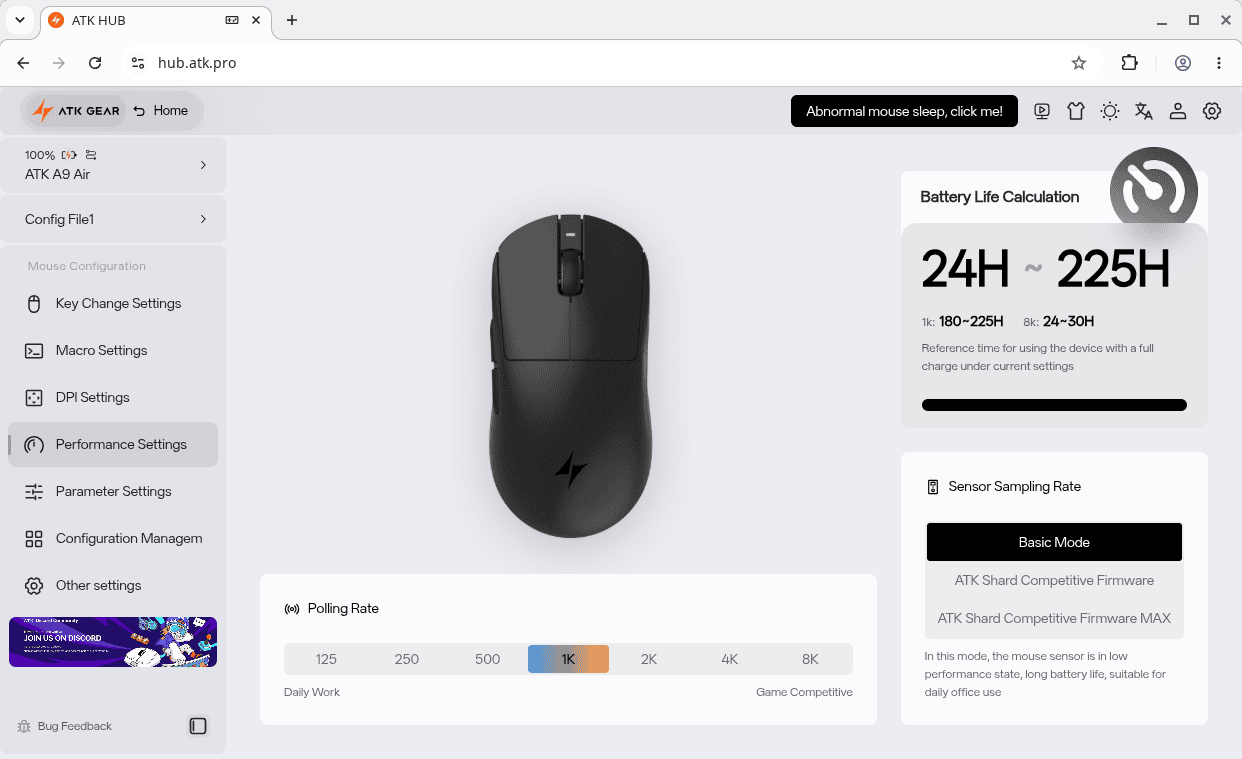
Only Chromium-based browsers, including Google Chrome and Microsoft Edge, are supported by the HUB.
On my Linux systems, I needed to create a udev rule allowing applications such as ATK HUB to access the mouse’s raw HID interface.
$ echo 'SUBSYSTEM=="hidraw", ATTRS{idVendor}=="373b", MODE="0666"' | sudo tee /etc/udev/rules.d/99-atk-webhid.rules >/dev/null
This command tells udev to reload all rule files:
$ sudo udevadm control --reload-rules
This command tells udev to process the connected devices again:
$ sudo udevadm trigger
Overall, the A9 Air offers good Linux compatibility for everyday use.
In Use

The optical switches beneath the main buttons produce crisp, well-defined clicks, although they are firmer than those fitted to many conventional mice. This firmness works well for deliberate clicks in games but may be less comfortable for workloads involving frequent clicking. Pre-travel is minimal, post-travel is reasonably controlled, and there is only a small amount of lateral movement in the main buttons. The side buttons are easy to locate and feel securely mounted, while the scroll wheel has clearly defined steps and a firm middle click.
The 300mAh battery helps ATK keep the weight down, but it is one of the design’s compromises. Battery life is reasonable at conventional polling rates but falls significantly when the mouse is operated continuously at 8,000Hz. Charging is handled through the supplied braided USB-A to USB-C cable, and the mouse can continue to be used in wired mode while charging.
Tracking is smooth, accurate and highly responsive. The supplied GEM-8K receiver supports polling rates of up to 8,000Hz, although the practical improvement over 1,000Hz or 2,000Hz will depend on the display’s refresh rate, system performance and workload. Higher polling rates also place additional load on the processor and reduce battery life, so 1,000Hz or 2,000Hz is likely to be the more sensible setting for everyday desktop use.
Verdict
Overall, the A9 Air delivers excellent build quality, accurate tracking and an unusually low weight at a competitive price. Its firm main clicks and reduced battery life at the highest polling rate will not appeal to everyone, but these are relatively minor drawbacks. It is a convincing alternative to substantially more expensive ultra-lightweight gaming mice.
The mouse is available from ATK’s website, where it is currently priced at $67.98.
Please read our Comment Policy before commenting.
I love this mouse.
It’s got a lovey action but the mouse buttons are a little stiff for me.