

Mastodon is a free and open source microblogging platform similar to Twitter, but with user privacy and decentralization in mind. It’s one of many protocols that interacts with the Fediverse of protocols like Pleroma, GNU Social, and others. Unlike Twitter, Mastodon is not one social network.
Getting started with Mastodon can be confusing for newcomers. Mastodon is a federated service. This means its similar to email. You can create an email account with many different providers. And that’s the same with Mastodon. The service lets you sign up to one of many sites that run Mastodon software, called instances. A user can communicate with other Mastodon users on different instances. The instances are themed – many by country, city, or interest.
Signup to Mastodon is simple. Just supply a username, email address and password and you’re set.
Mastodon is open source, so (unsurprisingly) developers have contributed several ways to set it up. You can run it as a software package on your server, or run it as a Docker image, or even as a Heroku service.
Here’s our verdict captured in a legendary LinuxLinks-style ratings chart. They are all free and open source goodness.
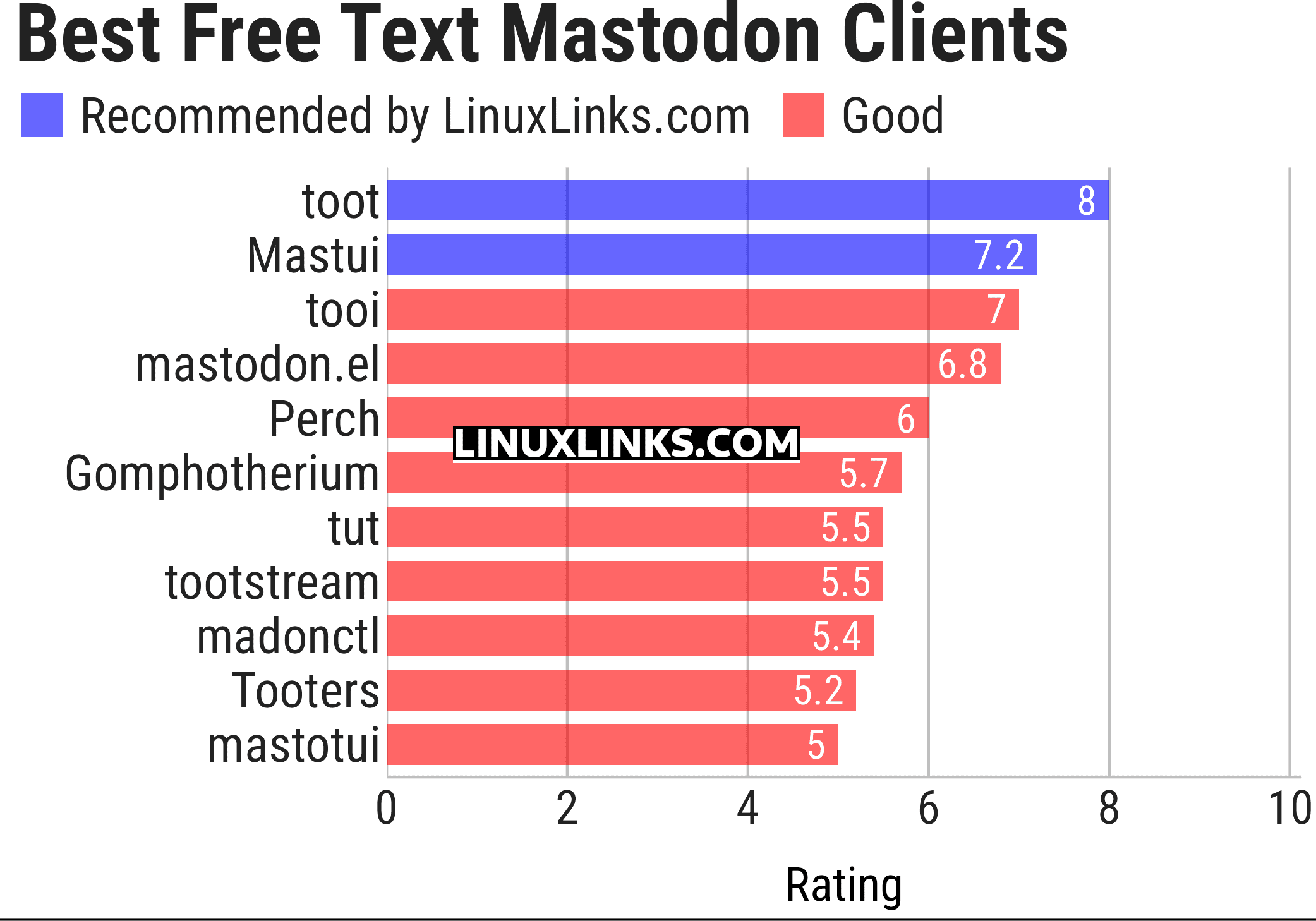
Let’s explore the 11 TUI-based Mastodon clients. For each title we have compiled its own portal page, a full description with an in-depth analysis of its features, together with links to relevant resources.
| Mastodon Clients | |
|---|---|
| toot | CLI and TUI client written in Python |
| Mastui | Built with Python and the powerful Textual framework |
| tooi | Text-based user interface for Mastodon, Pleroma and friends |
| mastodon.el | Emacs client for Mastodon |
| Perch | Social client for Mastodon and Bluesky |
| Gomphotherium | Provides a CLI as well as a TUI |
| tut | Command-line interface written in Go |
| tootstream | Python-based command-line interface |
| madonctl | Golang command line interface for the Mastodon API |
| Tooters | Rust TUI-based Mastodon app |
| mastotui | Distraction-free terminal client for Mastodon |
This article has been updated to reflect the changes outlined in our recent announcement.
 LinuxLinks helps you discover the best free and open source software for Linux. Explore our extensive collection of recommended applications, including alternatives to popular proprietary software. LinuxLinks helps you discover the best free and open source software for Linux. Explore our extensive collection of recommended applications, including alternatives to popular proprietary software.We also publish software reviews, Linux tutorials, hardware reviews, free programming books and articles covering the wider open source community. Browse our Linux resources to discover more. Know a useful free and open source Linux application we haven't covered? Suggest a program for inclusion. Has your software been featured on LinuxLinks? Display one of our Featured on LinuxLinks badges on your website or GitHub README. |
Please read our Comment Policy before commenting.
Let’s hope the surge over to Mastodon continues.