

LibreOffice is an open source software office suite developed by The Document Foundation that is compatible with other major office suites and available on a variety of platforms. It is a feature-packed and mature desktop productivity package.
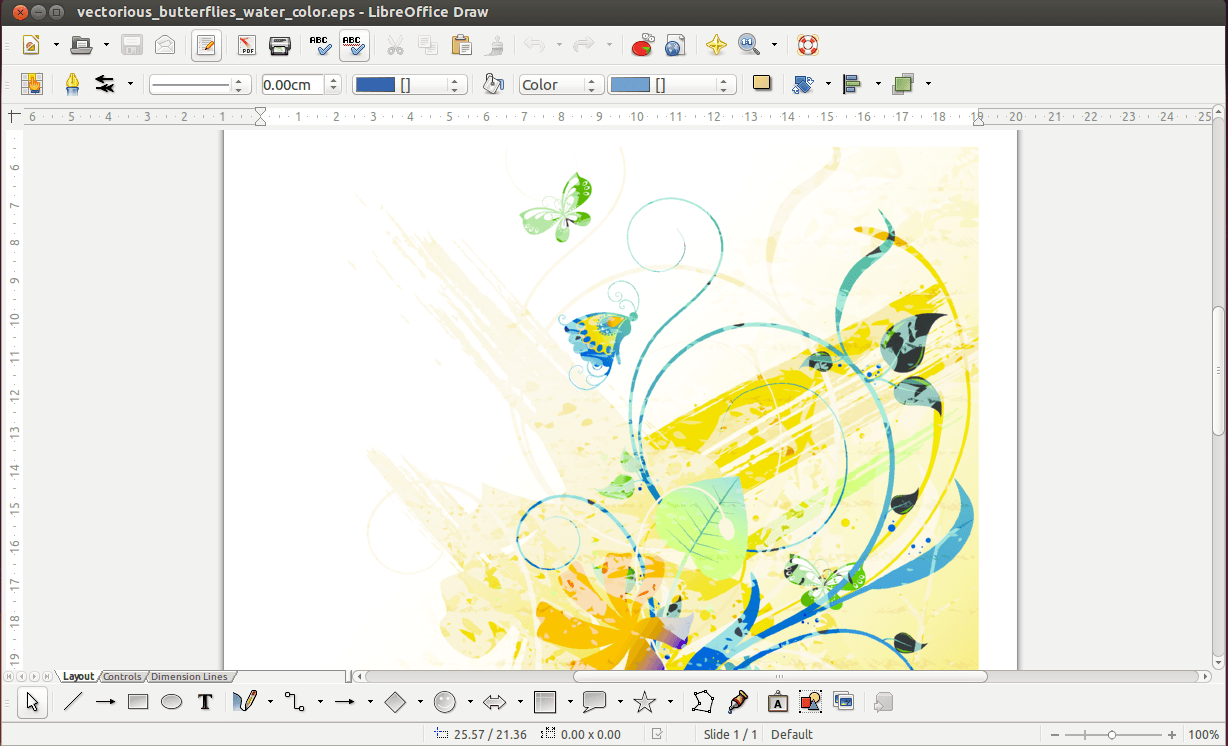
One of the constituent application of the LibreOffice suite is LibreOffice Draw. This is a vector graphics editor and diagramming tool. It can also carry out operations on raster graphics (pixels) such as photographs. With Draw, users can create a wide variety of graphical images.
Draw enables users to produce anything from a quick sketch to a complex plan, and offers the means to communicate with graphics and diagrams. Draw is an excellent package for producing technical drawings, general posters, etc. Draw lets you manipulate graphical objects, group them, crop them, use objects in 3D and much more.
Draw also enables users to design flowcharts. The software provides connectors between shapes, which are available in a range of line styles and facilitate building drawings such as flowcharts. It also includes features similar to desktop publishing software such as Scribus and Microsoft Publisher. Define your own “glue points” for connectors to adhere to, for precise and easily-repeatable positioning. Dimension lines automatically calculate and display linear dimensions as you draw.
Draw enables you to manipulate pictures and images in many ways; you can even create an entire photo album with it. Its powerful engine allows the conversion of images from and to a wide range of image and document formats.
Key Features
- Customizable interface
- Wizards
- Create 2D and 3D objects
- Create custom shapes; like AutoShapes in Microsoft Office
- Layer management
- Grid and snap lines as drawing aids
- Snap functions
- Magnetic Grid-point system
- Zoom function
- Dimensions and measurement display
- Connectors for making organization charts
- 3D functions that enable small three-dimensional drawings to be created (with texture and lighting effects)
- Drawing and page-style integration
- Bézier curves
- Templates with drawings can be imported from OTT, STW, OTH, OTS, STC, OTP, STI, OTG, STD and VOR format, as well as created from scratch and saved to file
- Extensive file extension support
- Extensions:
- Barcode enables LibreOffice to add barcodes to documents
- GeOOO allows the creations of thematic maps with LibreOffice
- Cadlo makes it possible to make technical drawings in LibreOffice Draw
- GEDCOM import filter for Draw
- Extensive help system
Website: www.libreoffice.org
Support: Documentation
Developer: The Document Foundation
License: GNU General Public License v3.0
LibreOffice is written in C++, XML and Java. Learn C++ with our recommended free books and free tutorials. Learn XML with our recommended free books and free tutorials. Learn Java with our recommended free books and free tutorials.
Related Software
| PDF Tools | |
|---|---|
| Scribus | Desktop page layout software producing commercial grade PDF output |
| ONLYOFFICE | Cloud online office suite with great PDF functionality |
| LibreOffice Draw | Vector graphics editor and diagramming tool that can create PDFs |
| PDFBox | Java tool for working with PDF documents |
| Ghostscript | Ghostscript PostScript / PDF interpreter |
| Dangerzone | Make PDFs safe |
| pdf-compress | Compress an overly large PDF file to smaller monochrome |
| PoDoFo | Easy to use PDF parsing and creation library |
| veraPDF | Industry supported PDF/A validation |
| pdfgrep | Command-line utility to search text in PDF files |
| Rescribe | Desktop tool for performing OCR |
| PDF4QT | PDF editor |
| Scans to PDF | Create small, searchable PDFs from scanned documents |
| rst2pdf | Converts reStructuredText files into styled documents |
| Paper Clip | Edit PDF document metadata |
| open-pdf-sign | Adds standards-based digital signatures, timestamps and validation |
| pdfposter | Print large posters on multiple sheets |
| plakativ | Stretches PDF or raster image across multiple pages |
| PDF Metadata Editor | Simple GUI tool |
| unlockR | Simple tool to decrypt PDF files |
| pdfresurrect | Analyze PDF documents |
| Densify | Compress PDF files using Ghostscript |
| IceBox | Converts images into a PDF file |
Read our verdict in the software roundup.
| Vector Graphics Editors | |
|---|---|
| Inkscape | Vector-based drawing program |
| Graphite | 2D vector and raster editor |
| OpenPencil | Combines visual design tools with automation facilities |
| SVG-edit | Complete vector graphics editor in the browser (in JavaScript) |
| Xfig | Draw and manipulate objects interactively |
| GodSVG | Editor for Scalable Vector Graphics files |
| LibreOffice Draw | Vector graphics editor and diagramming tool |
| LateXDraw | Vector drawing program for LaTeX using PSTricks |
| sK1 | High quality illustration program |
| VPaint | Experimental vector graphics and 2D animation editor |
| Karbon | Vector drawing and editing application |
| Ipe | Extensible drawing editor |
Read our verdict in the software roundup.
 Explore our carefully curated directory of recommended free and open source software, covering every major software category. Explore our carefully curated directory of recommended free and open source software, covering every major software category.The directory forms part of our extensive collection of articles for Linux enthusiasts. It includes hundreds of detailed reviews, together with free and open source alternatives to proprietary software from companies such as Google, Microsoft, Apple, Adobe, IBM, Cisco, Oracle, and Autodesk. LinuxLinks also covers interesting projects worth exploring, Linux-compatible hardware, free programming books and tutorials, and much more. Know a useful free and open source Linux application that we haven’t covered? Tell us about it using our submission form. |
Please read our Comment Policy before commenting.