

Last Updated on November 5, 2023
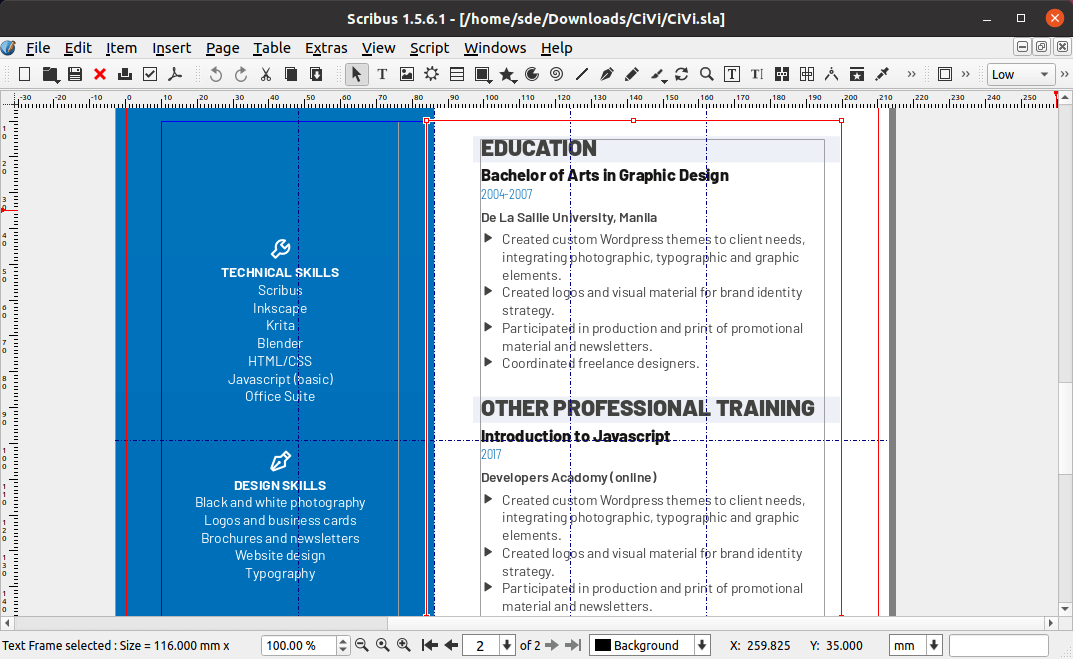
Scribus is an open-source desktop publishing (DTP) program that allows the creation of page layouts with text, graphics, photos and other visual elements.
Scribus is designed for flexible layout and typesetting, and the ability to prepare files for professional quality image setting equipment.
The software lets you design magazines, greeting cards, posters, company brochures, calendars and newsletters, as well as animated and interactive PDF presentations and forms. It is also useful for creating logos and drawings, as well as importing photos with high fidelity printing and precise color control.
It supports professional features, such as CMYK color, spot color, separations, ICC color and robust commercial grade PDF and Postscript.
Key Features
- Undo with object specific undo capabilities.
- Press-ready PDFs, including PDF 1.4 features such as transparency.
- Encryption.
- Extensive support for CMYK images, including clipping paths in TIFF and JPEG files, as well as extensive support for native Photoshop PSD files.
- Exportable CMYK separations.
- SVG & EPS importing/exporting, PDF importing.
- ICC color management through the littlecms Color Management System to ensure that colors seem on screen match those in print.
- Vector drawing tools.
- OpenType font support.
- Import text from OpenDocument text documents, Word files, Rich Text (.rtf), and HTML.
- Saves to an open file format (XML based) so users are not tied to the software.
- Translated into more than 25 languages.
- Python scripting.
- PDF 1.5 presentation effect support.
Website: www.scribus.net
Support: Wiki
Developer: Scribus Team (10 developers supported by the Scribus community)
License: GNU General Public License v2.0
Scribus is written in C++. Learn C++ with our recommended free books and free tutorials.
Related Software
| PDF Tools | |
|---|---|
| Scribus | Desktop page layout software producing commercial grade PDF output |
| ONLYOFFICE | Cloud online office suite with great PDF functionality |
| LibreOffice Draw | Vector graphics editor and diagramming tool that can create PDFs |
| PDFBox | Java tool for working with PDF documents |
| Ghostscript | Ghostscript PostScript / PDF interpreter |
| Dangerzone | Make PDFs safe |
| pdf-compress | Compress an overly large PDF file to smaller monochrome |
| PoDoFo | Easy to use PDF parsing and creation library |
| veraPDF | Industry supported PDF/A validation |
| pdfgrep | Command-line utility to search text in PDF files |
| Rescribe | Desktop tool for performing OCR |
| PDF4QT | PDF editor |
| Scans to PDF | Create small, searchable PDFs from scanned documents |
| Paper Clip | Edit PDF document metadata |
| pdfposter | Print large posters on multiple sheets |
| plakativ | Stretches PDF or raster image across multiple pages |
| PDF Metadata Editor | Simple GUI tool |
| unlockR | Simple tool to decrypt PDF files |
| pdfresurrect | Analyze PDF documents |
| Densify | Compress PDF files using Ghostscript |
| IceBox | Converts images into a PDF file |
Read our verdict in the software roundup.
 Explore our comprehensive directory of recommended free and open source software. Our carefully curated collection spans every major software category. Explore our comprehensive directory of recommended free and open source software. Our carefully curated collection spans every major software category.This directory is part of our ongoing series of informative articles for Linux enthusiasts. It features hundreds of detailed reviews, along with open source alternatives to proprietary solutions from major corporations such as Google, Microsoft, Apple, Adobe, IBM, Cisco, Oracle, and Autodesk. You’ll also find interesting projects to try, hardware coverage, free programming books and tutorials, and much more. Discovered a useful open source Linux program that we haven’t covered yet? Let us know by completing this form. |
Please read our Comment Policy before commenting.