

Densify is a graphical utility for reducing PDF file sizes using Ghostscript. It provides an interface to Ghostscript’s PDF compression settings, allowing users to choose a suitable output profile without constructing a command-line conversion manually.
The application offers several compression presets intended for different purposes. Lower-resolution profiles can produce smaller PDFs suitable for on-screen reading, while higher-quality settings are more appropriate for printing. The selected profile influences how Ghostscript processes images and other document content.
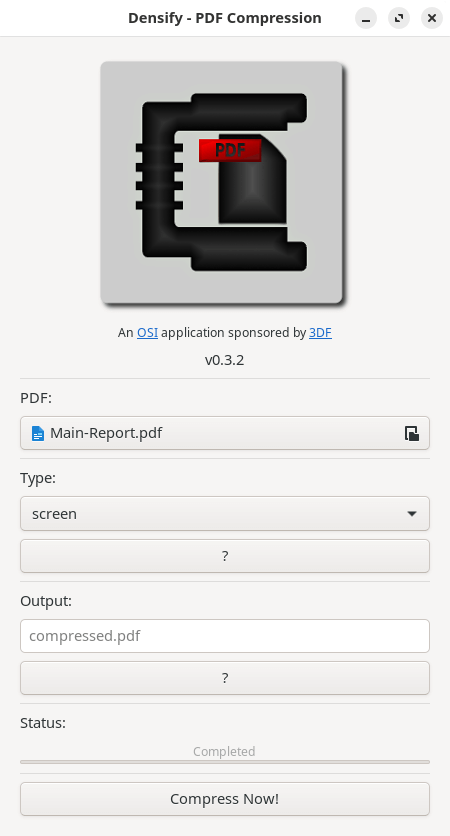
Users can select a source PDF, choose a compression setting and specify where the resulting document should be saved. Densify performs validation checks before processing, including confirming potentially destructive operations such as overwriting an existing file. Compression runs separately from the main interface so that the application can display progress and completion information.
This is free and open source software.
Key Features
- Graphical interface for compressing PDF documents using Ghostscript.
- Five predefined compression profiles: screen, ebook, printer, prepress and default.
- Choose output settings according to the intended document use.
- Select the PDF file to be compressed.
- Specify an output filename and destination.
- Validate the output filename before processing.
- Warn before replacing an existing file.
- Compression processing without blocking the graphical interface.
- Display compression status and completion information.
- GTK interface designed for straightforward PDF compression.
Website: github.com/hkdb/Densify
Support:
Developer: hkdb
License: MIT License
Densify is written in Python. Learn Python with our recommended free books and free tutorials.
Related Software
| PDF Tools | |
|---|---|
| Scribus | Desktop page layout software producing commercial grade PDF output |
| ONLYOFFICE | Cloud online office suite with great PDF functionality |
| LibreOffice Draw | Vector graphics editor and diagramming tool that can create PDFs |
| PDFBox | Java tool for working with PDF documents |
| Ghostscript | Ghostscript PostScript / PDF interpreter |
| Dangerzone | Make PDFs safe |
| pdf-compress | Compress an overly large PDF file to smaller monochrome |
| PoDoFo | Easy to use PDF parsing and creation library |
| veraPDF | Industry supported PDF/A validation |
| pdfgrep | Command-line utility to search text in PDF files |
| Rescribe | Desktop tool for performing OCR |
| PDF4QT | PDF editor |
| Scans to PDF | Create small, searchable PDFs from scanned documents |
| rst2pdf | Converts reStructuredText files into styled documents |
| Paper Clip | Edit PDF document metadata |
| open-pdf-sign | Adds standards-based digital signatures, timestamps and validation |
| pdfposter | Print large posters on multiple sheets |
| plakativ | Stretches PDF or raster image across multiple pages |
| PDF Metadata Editor | Simple GUI tool |
| unlockR | Simple tool to decrypt PDF files |
| pdfresurrect | Analyze PDF documents |
| Densify | Compress PDF files using Ghostscript |
| IceBox | Converts images into a PDF file |
Read our verdict in the software roundup.
 LinuxLinks helps you discover the best free and open source software for Linux. Explore our extensive collection of recommended applications, including alternatives to popular proprietary software. We also publish software reviews, Linux tutorials, hardware reviews, free programming books and articles covering the wider open source community. Browse our Linux resources to discover more. Know a useful free and open source Linux application we haven't covered? Suggest a program for inclusion. Has your software been featured on LinuxLinks? Display one of our Featured on LinuxLinks badges on your website or GitHub README. |
Please read our Comment Policy before commenting.