

Linux desktop environments generally do a good job of deciding which applications should open particular files. Double-click an image and it opens in an image viewer. Select a PDF and your preferred document viewer appears. But these associations don’t always behave as expected, particularly when several applications can handle the same file type or when installing new software changes existing defaults.
Default application and MIME association tools let users take control of these relationships. MIME (Multipurpose Internet Mail Extensions) types identify different kinds of content, allowing Linux to determine which applications can handle particular files. These utilities can inspect existing associations, change default applications, resolve conflicting settings and manage how files and links are opened. They offer a more convenient alternative to manually editing configuration files, with interfaces ranging from simple command-line utilities to interactive terminal applications and graphical tools.
These tools are particularly useful for Linux users who regularly install and test software, work across different desktop environments or prefer lightweight window managers without comprehensive application settings. They’re also valuable to system administrators, developers and anyone frustrated by files opening in the wrong application.
Here’s our verdict captured in a legendary LinuxLinks-style ratings chart. Only free and open source software is eligible for inclusion.
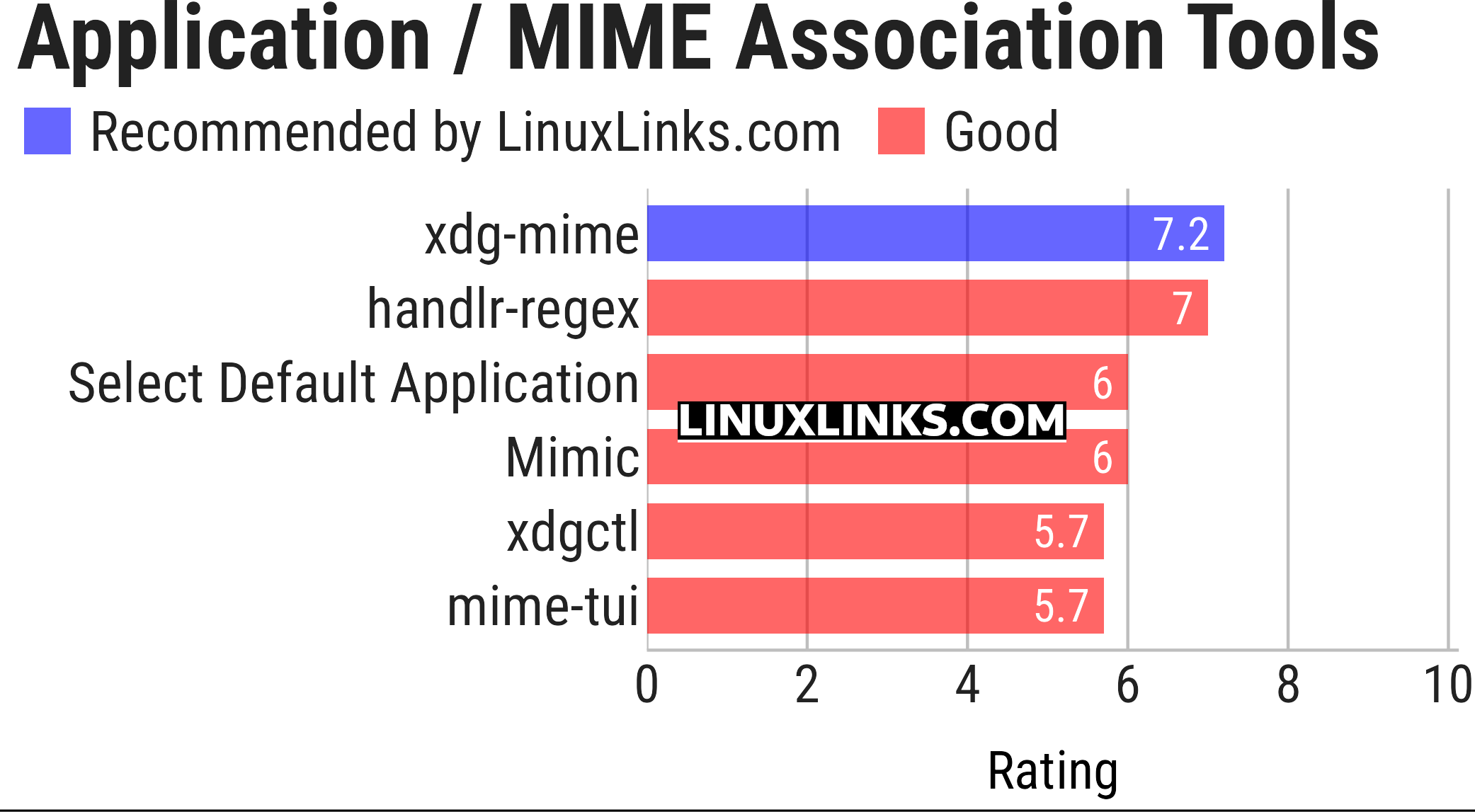
Click the links to learn more about each tool.
| Default Application and MIME Association Tools | |
|---|---|
| xdg-mime | Query MIME types and manage default application associations |
| handlr-regex | Manage default applications using regular expressions |
| Select Default Application | Graphical tool for managing default MIME type applications |
| Mimic | Manage default applications and their file associations |
| xdgctl | Terminal interface for managing XDG default applications |
| mime-tui | Keyboard-driven terminal interface for MIME associations |
 LinuxLinks helps you discover the best free and open source software for Linux. Explore our extensive collection of recommended applications, including alternatives to popular proprietary software. We also publish software reviews, Linux tutorials, hardware reviews, free programming books and articles covering the wider open source community. Browse our Linux resources to discover more. Know a useful free and open source Linux application we haven't covered? Suggest a program for inclusion. Has your software been featured on LinuxLinks? Display one of our Featured on LinuxLinks badges on your website or GitHub README. |
Please read our Comment Policy before commenting.