

Git is an open source distributed version control system which was originally designed by Linus Torvalds, the creator of Linux, in 2005 for Linux kernel development. This control system is widely used by the open source community, handling small to extremely large projects with an emphasis on speed and efficiency, but maintaining flexibility, scalability, and guaranteeing data integrity.
Git is one of a number of open source revision control systems available for Linux. Git is frequently regarded by many developers to be the finest version control tool available.
Most Linux distributions offer lots of secondary tools that add additional functionality. Like many things in Linux, the choice can be bamboozling. This article seeks to help identify workflow tools which we’ve found to be very useful. They should be a good addition to maximise the benefits of using Git.
Git workflow tools help teams manage the day-to-day process of changing, reviewing, testing, and releasing source code stored in Git repositories. They sit around Git rather than replacing it, adding structure to common tasks such as creating branches, naming commits, opening pull requests, rebasing work, resolving conflicts, tagging releases, and synchronising local changes with remote repositories.
Here’s our verdict with our legendary rating chart. Every program featured here is published under an open source license.
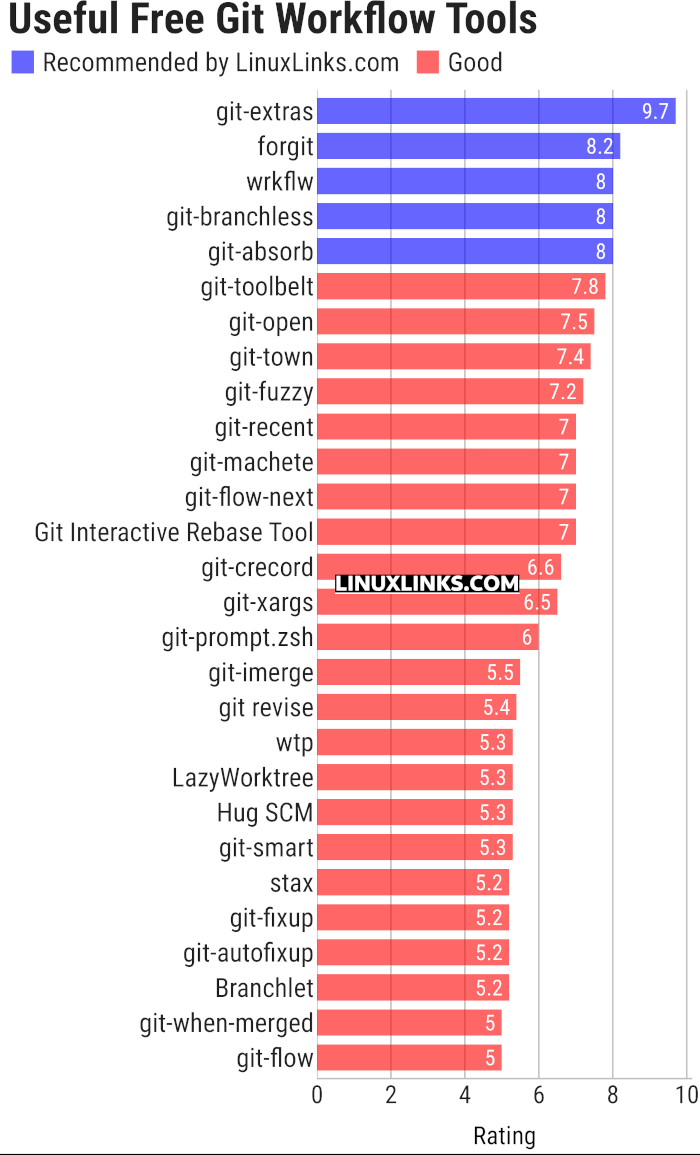
Click the links in the table below to learn all about each tool.
| Git Workflow Tools | |
|---|---|
| git-extras | Superb collection of tools for Git |
| forgit | Utility for using git interactively |
| wrkflw | Validate and run GitHub Actions workflows locally |
| git-branchless | Branchless workflow for git |
| git-absorb | Super-charging git rebase |
| git-toolbelt | Suite of useful Git commands |
| git-open | Adds a handy git open command to Git. |
| git-town | Automate the creation, synchronization, shipping, and cleanup |
| git-fuzzy | Interactive git with the help of fzf |
| git-recent | Jump between recently used local Git branches |
| git-machete | Robust tool that simplifies your git workflows |
| git-flow-next | Modern implementation of the Git-flow branching model |
| Git Interactive Rebase Tool | Terminal-based sequence editor for interactive rebase |
| git-crecord | Interactively select changes to commit or stage |
| git-xargs | Update across multiple GitHub repositories |
| git-prompt.zsh | Lightweight git prompt for zsh |
| git-imerge | Incremental merge and rebase for Git |
| git revise | Git subcommand and Python library |
| wtp | Enhanced Git worktree management |
| LazyWorktree | Git worktree management for the terminal |
| Hug SCM | The Humane Source Control Management Interface |
| git-smart | Small collection of Git helper commands |
| stax | CLI and TUI for stacked Git branches and PRs |
| git-fixup | Command-line helper for Git users |
| git-autofixup | Git helper that creates fixup commits for topic branches |
| Branchlet | Create and manage Git worktrees |
| git-when-merged | Merge commit finder |
| git-flow | High-level repository operations |
 Explore our carefully curated directory of recommended free and open source software, covering every major software category. Explore our carefully curated directory of recommended free and open source software, covering every major software category.The directory forms part of our extensive collection of articles for Linux enthusiasts. It includes hundreds of detailed reviews, together with free and open source alternatives to proprietary software from companies such as Google, Microsoft, Apple, Adobe, IBM, Cisco, Oracle, and Autodesk. LinuxLinks also covers interesting projects worth exploring, Linux-compatible hardware, free programming books and tutorials, and much more. Know a useful free and open source Linux application that we haven’t covered? Tell us about it using our submission form. |
Please read our Comment Policy before commenting.