

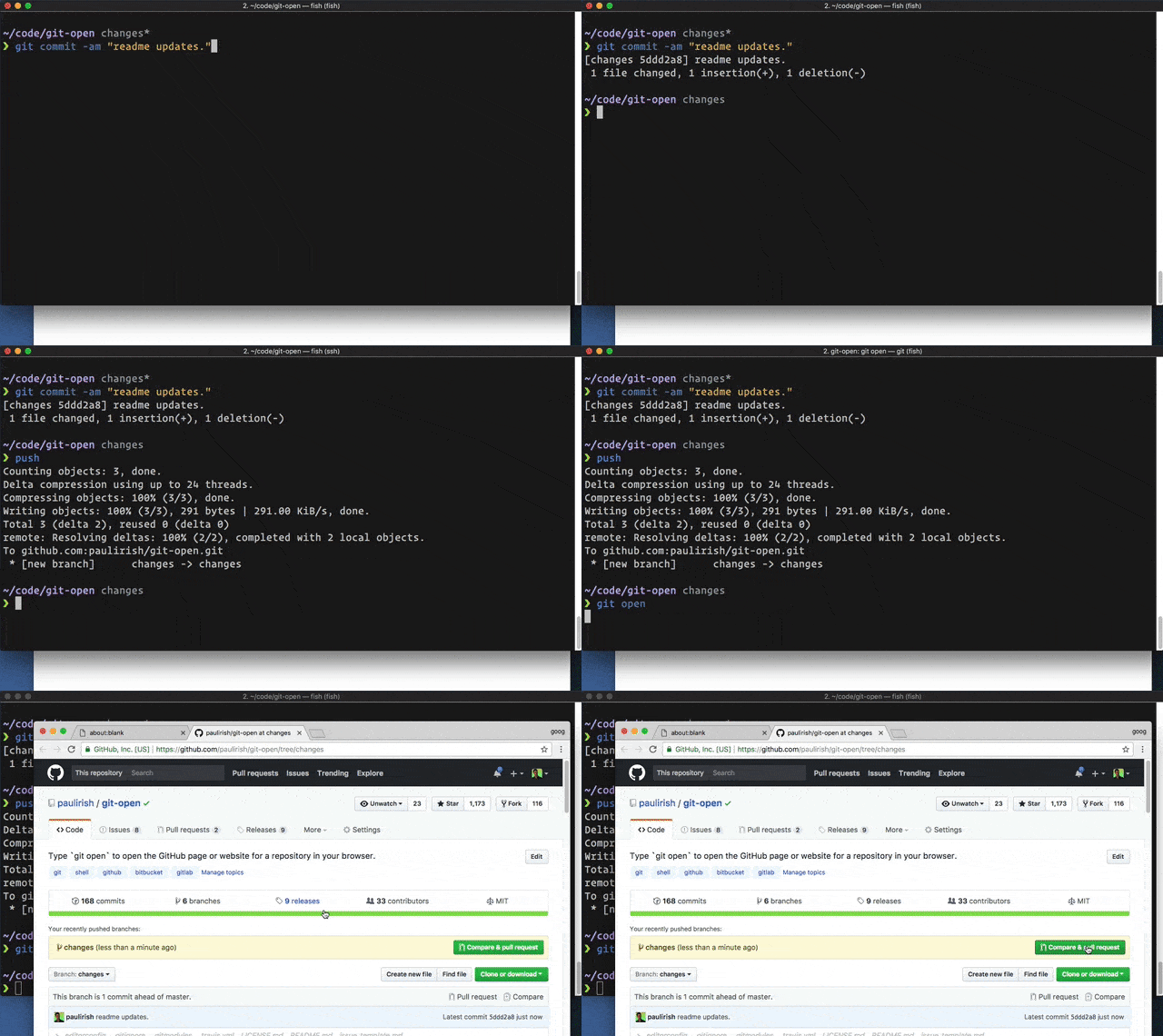
git-open is a small command-line helper that adds a handy git open command to Git.
Run it inside a repository and it opens the matching repository page in your browser, using the configured remote and current branch. It’s useful when you regularly jump between the terminal and hosted Git services, cutting out the copy, paste, search, and navigation steps.
The tool supports common repository hosts including GitHub, GitLab, Bitbucket, Atlassian Bitbucket Server, Visual Studio Team Services, Team Foundation Server, AWS CodeCommit, and cnb.cool. It can also open a specific remote, branch, commit, issue, or custom suffix such as pull requests.
This is free and open source software.
Key Features
- Adds a simple
git opencommand for opening the current repository in a web browser. - Opens the page for the current branch by default.
- Supports specifying a remote name and branch name manually.
- Can open the current commit with
--commitor-c. - Can open a matching issue from branch naming conventions with
--issueor-i. - Offers a
--printmode to output the URL without opening a browser. - Supports custom URL suffixes, useful for opening pages such as pull requests.
- Works with many hosted Git repository services and self-hosted GitLab setups.
- Can be installed as a standalone script or through npm.
- Includes plugin setup options for Zsh and Bash environments.
Website: github.com/paulirish/git-open
Support:
Developer: Paul Irish and contributors
License: MIT License
Related Software
| Git Workflow Tools | |
|---|---|
| git-extras | Superb collection of tools for Git |
| forgit | Utility for using git interactively |
| wrkflw | Validate and run GitHub Actions workflows locally |
| git-branchless | Branchless workflow for git |
| git-absorb | Super-charging git rebase |
| git-toolbelt | Suite of useful Git commands |
| git-open | Adds a handy git open command to Git. |
| git-town | Automate the creation, synchronization, shipping, and cleanup |
| git-fuzzy | Interactive git with the help of fzf |
| git-recent | Jump between recently used local Git branches |
| git-machete | Robust tool that simplifies your git workflows |
| git-flow-next | Modern implementation of the Git-flow branching model |
| Git Interactive Rebase Tool | Terminal-based sequence editor for interactive rebase |
| git-crecord | Interactively select changes to commit or stage |
| git-xargs | Update across multiple GitHub repositories |
| git-prompt.zsh | Lightweight git prompt for zsh |
| git-imerge | Incremental merge and rebase for Git |
| git revise | Git subcommand and Python library |
| wtp | Enhanced Git worktree management |
| LazyWorktree | Git worktree management for the terminal |
| Hug SCM | The Humane Source Control Management Interface |
| git-smart | Small collection of Git helper commands |
| stax | CLI and TUI for stacked Git branches and PRs |
| git-fixup | Command-line helper for Git users |
| git-autofixup | Git helper that creates fixup commits for topic branches |
| Branchlet | Create and manage Git worktrees |
| git-when-merged | Merge commit finder |
| git-flow | High-level repository operations |
Read our verdict in the software roundup.
 Explore our carefully curated directory of recommended free and open source software, covering every major software category. Explore our carefully curated directory of recommended free and open source software, covering every major software category.The directory forms part of our extensive collection of articles for Linux enthusiasts. It includes hundreds of detailed reviews, together with free and open source alternatives to proprietary software from companies such as Google, Microsoft, Apple, Adobe, IBM, Cisco, Oracle, and Autodesk. LinuxLinks also covers interesting projects worth exploring, Linux-compatible hardware, free programming books and tutorials, and much more. Know a useful free and open source Linux application that we haven’t covered? Tell us about it using our submission form. |
Please read our Comment Policy before commenting.