

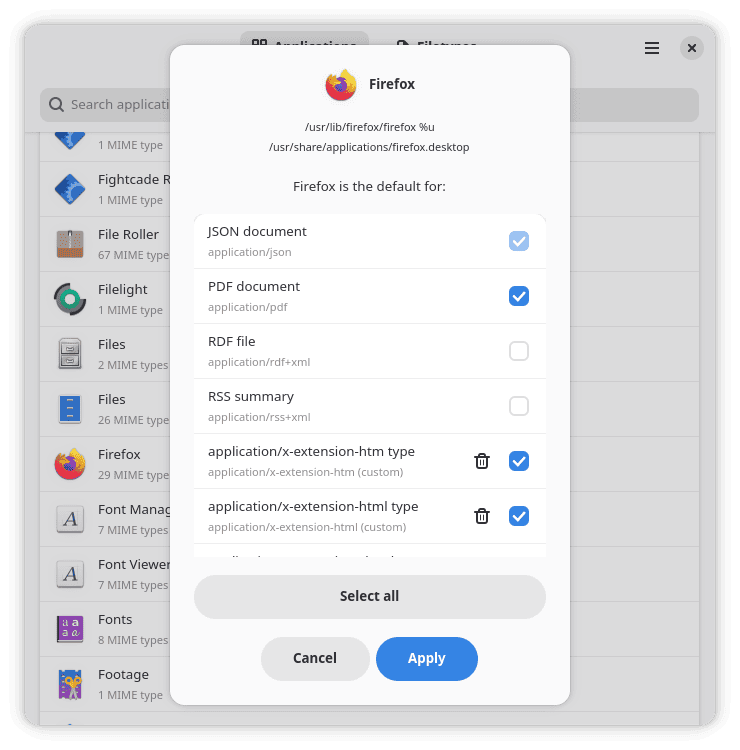
Mimic is a graphical utility for managing default applications and MIME type associations. It provides an easier way to inspect and modify the associations normally stored in mimeapps.list files, avoiding the need to edit these configuration files manually.
The application offers two main views. You can browse installed applications to see the file types associated with each program, or approach the task from the opposite direction by browsing MIME types and selecting which application should handle them. Mimic uses GTK4 and Libadwaita for its interface.
This is free and open source software.
Key Features
- Browse installed applications and their associated MIME types.
- Browse file types grouped into categories such as audio, images, text, video, fonts and models.
- Set the default application used to handle a MIME type.
- Add new MIME type associations to installed applications.
- Remove custom associations that are no longer required.
- Distinguishes between application-provided, custom-added and default associations.
- Recognises system-wide, local, desktop-specific and implicit defaults.
- Can load defaults supplied by the selected desktop environment.
- Search applications by name or executable.
- Search MIME types by identifier or human-readable description.
- Can display applications which do not currently advertise any MIME associations.
- Handles applications represented by multiple desktop files.
- Accounts for multiple applications configured as defaults and duplicate entries.
- Writes changes through temporary files before replacing existing configuration.
- Offers keyboard shortcuts for searching and switching between application and file-type views.
Website: github.com/ArijanJ/Mimic
Support:
Developer: Arijan J
License: GNU General Public License v2.0
Mimic is written in Python. Learn Python with our recommended free books and free tutorials.
 LinuxLinks helps you discover the best free and open source software for Linux. Explore our extensive collection of recommended applications, including alternatives to popular proprietary software. LinuxLinks helps you discover the best free and open source software for Linux. Explore our extensive collection of recommended applications, including alternatives to popular proprietary software.We also publish software reviews, Linux tutorials, hardware reviews, free programming books and articles covering the wider open source community. Browse our Linux resources to discover more. Know a useful free and open source Linux application we haven't covered? Suggest a program for inclusion. Has your software been featured on LinuxLinks? Display one of our Featured on LinuxLinks badges on your website or GitHub README. |
Please read our Comment Policy before commenting.