

Select Default Application is a graphical utility for managing default applications and MIME associations on Linux. The application is built with Qt and C++ and follows the XDG MIME Apps specification so that changes use the same association mechanisms understood by freedesktop.org-compatible desktop environments.
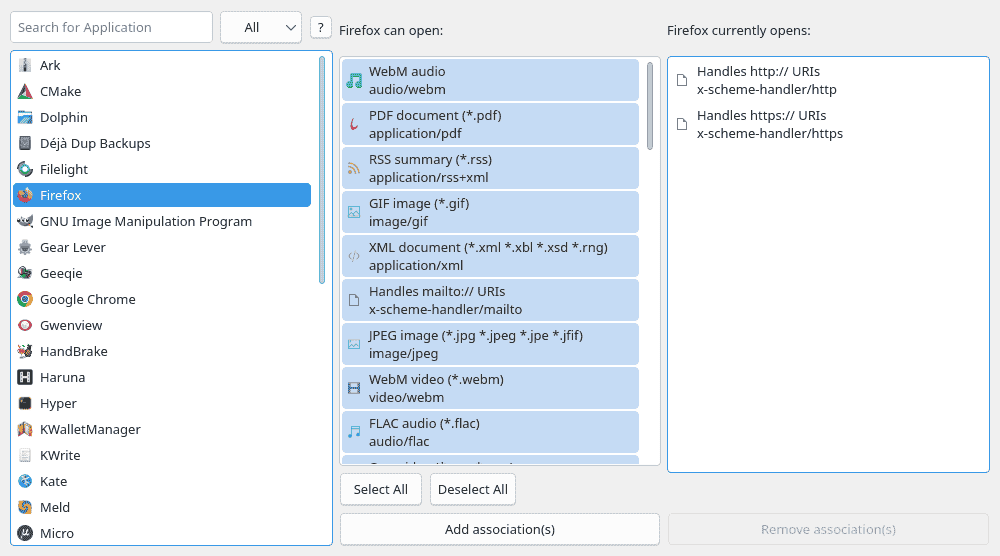
Its interface is application-centred: users select an installed program, inspect the MIME types it advertises, and view the types for which it is currently the default. The backend separately handles discovery, precedence and updates, while the GUI presents association changes and conflicts without requiring manual editing of mimeapps.list.
This is free and open source software.
Key Features
- Reads user, system-wide and desktop-specific MIME association files according to XDG precedence rules.
- Adds associations that make a selected application the default for chosen MIME types.
- Removes explicit user associations so lower-priority defaults can take effect again.
- Presents conflicting existing defaults before they are overwritten.
- Lets users choose individual MIME types to change when several conflicts are detected at once.
- Provides application search and MIME-category filtering.
- Displays application and MIME type icons using the desktop icon theme.
- Offers Select All and Deselect All controls for bulk association management.
- Uses a three-panel layout showing applications, supported MIME types and current defaults.
- Writes changes atomically with
QSaveFileto reduce the risk of damaged configuration. - Performs batch updates to reduce repeated disk writes.
- Supports desktop environments and window-manager setups that follow freedesktop.org standards.
- Provides focused verbose logging for MIME parsing and association changes.
- Depends on Qt rather than KDE Frameworks, keeping it usable outside Plasma.
Website: github.com/Tenshou170/selectdefaultapplication-Qt6
Support:
Developer: Tenshou170
License: GNU General Public License v3.0
Select Default Application is written in C++. Learn C++ with our recommended free books and free tutorials.
 LinuxLinks helps you discover the best free and open source software for Linux. Explore our extensive collection of recommended applications, including alternatives to popular proprietary software. We also publish software reviews, Linux tutorials, hardware reviews, free programming books and articles covering the wider open source community. Browse our Linux resources to discover more. Know a useful free and open source Linux application we haven't covered? Suggest a program for inclusion. Has your software been featured on LinuxLinks? Display one of our Featured on LinuxLinks badges on your website or GitHub README. |
Please read our Comment Policy before commenting.