

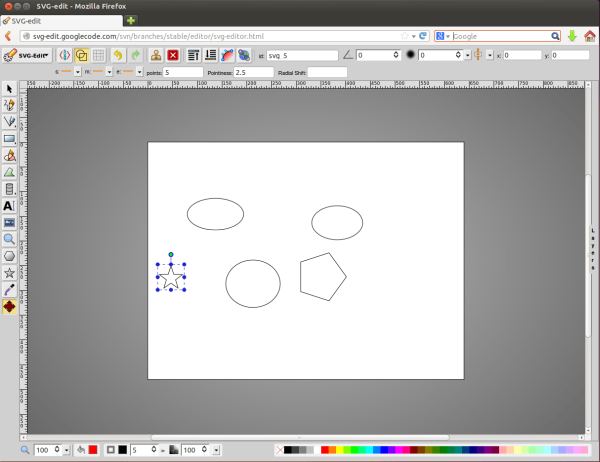
SVG-edit is a browser-based vector graphics editor for creating and modifying Scalable Vector Graphics (SVG) files. It provides a graphical drawing environment for working with shapes, paths, text, gradients and embedded images. Its interface offers familiar object selection and transformation tools, making it possible to edit SVG documents without working directly with their XML representation.
The application supports both visual editing and direct modification of SVG source code. Objects can be arranged into groups and layers, while path editing tools provide access to individual segments and control points. SVG-edit also includes alignment controls, colour and gradient editors, an eyedropper and several export formats. Its underlying SVG canvas component can be incorporated into other web applications, and the editor supports extensions for adding functionality. Current development targets modern browsers rather than the obsolete browser versions listed in older documentation.
This is free and open source software.
Key Features
- Create and edit SVG graphics in a web browser.
- Draw freehand lines, polylines and Bézier paths.
- Create rectangles, rounded rectangles, ellipses, circles, polygons and stars.
- Insert and style text objects.
- Embed raster images in SVG documents.
- Select, move, resize and rotate drawing objects.
- Group, ungroup and align multiple objects.
- Organise artwork using layers.
- Convert supported geometric shapes into editable paths.
- Edit individual path segments and control points.
- Add and modify subpaths within complex shapes.
- Apply solid fills, strokes, linear gradients and radial gradients.
- Configure stroke width, line joins and end caps.
- Select colours through a picker and eyedropper tool.
- Arrange objects using alignment and positioning controls.
- Use zoom, pan and wireframe display modes.
- Change canvas dimensions and background appearance.
- Display and modify SVG source code directly.
- Open existing SVG documents and save edited files.
- Import SVG content into the current drawing.
- Export graphics to PNG, JPEG, BMP and WebP.
- Undo and redo editing operations.
- Support additional capabilities through an extension system.
- Embed the SVG canvas component in other web applications.
- Provide a configurable interface with localisation support.
Website: github.com/SVG-Edit/svgedit
Support:
Developer: SVG-edit Team
License: MIT License
SVG-edit is written in JavaScript. Learn JavaScript with our recommended free books and free tutorials.
Related Software
| Vector Graphics Editors | |
|---|---|
| Inkscape | Vector-based drawing program |
| Graphite | 2D vector and raster editor |
| OpenPencil | Combines visual design tools with automation facilities |
| SVG-edit | Complete vector graphics editor in the browser (in JavaScript) |
| Xfig | Draw and manipulate objects interactively |
| GodSVG | Editor for Scalable Vector Graphics files |
| LibreOffice Draw | Vector graphics editor and diagramming tool |
| LateXDraw | Vector drawing program for LaTeX using PSTricks |
| sK1 | High quality illustration program |
| VPaint | Experimental vector graphics and 2D animation editor |
| Karbon | Vector drawing and editing application |
| Ipe | Extensible drawing editor |
Read our verdict in the software roundup.
 LinuxLinks helps you discover the best free and open source software for Linux. Explore our extensive collection of recommended applications, including alternatives to popular proprietary software. We also publish software reviews, Linux tutorials, hardware reviews, free programming books and articles covering the wider open source community. Browse our Linux resources to discover more. Know a useful free and open source Linux application we haven't covered? Suggest a program for inclusion. Has your software been featured on LinuxLinks? Display one of our Featured on LinuxLinks badges on your website or GitHub README. |
Please read our Comment Policy before commenting.