

hyprsunset is a colour-temperature and gamma adjustment utility developed for the Hyprland Wayland compositor. It provides a way to make displays appear warmer, particularly during evening hours, without relying on conventional screen shaders.
The application uses Hyprland’s colour transformation matrix protocol to modify the appearance of connected displays. It supports automatic changes at specified times and manual adjustments through command-line controls, allowing users to configure different display characteristics throughout the day.
This is free and open source software.
Key Features
- Adjusts display colour temperature to reduce the proportion of blue light and produce a warmer appearance.
- Uses Hyprland’s colour transformation matrix protocol rather than applying a conventional screen shader.
- Colour transformations are not included in normal screenshots or screen recordings.
- Gamma adjustment changes perceived screen brightness, including below the monitor’s normal minimum brightness.
- Time-based profiles automatically switch between different colour-temperature and gamma settings.
- Supports multiple profiles with individually configured activation times and display characteristics.
- Each profile can specify colour temperature, gamma and whether colour filtering should be disabled.
- Automatically applies the appropriate scheduled profile when the application starts.
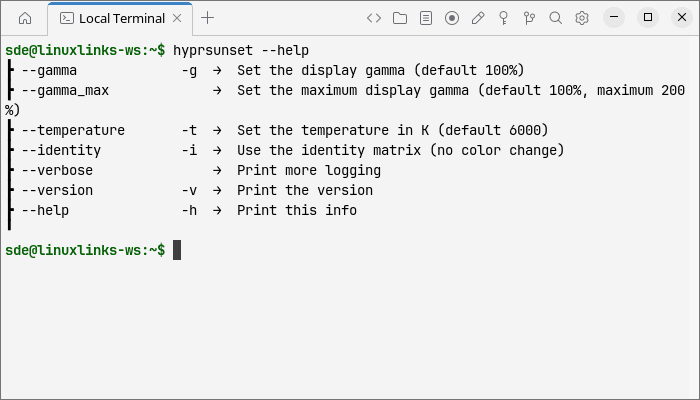
- Provides command-line controls for temporarily overriding the active colour-temperature setting.
- Supports runtime adjustments through Hyprland’s hyprctl interface, including relative gamma changes.
- Identity mode disables colour-temperature adjustments while permitting gamma control.
- Reset commands restore the complete active profile or selected settings such as temperature and gamma.
- Configurable maximum gamma values allow administrators to limit brightness adjustments.
- Profiles can execute a specified command when activated, enabling integration with other desktop workflows.
- Supports querying the current profile and integrating adjustment commands with Hyprland keyboard shortcuts.
Website: github.com/hyprwm/hyprsunset
Support:
Developer: Hypr Development
License: BSD 3-Clause ‘New’ or ‘Revised’ License
hyprsunset is written in C++. Learn C++ with our recommended free books and free tutorials.
Related Software
| Eye Care Software | |
|---|---|
| Safe Eyes | Simple and extensible break reminder |
| Clight | Lightweight C daemon that turns your webcam into a light sensor |
| Stretchly | Reminder to take breaks |
| BreakTimer | Set up customizable breaks and will remind you to take them |
| Workrave | Assists in the recovery and prevention of Repetitive Strain Injury |
| Gammastep | Adjust the color temperature of your screen |
| wluma | Adaptive brightness based on screen content and ambient light |
| hyprsunset | Blue-light filtering and gamma adjustment for Hyprland |
| ZenBreak | Menu bar app that reminds you to take breaks |
| RSIBreak | Take care of your health and take regular breaks |
| sunsetr | Automatic blue-light filter |
| wlsunset | Adjusts display color temperature on Wayland compositors |
| Stretch Break | Digital wellbeing tool that helps you take regular breaks |
| Sane Break | Gentle break reminder |
| Taline | Eye-break reminders based on the 20-20-20 rule |
| eyerest | Remind your eyes to take a screen break |
| Blink | Configurable reminders to take regular screen breaks |
Read our verdict in the software roundup.
 LinuxLinks helps you discover the best free and open source software for Linux. Explore our extensive collection of recommended applications, including alternatives to popular proprietary software. We also publish software reviews, Linux tutorials, hardware reviews, free programming books and articles covering the wider open source community. Browse our Linux resources to discover more. Know a useful free and open source Linux application we haven't covered? Suggest a program for inclusion. Has your software been featured on LinuxLinks? Display one of our Featured on LinuxLinks badges on your website or GitHub README. |
Please read our Comment Policy before commenting.