

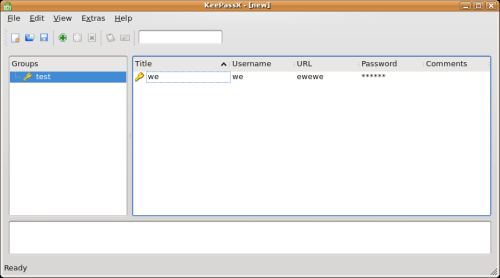
KeePassX is a multi-platform port of KeePass, an open source and cross-platform password manager. This utility helps you to manage your passwords in a secure way. You can put all your passwords in one database, which is locked with one master key or a key-disk. This lets users only need to remember one single master password or insert the key-disk to unlock the whole database.
The databases are encrypted using the algorithms AES (alias Rijndael) or Twofish using a 256 bit key.
KeePassX currently uses same the database file format as the KeePass 1.x (Classic) password manager software for Windows.
Key Features
- Extensive management- title for each entry for better identification:
- Determine different expiration dates.
- Insertion of attachments.
- User-defined symbols for groups and entries.
- Fast entry duplication.
- Sorting entries in groups.
- Search function: in specific groups or in the complete database.
- Auto-Type, a feature that allows you to e.g. log in to a web page by pressing a single key combination. KeePassX does the rest of the typing for you. Auto-Type reads the title of currently active window on your screen and matches it to the configured database entries.
- Database security with access to the KeePassX database being granted either with a password, a key-file (e.g. a CD or a memory-stick) or both.
- Automatic generation of secure passwords.
- Precaution features, quality indicator for chosen passwords hiding all passwords behind asterisks.
- Encryption- either the Advanced Encryption Standard (AES) or the Twofish algorithm are used, with encryption of the database in 256 bit sized increments.
- Import and export of entries. Import from PwManager (*.pwm) and KWallet (*.xml) files, Export as textfile (*.txt).
Website: www.keepassx.org
Support: FAQ
Developer: KeePassX Team
License: GNU GPL v2
KeePassX is written in C++. Learn C++ with our recommended free books and free tutorials.
Related Software
| GUI Password Managers | |
|---|---|
| KeePassXC | Safely store passwords and auto-type them into websites and software |
| Bitwarden | Password management for individuals, teams, and business organizations |
| KeeWeb | Password manager compatible with KeePass |
| Secrets | Password manager which makes use of the KeePass v.4 format |
| Password Safe | Password manager using wxWidgets |
| QtPass | Graphical User Interface for pass |
| KWalletManager | Password management tool with Blowfish and GPG encryption |
| Rooster | Simple password manager for geeks |
| OneKeePass | Supports the KeePass-compatible database |
| SpicyPass | Lightweight password manager |
| KeePassX | Multi-platform port of KeePass |
| Seahorse | GNOME front end for GnuPG |
| Pasaffe | Easy to use password manager for GNOME |
| Rotor | Stateless password manager |
| Identities | Modern password-store client made for GNOME |
| FMP | Password manager written in memory-safe Rust |
| Passy | Offline password manager with cross-platform synchronization |
| Keycord | Browse and edit password stores |
| Keybox | Minimal, encrypted, local password manager |
| Key Rack | View and edit passwords |
| FPM2 | GTK2 port from Figaro’s Password Manager |
| Buttercup | Simple password manager based on NodeJS |
Read our verdict in the software roundup.
 Explore our carefully curated directory of recommended free and open source software, covering every major software category. Explore our carefully curated directory of recommended free and open source software, covering every major software category.The directory forms part of our extensive collection of articles for Linux enthusiasts. It includes hundreds of detailed reviews, together with free and open source alternatives to proprietary software from companies such as Google, Microsoft, Apple, Adobe, IBM, Cisco, Oracle, and Autodesk. LinuxLinks also covers interesting projects worth exploring, Linux-compatible hardware, free programming books and tutorials, and much more. Know a useful free and open source Linux application that we haven’t covered? Tell us about it using our submission form. |
Please read our Comment Policy before commenting.