

Hashing is the process of passing data through a formula to produce a condensed fixed-value representation, called a hash value. That hash is typically a string of characters and the hashes generated by a formula are always the same length, regardless of how much data fed into it. For example, the MD5 formula produces 128-bit checksums. It converts data into blocks of specific sizes and manipulates that data a number of times.
Data security applications require the hash function is collision-resistant, which means that it is very hard to find data that will generate the same hash value. Hashing is an important method used for creating a digital signature and for encrypting data.
When you download a file from the internet, it’s good safety practice to check whether you received the original version. Comparing checksums you received from the file creator with the ones you obtain by checking the file yourself is a reliable way to confirm your download’s integrity.
This article picks the best GUI tools for data hashing. We only feature free and open source software.
Here’s our verdict captured in a legendary LinuxLinks-style ratings chart.
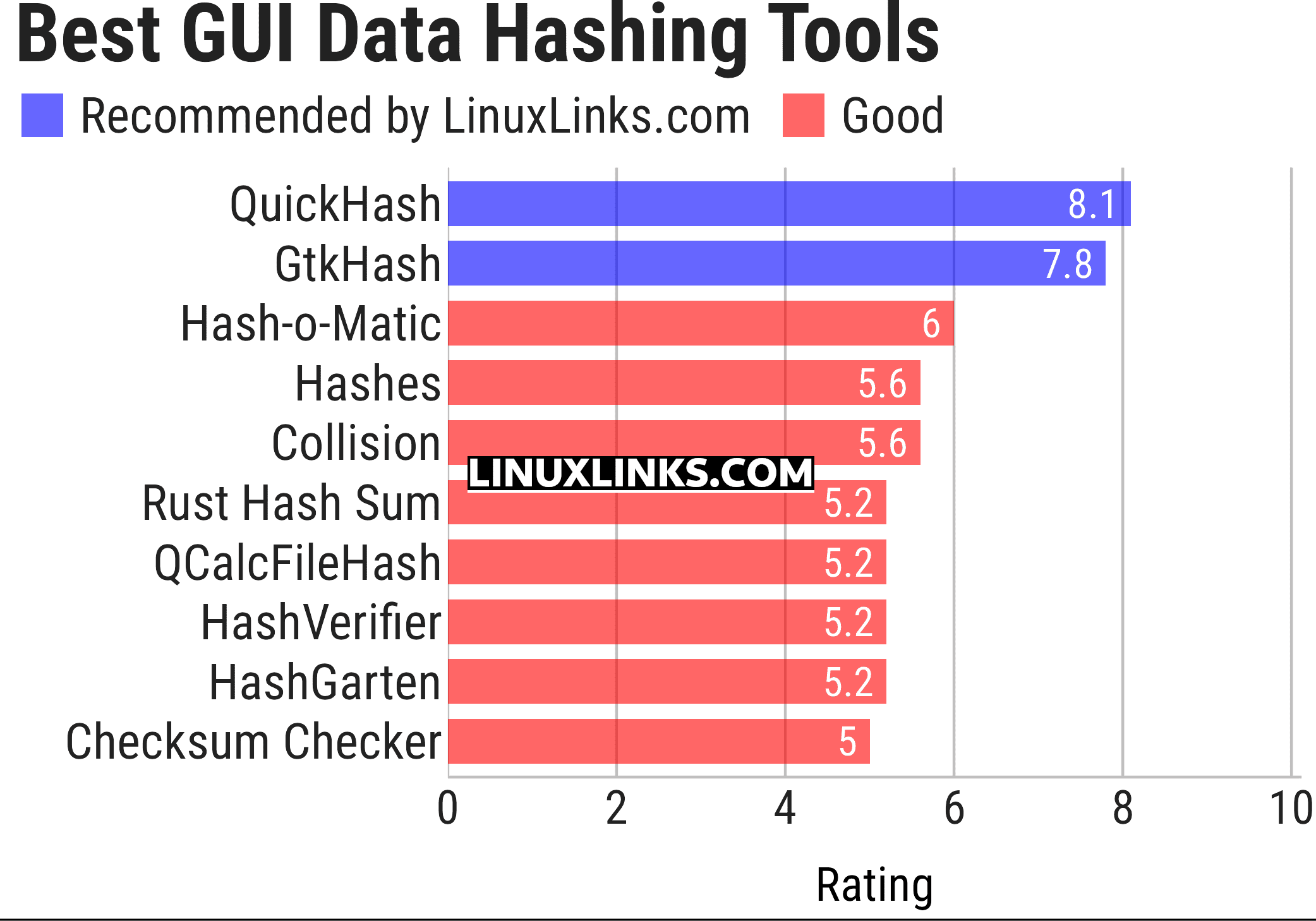
Let’s explore the data hashing GUI tools. For each program we have compiled its own portal page, a full description with an in-depth analysis of its features, together with links to relevant resources.
| GUI Data Hashing Tools | |
|---|---|
| QuickHash GUI | Data hashing tool |
| GtkHash | Desktop utility for computing message digests or checksums |
| Hash-o-Matic | Generate, compares and verify MD5, SHA-256 and SHA-1 hashes |
| Hashes | Simple hash algorithm identification |
| Collision | Checks hashes for your files |
| Rust Hash Sum | Calculate and verify file checksums |
| QCalcFileHash | Hash calculator |
| HashVerifier | Checksum generation and verification utility |
| HashGarten | Graphical checksum utility and frontend for Jacksum |
| Checksum Checker | Verify file checksums against expected values |
This article has been updated to reflect the changes outlined in our recent announcement.
 LinuxLinks helps you discover the best free and open source software for Linux. Explore our extensive collection of recommended applications, including alternatives to popular proprietary software. We also publish software reviews, Linux tutorials, hardware reviews, free programming books and articles covering the wider open source community. Browse our Linux resources to discover more. Know a useful free and open source Linux application we haven't covered? Suggest a program for inclusion. Has your software been featured on LinuxLinks? Display one of our Featured on LinuxLinks badges on your website or GitHub README. |
Please read our Comment Policy before commenting.