

ATutor is an open source Web-based Learning Content Management System (LCMS).
Administrators can install or update ATutor quickly, develop custom themes to give ATutor a new look, and easily extend its functionality with feature modules.
Educators can quickly assemble, package, and redistribute Web-based instructional content, easily import prepackaged content, and conduct their courses online. Students learn in an accessible, adaptive, social learning environment.
Key Features
- Inbox / messaging functionality.
- Encrypted login passwords.
- Work groups.
- File storage which can be shared across groups or an entire course.
- Group blogs.
- Feedback.
- Communication tools.
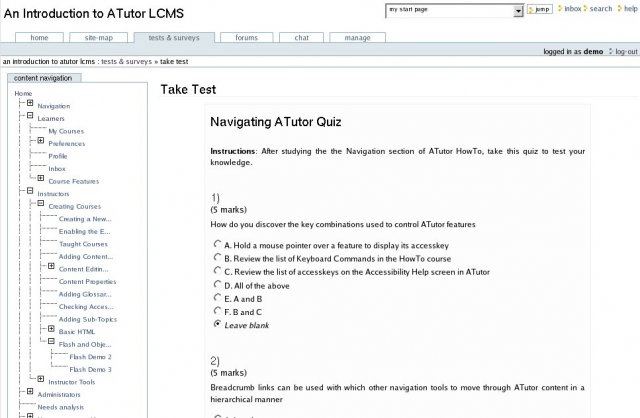
- Students can make tests, check and store the scores.
- Web-based information can be added as links in the ATutor database.
- SCORM Run-Time Environment & SCO Manager.
- Instructor ATutor Handbook: A link to the ATutor Instructor documentation is provided in every section.
- Guest Access to Courses: Guests can access private courses using a link, provided by an instructor. The course can be viewed, but it can not be modified by guests.
- Course Tool Preferences: Instructors can pick only the necessarily tools for defined courses.
- Content Usage: Individual statistics are provided in order to identify issues with the content coverage and the learning progress of each person.
- Work Groups Manager: Different work groups can be created and managed by the instructors.
- File Storage: File Storage functionality allows files to be uploaded, stored and shared with different groups of users.
- Content Editor: HTML content can be created and published in the courses.
- Visual Editor: A JavaScript based WYSIWYG editor is included in the application.
- Reading List: A Reading List with external resources like books can be included by the instructors.
- Backup Manager: The courses can be stored through the backup functionality.
- News & Announcements: Instructors can post news and announcements to inform the students for the courses content and modifications. An RSS feed can be started.
- Polls: Polls can be used to gather students’ opinions.
- Forums: Multiple forums can be set for each of the courses.
- Course Email: Bulk e-mails can be sent to different users.
- Privileges: Tutors can promote students allowing access to different instructors tools.
- Addon Modules: FAQ, Google Search, RSS Feeds, EWiki, ACollab, ATalker Text-to-Speech and SCORM Packages modules are included in the quick installer functionality.
- Module Manager: Administrators can install, enable and disable modules. Some of them are included in the script’s installation package. The others can be integrated additionally.
- Patcher Module: Administrators can easily install different patches and security updates released by the ATutor developers.
- Administrator ATutor Handbook: A link to the ATutor Administrator documentation is provided in every section.
- Administrator Privileges: Specific privileges can be set for each administrator.
- Pretty URLs: Pretty URLs can be enabled. This will ease the search engines in the indexing of the public ATutor courses.
- Themes Manager: Themes can be modified and customized.
- Automated Installer and Upgrade: An easy solution for the ATutor upgrade.
- General Statistics: Shows system usage statistics.
- Secure Course Content: Prevents unauthorized access to courses.
- User Manager: Modification and management of users’ profiles.
- Enrollment Manager: Enrol students to courses.
- Course Manager: Manage courses, assign instructors.
- Backup Manager: Generate backups and download backups of courses.
- Course Categories: Set courses in corresponding categories.
- Language Manager: Import and manage language packs.
- Supports accessibility standards: W3C WCAG 1.0, W3C WCAG 2.0, W3C ATAG 2.0, US Section 508, Italy Stanca Act, IMS AccessForAll 2.0, and ISO FDIS 24751.
- Supports Interoperability standards: OpenSocial 1.0, OAuth Authentication Protocol, IMS Content Packaging 1.1.2+, SCORM Content Packaging, SCORM 1.2 LMS RTE3, IMS Question Test Interoperability (QTI) 1.2/2.1, IMS Common Cartridge 1.0, and W3C XHTML 1.0.
Website: atutor.github.io
Support: GitHub Code Repository
Developer: Inclusive Design Research Centre, OCAD University
License: GNU General Public License v2.0
ATutor is written in PHP. Learn PHP with our recommended free books and free tutorials.
Related Software
| e-Learning Tools | |
|---|---|
| Moodle | Modular Object-Oriented Dynamic Learning Environment |
| Oppia | Online learning tool simulating a one-on-one conversation with a tutor |
| Processing | Flexible software sketchbook and language |
| Chamilo | Flexible, easy-to-use e-Learning platform |
| Canvas | Modern learning management system. |
| ILIAS | Flexible and powerful open source learning management system |
| Frappe Learning | Easy-to-use learning system |
| VUE | Concept and content mapping application |
| Claroline | Collaborative e-Learning and eWorking platform |
| Omeka S | Web publication system for universities, galleries, libraries, archives |
| SWAD | Social Workspace At a Distance |
| BOSS | Course management tool |
| ATutor | Designed with accessibility and adaptability in mind |
Read our verdict in the software roundup.
| Classroom Tools | |
|---|---|
| Moodle | Produce modular internet-based courses |
| Veyon | Computer monitoring and classroom management |
| TCExam | FLOSS Computer-Based Assessment system |
| Epoptes | Computer lab management and monitoring tool |
| Claroline | Collaborative e-Learning and eWorking platform |
| Mando | Interactive whiteboard using a camera and a projector |
| iTest | Computerised examination |
| ATutor | Designed with accessibility and adaptability in mind |
Read our verdict in the software roundup.
| Tools for Librarians | |
|---|---|
| BiblioteQ | Professional cataloging and library management suite |
| LibKi | Reservation and time management system |
| VIVO | Semantic researcher networking |
| SubjectsPlus | Manage interrelated parts of a library website |
| MRBS | Web-based booking system |
| Omeka S | Web publication system for universities, galleries, libraries |
| ATutor | Designed with accessibility and adaptability in mind |
| OpenRoom | Simple online interface for managing and reserving rooms |
| Guide on the Side | Create online, interactive tutorials |
Read our verdict in the software roundup.
 Explore our carefully curated directory of recommended free and open source software, covering every major software category. Explore our carefully curated directory of recommended free and open source software, covering every major software category.The directory forms part of our extensive collection of articles for Linux enthusiasts. It includes hundreds of detailed reviews, together with free and open source alternatives to proprietary software from companies such as Google, Microsoft, Apple, Adobe, IBM, Cisco, Oracle, and Autodesk. LinuxLinks also covers interesting projects worth exploring, Linux-compatible hardware, free programming books and tutorials, and much more. Know a useful free and open source Linux application that we haven’t covered? Tell us about it using our submission form. |
Please read our Comment Policy before commenting.