

Processing is a programming environment for learning to code through visual and interactive projects. It makes graphics, animation and interaction central to the programming process, helping learners see the results of their code immediately.
The software is widely used in education, digital art, creative coding and interactive design. Beginners can start with simple drawings and animations before progressing to simulations, data visualisations and more elaborate applications.
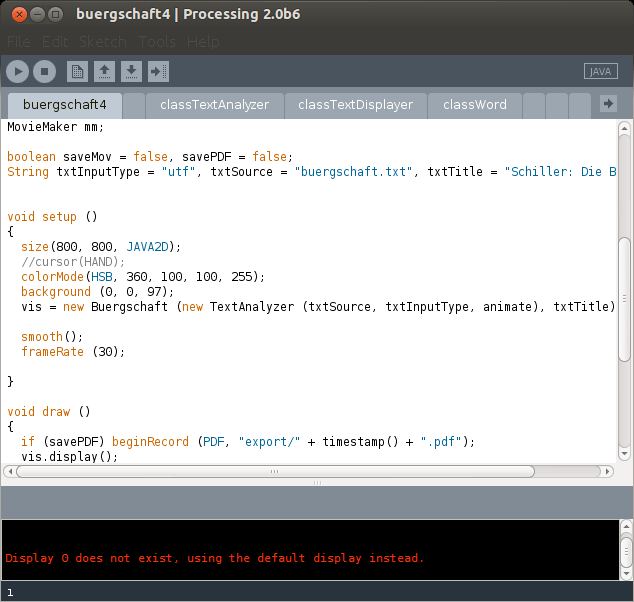
Processing includes its own development environment, often called the Processing Development Environment (PDE). Programs are known as sketches and can be organised into a sketchbook, making it straightforward to experiment with different ideas and projects.
The environment is deliberately less complex than a conventional integrated development environment, while supporting more advanced work through contributed libraries, tools and programming modes.
This is free and open source software.
Key Features
- Processing Development Environment with an integrated editor, execution controls and error reporting.
- Sketchbook system for organising programming projects.
- Simple drawing commands for shapes, colours, text and images.
- Support for 2D and 3D graphics, animation and interactive applications.
- OpenGL-accelerated rendering for graphics-intensive sketches.
- Event handling for keyboard, mouse and other forms of user interaction.
- Built-in functions for transformations, geometry, mathematical calculations and typography.
- Support for loading, manipulating and displaying images.
- Extensible functionality through libraries for sound, video, networking, serial communication and other capabilities.
- Contribution Manager for discovering and managing additional libraries, tools, modes and examples.
- Alternative programming modes for different languages and target environments.
- Example sketches and reference documentation covering fundamental programming concepts.
- Export facilities for sharing projects as standalone applications.
- Support for integration with external hardware and interactive installations.
- Cross-platform support – runs on Linux, macOS, and Windows.
Website: github.com/benfry/processing4
Support:
Developer: Casey Reas, Ben Fry and contributors
License: GNU General Public License v2.0 (development environment); GNU Lesser General Public License v2.1 (core library)
Processing is written in Java. Learn Java with our recommended free books and free tutorials.
Related Software
| e-Learning Tools | |
|---|---|
| Moodle | Modular Object-Oriented Dynamic Learning Environment |
| Oppia | Online learning tool simulating a one-on-one conversation with a tutor |
| Processing | Flexible software sketchbook and language |
| Chamilo | Flexible, easy-to-use e-Learning platform |
| Canvas | Modern learning management system. |
| ILIAS | Flexible and powerful open source learning management system |
| Frappe Learning | Easy-to-use learning system |
| VUE | Concept and content mapping application |
| Claroline | Collaborative e-Learning and eWorking platform |
| Omeka S | Web publication system for universities, galleries, libraries, archives |
| SWAD | Social Workspace At a Distance |
| BOSS | Course management tool |
| ATutor | Designed with accessibility and adaptability in mind |
Read our verdict in the software roundup.
| Programming Tools for Kids | |
|---|---|
| Snap! | Visual, block, drag-and-drop programming language |
| TurboWarp | Mod of Scratch |
| Scratch | Easy to use programming environment for ages 8 and up |
| Blockly | Web-based, visual programming editor that's developed by Google |
| Processing | Flexible software sketchbook and language |
| Greenfoot | Simple but powerful Java IDE |
| KTurtle | Educational programming environment for learning how to program |
| Alice | Innovative 3D programming environment |
| BASIC-256 | Easy to use version of BASIC |
| Robocode | Engaging and educational programming game |
| Hedy | Gradual textual programming language |
| CodeWorld | Web-based educational programming environment |
Read our verdict in the software roundup.
 LinuxLinks helps you discover the best free and open source software for Linux. Explore our extensive collection of recommended applications, including alternatives to popular proprietary software. We also publish software reviews, Linux tutorials, hardware reviews, free programming books and articles covering the wider open source community. Browse our Linux resources to discover more. Know a useful free and open source Linux application we haven't covered? Suggest a program for inclusion. Has your software been featured on LinuxLinks? Display one of our Featured on LinuxLinks badges on your website or GitHub README. |
Please read our Comment Policy before commenting.