
The Raspberry Pi created a lot of interest in the press for its low cost and credit-card size. The main reason for the creation of the Raspberry Pi was to see it used by kids all across the globe to learn programming. Computer classes in the UK have been constrained by the national curriculum for ICT, with students having to limit their computing activities to learning applications such as Word and PowerPoint, and using the internet to help with their school work. However, learning how to use Microsoft Office is often of little or no interest to students. Students are motivated by interactive activities such as programming, as they like to make things to find out how they work.
The art of programming is often perceived as being a difficult activity. This is, in part, because coding can be quite unforgiving with lots of information to remember. It is not a simple activity such as surfing the net, or formatting paragraph text.
Fortunately, there are a growing range of software, often open source, that helps students learn how to code. Stripping away the complexity, the programming languages and associated tools featured in this article aim to create new ways of helping students create projects that appeal to younger minds.
To provide an insight into the quality of software that is available, we have compiled a list of 12 high quality programming tools that provide an ideal introduction to programming. Hopefully, there will be something of interest here for teachers and students alike.
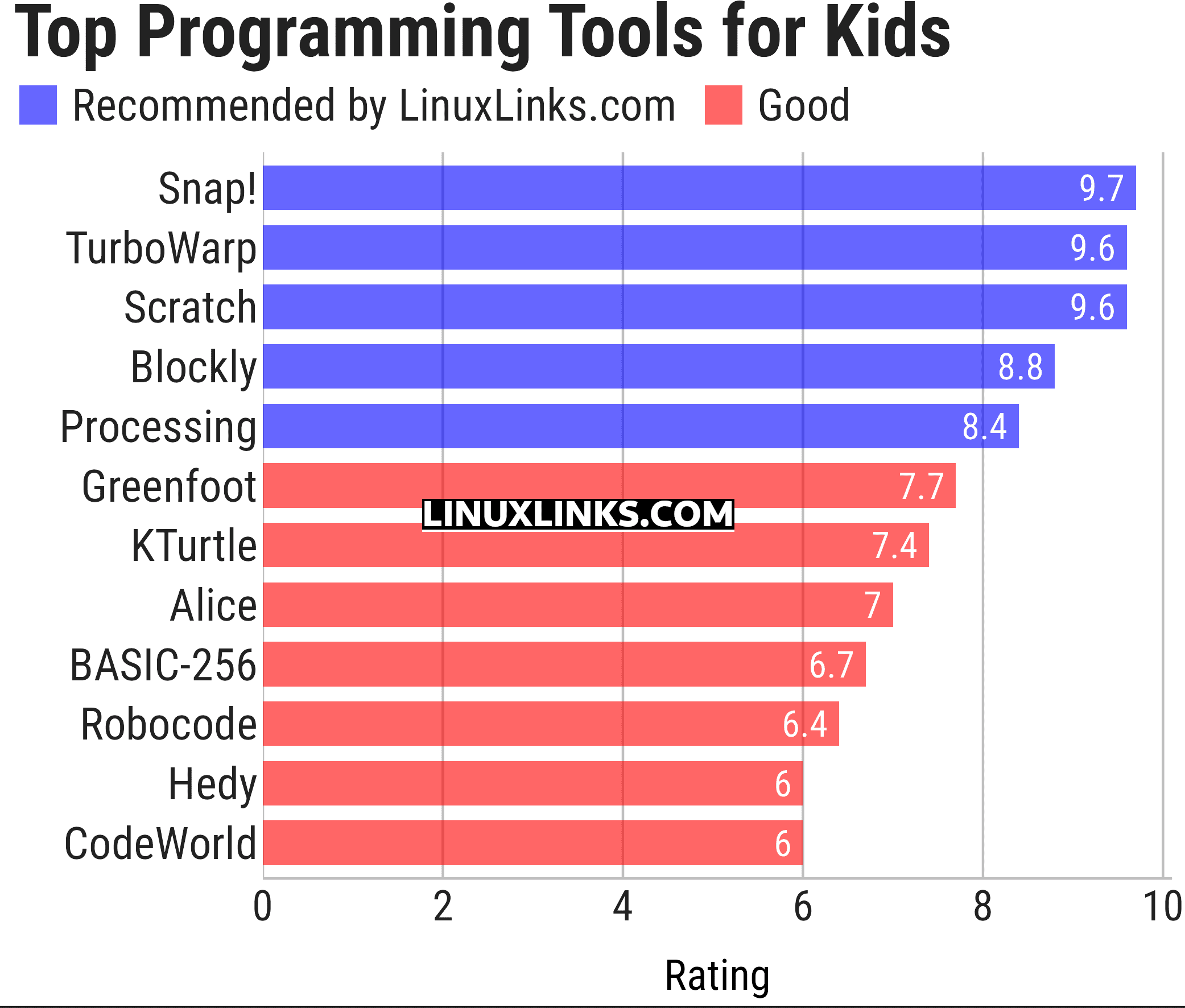
Let’s explore the 12 programming tools at hand. For each title we have compiled its own portal page, a full description with an in-depth analysis of its features, a screenshot of the software in action, together with links to relevant resources.
| Programming Tools for Kids | |
|---|---|
| Snap! | Visual, block, drag-and-drop programming language |
| TurboWarp | Mod of Scratch |
| Scratch | Easy to use programming environment for ages 8 and up |
| Blockly | Web-based, visual programming editor that's developed by Google |
| Processing | Flexible software sketchbook and language |
| Greenfoot | Simple but powerful Java IDE |
| KTurtle | Educational programming environment for learning how to program |
| Alice | Innovative 3D programming environment |
| BASIC-256 | Easy to use version of BASIC |
| Robocode | Engaging and educational programming game |
| Hedy | Gradual textual programming language |
| CodeWorld | Web-based educational programming environment |
This article has been updated to reflect the changes outlined in our recent announcement.
 LinuxLinks helps you discover the best free and open source software for Linux. Explore our extensive collection of recommended applications, including alternatives to popular proprietary software. LinuxLinks helps you discover the best free and open source software for Linux. Explore our extensive collection of recommended applications, including alternatives to popular proprietary software.We also publish software reviews, Linux tutorials, hardware reviews, free programming books and articles covering the wider open source community. Browse our Linux resources to discover more. Know a useful free and open source Linux application we haven't covered? Suggest a program for inclusion. Has your software been featured on LinuxLinks? Display one of our Featured on LinuxLinks badges on your website or GitHub README. |
Please read our Comment Policy before commenting.
What about TurboWarp?
Is it FOSS? I had the same question as you
I’m sure you can find out this information. Yes, it’s GPL, but it’s just a mod of Scratch.
I’ve taken over maintenance of this roundup. I’ve added TurboWarp.