

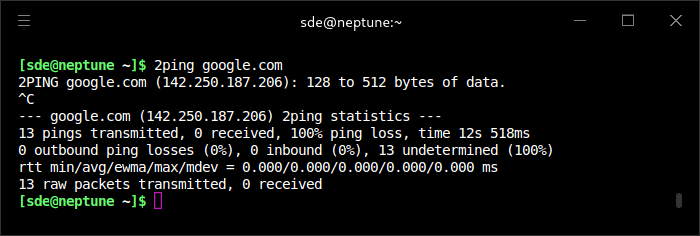
2ping is a bi-directional network diagnostic utility designed to determine which direction packet loss occurs between two systems. It uses a protocol involving a client and listener, allowing measurements that conventional one-way ping requests cannot provide.
The application exchanges additional acknowledgements and maintains state information about transmitted and received requests. When packets are lost, the two endpoints can compare their records to determine whether the loss occurred on the outward or return path.
2ping is useful for administrators investigating asymmetric network problems. It can help distinguish traffic lost in one direction from traffic lost in the other, providing more precise evidence when diagnosing difficult connectivity issues.
This is free and open source software.
Key Features
- Measure round-trip connectivity between two participating endpoints.
- Determine the direction of packet loss through state comparison.
- Three-way ping exchanges using a request, reply and acknowledgement.
- Operate over UDP rather than requiring ICMP echo handling.
- Support IPv4 and IPv6 communication.
- Client and listener modes for bi-directional measurements.
- Maintain endpoint state to account for delayed or lost acknowledgements.
- Continue investigations across temporary connectivity failures.
- Display packet-loss statistics for outgoing and incoming traffic.
- Configurable probing intervals, timeouts and packet sizes.
- Useful for investigating asymmetric links and intermittent network failures.
Website: forge.colobox.com/rfinnie/2ping
Support:
Developer: Ryan Finnie
License: Mozilla Public License v2.0
2ping is written in Python. Learn Python with our recommended free books and free tutorials.
Related Software
| Alternatives to ping | |
|---|---|
| pingnoo | Offers a graphical representation for traceroute and ping output (GUI) |
| hping3 | Supports TCP, UDP, ICMP and RAW-IP protocols with traceroute mode |
| gping | Ping but with a graph |
| GNOME Nettool | Performs ping, netstat, traceroute, port scans, lookup, and whois (GUI) |
| mtr | Combines 'traceroute' and 'ping' programs in a single network tool |
| pingtop | Ping multiple servers and show the result in a top like terminal UI |
| pingu | Command implementation in Go but with colorful output and pingu ascii art |
| 2ping | Bi-directional ping tool using 3-way pings (akin to TCP SYN, SYN/ACK, ACK) |
| BWPing | Measures bandwidth and response times between two hosts using ICMP |
| cnping | Minimal graphical IPv4 Ping / HTTP tool |
| fping | Send ICMP echo probes to network hosts |
| SmokePing | Measure, store and display latency, latency distribution and packet loss |
| tcping | ICMP ping but for TCP |
| alive | Periodic ping |
| ping3 | Python3 version of ICMP ping |
| echoping | Testing tool for network protocols |
| xping | Continuously probe multiple hosts using icmp-echo |
| omping | Test IPv4/IPv6 multicast connectivity on a LAN |
| Trippy | Network diagnostic tool combining the functionality of ping & traceroute |
| Echo | Simple GUI GTK4 utility to ping websites |
| pingstat | Multi-server ping logging |
| myping | Ping multiple hosts at the same time |
| mtr085 | Fork of mtr adding functionality such as Unicode histograms |
| mtr-gtk | GUI frontend |
| Ping Monitor | Displays real-time ping times (GUI) |
| split ping | See the direction of loss or latency |
| ring | ping rewritten in Rust |
 LinuxLinks helps you discover the best free and open source software for Linux. Explore our extensive collection of recommended applications, including alternatives to popular proprietary software. We also publish software reviews, Linux tutorials, hardware reviews, free programming books and articles covering the wider open source community. Browse our Linux resources to discover more. Know a useful free and open source Linux application we haven't covered? Suggest a program for inclusion. Has your software been featured on LinuxLinks? Display one of our Featured on LinuxLinks badges on your website or GitHub README. |
Please read our Comment Policy before commenting.