

X File Explorer (Xfe) is an Microsoft Explorer or Commander like file manager for Linux.
Xfe is small, very fast and only requires the FOX library to be fully functional. It can be launched from the command line extremely quickly. Xfe can also efficiently complete terminal commands.
Xfe is desktop independent and can easily be customized. It has Commander and Explorer styles. Xfe is based on the popular, but discontinued X Win Commander, originally written by Maxim Baranov.
Key Features
- Fast graphical user interface.
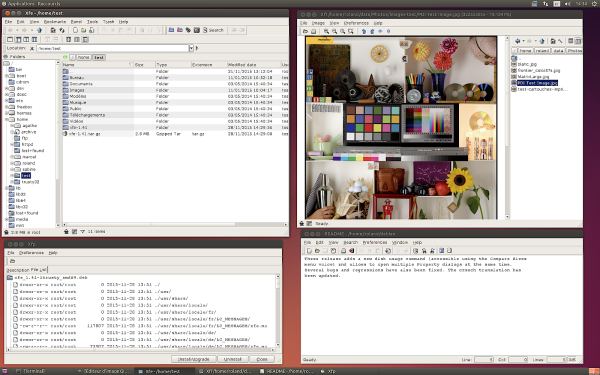
- Commander/Explorer interface with four file manager modes : a) one panel, b) a directory tree and one panel, c) two panels, and d) a directory tree and two panels.
- Integrated text editor (X File Write, xfw).
- Integrated text viewer (X File View, xfv).
- Integrated image viewer (X File Image, xfi).
- Integrated RPM or DEB packages viewer / installer / uninstaller (X File Package, xfp).
- Copy/cut/paste files from and to your favorite desktop (GNOME/KDE/XFCE).
- Drag and Drop in Xfe and from and to your favorite desktop.
- Root mode.
- Status line.
- File associations.
- Optional trash can for file delete operations.
- Auto save registry.
- Double click or single click files and directories navigation.
- Right mouse click pop-up menu in tree list and file list.
- Change file(s) attributes.
- Mount/Unmount devices.
- Toolbar.
- Bookmarks (up to 20).
- Back and forward history lists for directory navigation.
- Color themes (GNOME, KDE, Windows 95, iMac, BeOS and many more).
- Icons themes (XFE, GNOME, XFCE, …).
- Create / Extract archives (tar, zip, gzip, bzip2, compress, rar, lzh formats are supported).
- Tooltips with file properties.
- Progress bars or dialogs for lengthy file operations.
- Thumbnails image previews.
- Ability to enqueue multimedia files (open command).
- UTF-8 support (through the FOX 1.6 library).
- Key bindings that can be modified and restored.
- Available in 17 languages (French, German, Brazilian Portuguese, Polish, Turkish, Catalan, Spanish, Argentinian Spanish, Italian, Portuguese, Hungarian, Norwegian, Danish, Russian, Czech, Swedish, and Chinese).
Website: roland65.free.fr/xfe/
Support: Documentation
Developer: Roland Baudin
License: GNU General Public License v2.0
Xfe is written in C++. Learn C++ with our recommended free books and free tutorials.
Related Software
| Orthodox File Managers | |
|---|---|
| Krusader | Advanced twin panel (commander style) file manager for KDE |
| Midnight Commander | User-friendly yet powerful text-mode file manager and visual shell |
| Double Commander | Inspired by Total Commander |
| Ranger | File manager with an ncurses frontend written in Python |
| GNOME Commander | Built on the GTK-toolkit and GnomeVFS |
| Xfe | Very similar to Windows Explorer but with twin panes |
| muCommander | Lightweight, cross-platform file manager |
| far2l | AR Manager fork bringing panels, plugins and archives to Linux |
| Vifm | Vim-style two-pane navigator with modal keyboard control |
| File Commander | Total Commander-like orthodox file manager |
| Sunflower | Small and highly customizable twin-panel file manager |
| trolCommander | Fork of muCommander |
| FileRunner | Simple and efficient file manager written in Tcl |
| F2 Commander | Lean text-mode commander for browsing and batch operations |
| Tux Commander | Uses the old GTK2 windowing toolkit |
| Midday Commander | Dual-pane console navigator with Midnight Commander-style flow |
| Worker | In the style of the Amiga's DirOpus |
| Waydir | Wayland-native desktop browser focused on speed and simplicity |
| WCMCommander | Mimicking the look-n-feel of Far Manager |
| gentoo | Two-pane file manager |
| emelFM2 | Orthodox file manager using GTK+ 2 |
Read our verdict in the software roundup.
| Graphical File Managers (Non-Qt, Non-GTK) | |
|---|---|
| Spacedrive | File manager powered by a virtual distributed filesystem |
| Xfe | MS-Explorer or Commander like file manager for X |
| muCommander | File manager with a dual-pane interface |
| Sigma File Manager | Quickly evolving, modern file manager |
| far2l | Linux fork of FAR Manager v2 |
| Xplorer | Modern file explorer written in TypeScript |
| trolCommander | Fork of muCommander |
| TkDesk | Tcl/Tk-based file manager |
| System G | File manager with git support |
| COSMIC Files | File manager designed for the COSMIC desktop environment |
| Worker | File manager in the style of Amiga’s DirOpus |
Read our verdict in the software roundup.
 Explore our comprehensive directory of recommended free and open source software. Our carefully curated collection spans every major software category. Explore our comprehensive directory of recommended free and open source software. Our carefully curated collection spans every major software category.This directory is part of our ongoing series of informative articles for Linux enthusiasts. It features hundreds of detailed reviews, along with open source alternatives to proprietary solutions from major corporations such as Google, Microsoft, Apple, Adobe, IBM, Cisco, Oracle, and Autodesk. You’ll also find interesting projects to try, hardware coverage, free programming books and tutorials, and much more. Discovered a useful open source Linux program that we haven’t covered yet? Let us know by completing this form. |
Please read our Comment Policy before commenting.
xfe LOOKS good, but is very inflexible. In slack, it DEMANDS to use giimp (!!!!) just to VIEW iimages.
Changing the option to ‘geegie’ for user in ‘properties’ of image FAILS; Changing in ‘preferences’ to ‘geegie’ fails also. Note /usr/bin/geegie works well on my machine. This is a complete graphical failure by xfe..I tried for half an hour to use reasonable fixes – NONE WORKED.
jr, I think you’ve got a local issue. I’ve tried Xfe on numerous distributions. Each time, opening a jpg or png launches its own image viewer, X File Image. It certainly does not ‘demand’ opening gimp to view images. By default, its image editor is gimp, but this can be changed in Preferences.