

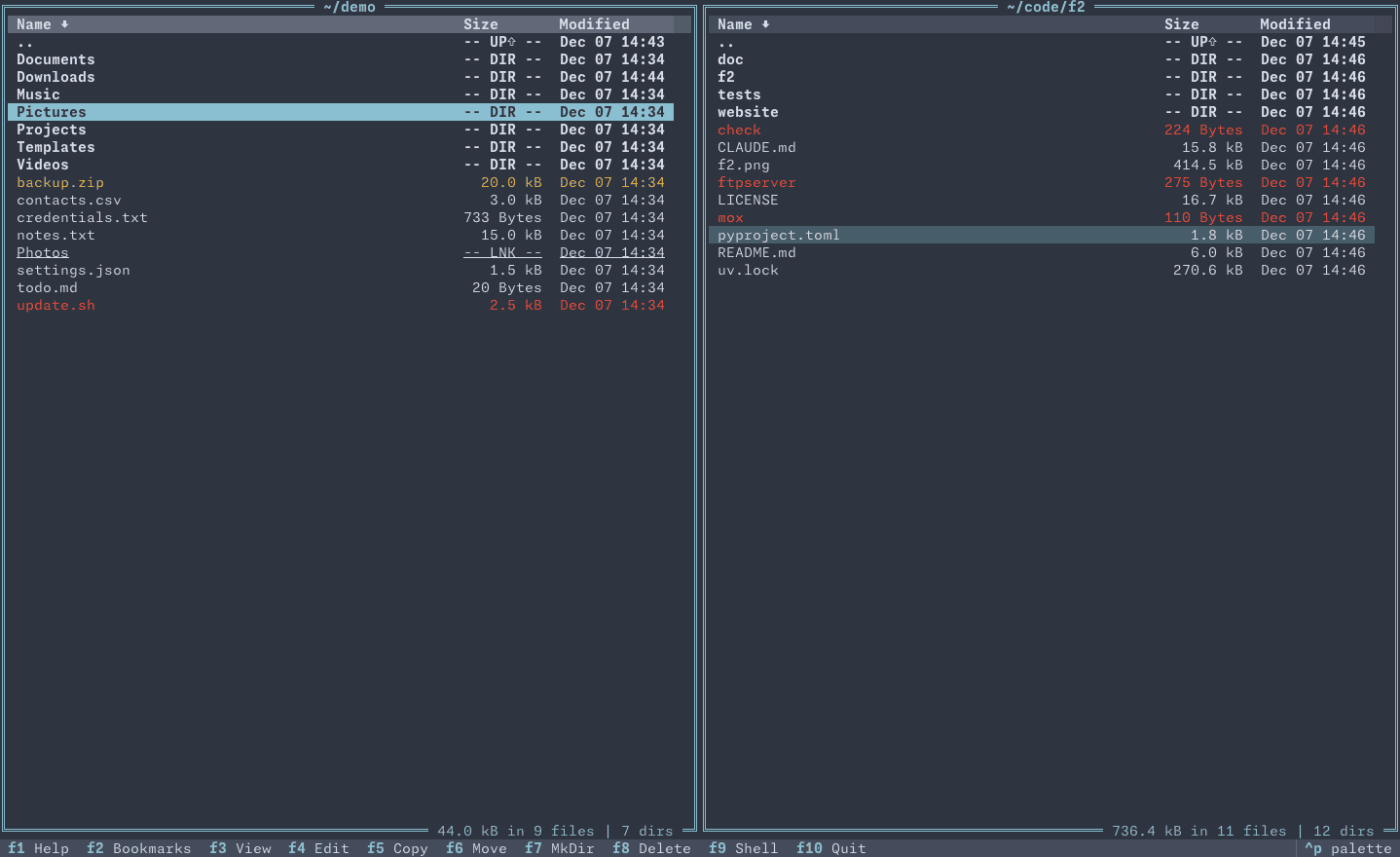
F2 Commander is an orthodox terminal file manager that brings the familiar two-panel file management interface to modern terminal environments.
The application is designed to make working with different filesystems straightforward. In addition to ordinary local directories, it can access remote storage services, network filesystems, and compressed archives using a common interface.
Its design emphasises discoverability. A footer menu, command palette, built-in help, and familiar keyboard shortcuts make features accessible without requiring users to memorise a large collection of commands.
F2 Commander uses a flexible filesystem abstraction that allows users to work with local and remote content through similar operations. Its interface also integrates with desktop applications, allowing files and directories to be opened with external programs when appropriate.
This is free and open source software.
Key Features
- Orthodox dual-panel interface with a footer menu for common operations.
- Vi-style navigation and traditional function-key shortcuts.
- Command palette for accessing available commands using Ctrl-P.
- File listings with configurable sorting, glob filtering, file attributes, and directory size calculation.
- Incremental fuzzy searching for locating files within directory listings.
- Recursive file searching and searching within text files.
- Multiple file selection for batch operations.
- Copy, move, rename, delete, and create files and directories.
- Trash integration for deleting files without immediately removing them permanently.
- Remote filesystem access using fsspec, including SFTP, FTP, WebDAV, SMB, and supported cloud storage services.
- Navigate archive contents and read or write supported compressed archive formats using libarchive.
- Preview panel supporting syntax-highlighted text, images, and directory trees.
- PDF file previews.
- Open files and directories using applications associated with them by the operating system.
- Configurable bookmarks and quick navigation to specified directory paths.
- View and edit files using integrated commands and external applications.
- Drop into a shell from the file manager.
- User-level JSON configuration with configurable application settings.
- Multiple colour themes and built-in help.
- Cross-platform support – runs on Linux and macOS.
Website: github.com/candidtim/f2-commander
Support:
Developer: candidtim
License: Mozilla Public License v2.0
F2 Commander is written in Python. Learn Python with our recommended free books and free tutorials.
Related Software
| Orthodox File Managers | |
|---|---|
| Krusader | Advanced twin panel (commander style) file manager for KDE |
| Midnight Commander | User-friendly yet powerful text-mode file manager and visual shell |
| Double Commander | Inspired by Total Commander |
| Ranger | File manager with an ncurses frontend written in Python |
| GNOME Commander | Built on the GTK-toolkit and GnomeVFS |
| Xfe | Very similar to Windows Explorer but with twin panes |
| muCommander | Lightweight, cross-platform file manager |
| far2l | AR Manager fork bringing panels, plugins and archives to Linux |
| Vifm | Vim-style two-pane navigator with modal keyboard control |
| File Commander | Total Commander-like orthodox file manager |
| Sunflower | Small and highly customizable twin-panel file manager |
| trolCommander | Fork of muCommander |
| FileRunner | Simple and efficient file manager written in Tcl |
| F2 Commander | Lean text-mode commander for browsing and batch operations |
| Tux Commander | Uses the old GTK2 windowing toolkit |
| Midday Commander | Dual-pane console navigator with Midnight Commander-style flow |
| Worker | In the style of the Amiga's DirOpus |
| Waydir | Wayland-native desktop browser focused on speed and simplicity |
| WCMCommander | Mimicking the look-n-feel of Far Manager |
| gentoo | Two-pane file manager |
| emelFM2 | Orthodox file manager using GTK+ 2 |
Read our verdict in the software roundup.
| Console File Managers | |
|---|---|
| nnn | Fast and flexible file manager |
| Midnight Commander | User-friendly yet powerful orthodox file manager |
| superfile | Very fancy and modern terminal file manager |
| Ranger | File manager with an ncurses frontend written in Python |
| lf | Terminal file manager heavily inspired by ranger |
| Yazi | File manager with asynchronous support |
| CliFM | Shell-like, command line terminal file manager |
| joshuto | Ranger-like file manager |
| far2l | Linux fork of FAR Manager v2 |
| Vifm | ncurses based file manager with vi like keybindings |
| fm | Double pane file manager written in Go |
| elio | Fast file browsing with rich previews in three panes |
| felix | TUI file manager with Vim-like key mapping |
| fman | Uses Bubbletea, Lipgloss, Bubblezone, stickers, Chroma, and go-arg |
| FCD | Continuation of rnr |
| Rat Commander | Two-panel file manager with built-in editing and remote access |
| projectable | TUI file manager built for projects |
| Last File Manager | 1 or 2 pane Python based file manager |
| F2 Commander | An orthodox file manager with Vim-like controls and previews |
| Midday Commander | Keyboard-driven dual-panel file manager with archive browsing |
| WCM Commander | A Far Manager clone |
| TUIFI Manager | Termux-oriented file manager |
| runa | Minimalist terminal file browser with configurable keybindings |
| sff | Simple file finder |
| Zeta | Dual-pane file manager with an embedded terminal and Git tools |
| jafff | Just another f* fast file manager |
| goful | Another file manager written in Go |
Read our verdict in the software roundup.
 LinuxLinks helps you discover the best free and open source software for Linux. Explore our extensive collection of recommended applications, including alternatives to popular proprietary software. We also publish software reviews, Linux tutorials, hardware reviews, free programming books and articles covering the wider open source community. Browse our Linux resources to discover more. Know a useful free and open source Linux application we haven't covered? Suggest a program for inclusion. Has your software been featured on LinuxLinks? Display one of our Featured on LinuxLinks badges on your website or GitHub README. |
Please read our Comment Policy before commenting.