

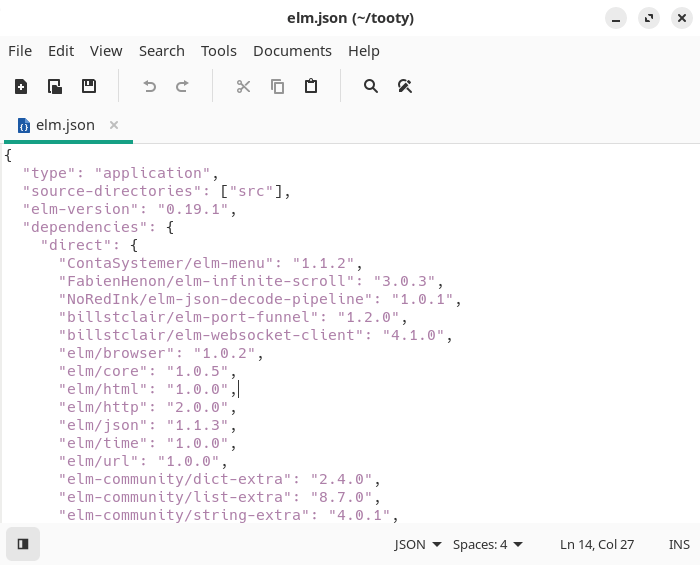
xed is a graphical text editor developed by the Linux Mint project. It follows the familiar model of a compact desktop editor while providing syntax-aware editing and an extensible plugin system.
Its tabbed interface works well for ordinary text documents, configuration files and source code. xed supports Unicode text and can access remote files through the desktop’s virtual file system, allowing network-hosted documents to be edited using the same workflow as local files.
The application keeps the core interface conventional. More specialised functionality can be enabled through plugins rather than being permanently exposed in the main editing window.
This is free and open source software.
Key Features
- Tabbed multiple-document interface.
- Syntax highlighting for programming and markup languages.
- Unicode text editing with UTF-8 support.
- Search and replace.
- Undo and redo.
- Automatic indentation.
- Remote file editing.
- Configurable editor font and display preferences.
- Line numbering and text-wrapping options.
- Document revert facilities.
- Printing and print preview.
- Plugin architecture for adding optional capabilities.
- Plugins include spell checking, document statistics and case conversion.
- File-browser integration can be enabled through a plugin.
- Additional plugins provide text sorting and other document operations.
Website: github.com/linuxmint/xed
Support:
Developer: JosephMcc, Clement Lefebvre, Stefano Karapetsas, and other contributors
License: GNU General Public License v2.0
xed is written in C. Learn C with our recommended free books and free tutorials.
Related Software
| Simple GUI Based Text Editors | |
|---|---|
| Notepad Next | Cross-platform text and source code editor |
| Pulsar | Hyper-hackable text editor |
| Lite XL | Lightweight cross-platform text editor derived from lite |
| Kate | Multi-document editor |
| GNOME Text Editor | Default text editor for the GNOME desktop environment |
| CudaText | Replacement for the discontinued SynWrite |
| Pluma | Powerful text editor for MATE |
| Mousepad | Simple text editor for the Xfce desktop environment |
| FeatherPad | Lightweight Qt plain-text editor |
| Nota | Browse, create, and edit text files |
| CorePad | Document editor for C Suite, a minimalistic application suite |
| xed | Small and lightweight text editor |
| gedit | Small and lightweight text editor for GNOME |
| Jottr | Designed for writers, journalists and researchers |
| typobuster | Simplified text editor with transformations and automatic correction |
| Jollpi | A nimble editor with syntax highlighting, tabs and a handy minimap |
| Howl | General purpose editor |
| Parchment | Strips away the clutter to put words firmly centre stage |
| Janus | Simple native Linux notepad meant for text editing |
| Webkit Word | Text editor built with GTK4/Libadwaita |
| v2 | Local-first rich-text editor with versioning capabilities |
| Mini Text | Very small and basic text editor |
Read our verdict in the software roundup.
 Explore our carefully curated directory of recommended free and open source software, covering every major software category. Explore our carefully curated directory of recommended free and open source software, covering every major software category.The directory forms part of our extensive collection of articles for Linux enthusiasts. It includes hundreds of detailed reviews, together with free and open source alternatives to proprietary software from companies such as Google, Microsoft, Apple, Adobe, IBM, Cisco, Oracle, and Autodesk. LinuxLinks also covers interesting projects worth exploring, Linux-compatible hardware, free programming books and tutorials, and much more. Know a useful free and open source Linux application that we haven’t covered? Tell us about it using our submission form. |
Please read our Comment Policy before commenting.