

Veyon is open source software that lets you monitor and control a group of computers (e.g. classrooms) on a central computer (e.g. an instructor’s computer) and use various features and modes.
Veyon can be used transparently in different environments. This means a teacher computer running Linux can easily access student computers running Windows and vice versa. Veyon provides an user interface which has been optimized for easy use and fast access to all important features.
Veyon is the official successor of iTALC. The program is available in English and many other languages.
Key Features
- Using functions on individual computers.
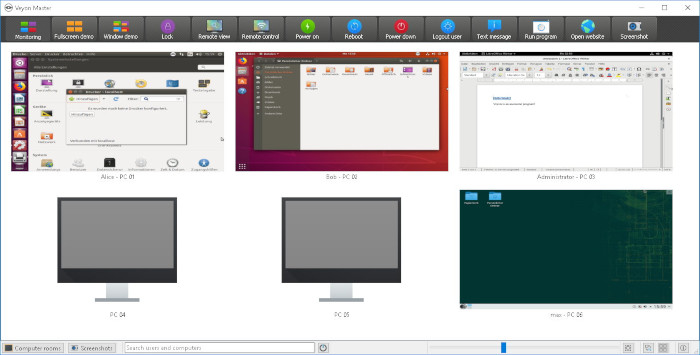
- Monitoring mode – offers an overview of all computers and see their screen contents in thumbnails. The screen content is updated almost in real time, so you can monitor all activity at the selected locations.
- Demonstration mode – in this mode, your screen content is broadcasted to all remote computers and displayed in real time. You can choose between a full screen and a window demo.
- Lock screens – all input devices on the students’ computers are locked with a blocking image displayed to prevent distractions caused by open applications.
- Remote access – consists of two very similar features Remote view and Remote control. In both access modes, the screen of a remote computer is displayed in full size in a separate window. In contrast to the monitoring mode in the main window, you can watch the activities on a computer in detail or intervene yourself.
- Power on, restart and shutdown computers – the features Power on, Reboot and Power down are helpful both for administrative purposes and for the preparation and follow-up of courses and exams. Using these functions, you can remotely power on, restart, or shut down computers.
- Log off users – complements the possibilities described in the previous section to control basic computer states.
- Send text message – send a text message to individual or all course participants.
- Home schooling – Veyon’s network technology is not restricted to a subnet and therefore students at home can join lessons via VPN connections just by installing the Veyon service
- Run a program.
- Open a website.
- Screenshot – save the current screen content of single or all computers in image files.
Website: veyon.io
Support: Documentation, FAQ, Blog, Forums, GitHub Code Repository
Developer: Tobias Junghans / Veyon Solutions
License: GNU General Public License v2.0
Veyon is written in C++. Learn C++ with our recommended free books and free tutorials.
Related Software
| Classroom Tools | |
|---|---|
| Moodle | Produce modular internet-based courses |
| Veyon | Computer monitoring and classroom management |
| TCExam | FLOSS Computer-Based Assessment system |
| Epoptes | Computer lab management and monitoring tool |
| Claroline | Collaborative e-Learning and eWorking platform |
| Mando | Interactive whiteboard using a camera and a projector |
| iTest | Computerised examination |
| ATutor | Designed with accessibility and adaptability in mind |
Read our verdict in the software roundup.
| Remote Display Clients | |
|---|---|
| TigerVNC | Platform-neutral implementation of VNC |
| Remmina | GTK+/Gnome Remote Desktop Client |
| KRDC | Connect with RDP or VNC to another computer |
| X2Go | Fast terminal server suite based on NoMachine's NX libraries |
| RustDesk | Works out of the box with no configuration required |
| Veyon | Computer monitoring and classroom management |
| TurboVNC | TightVNC-compatible remote desktop software |
| FreeRDP | Remote Desktop Protocol Implementation |
| TightVNC | Client/server allowing remote network access to graphical desktops |
| noVNC | VNC client web application |
| Connections | Aims at replacing Vinagre as the remote desktop client for GNOME |
| Xpra | Multi-platform persistent remote display server with built-in HTML5 client |
| Guacamole | Clientless remote desktop gateway |
| Dayon! | Easy to use, cross-platform remote desktop assistance solution |
| RustConn | Connection orchestrator for Linux with a GTK4/Wayland-native interface |
| HopToDesk | Remote desktop tool with end-to-end encryption |
| Field Monitor | Remote desktop client designed for GNOME |
| Vinagre | VNC client for the Gnome Desktop |
| rdesktop | Client for Windows Terminal Services |
Read our verdict in the software roundup.
| Remote Desktop Servers | |
|---|---|
| TigerVNC | Platform-neutral implementation of VNC |
| GNOME Remote Desktop | Designed for GNOME using pipewire. |
| X2Go | Fast terminal server suite based on NoMachine's NX libraries |
| RustDesk | Works out of the box with no configuration required |
| TurboVNC | TightVNC-compatible remote desktop software |
| FreeRDP | Remote Desktop Protocol Implementation |
| TightVNC | Remote network access to graphical desktops |
| xrdp | Accepts connections from variety of RDP clients |
| Xpra | Multi-platform persistent remote display server |
| Guacamole | Clientless remote desktop gateway |
| OpenSSH | Encrypted communication sessions using the ssh protocol |
| Veyon | Computer monitoring and classroom management |
| KasmVNC | Browser-based VNC server for secure remote desktop access |
| IronRDP | Rust implementation of RDP |
| Dayon! | Easy to use, cross-platform remote desktop assistance solution |
| wayvnc | VNC server for wlroots-based Wayland compositors |
| Lamco RDP Server | Wayland-native RDP server for Linux |
| hypr-rdp | Native RDP server for Hyprland |
Read our verdict in the software roundup.
 Explore our carefully curated directory of recommended free and open source software, covering every major software category. Explore our carefully curated directory of recommended free and open source software, covering every major software category.The directory forms part of our extensive collection of articles for Linux enthusiasts. It includes hundreds of detailed reviews, together with free and open source alternatives to proprietary software from companies such as Google, Microsoft, Apple, Adobe, IBM, Cisco, Oracle, and Autodesk. LinuxLinks also covers interesting projects worth exploring, Linux-compatible hardware, free programming books and tutorials, and much more. Know a useful free and open source Linux application that we haven’t covered? Tell us about it using our submission form. |
Please read our Comment Policy before commenting.